![[INDL] MOD-HACK DETECTED](https://media.forgecdn.net/avatars/1681/424/639068416875634553.png)
[INDL] MOD-HACK DETECTED
The ultimate tool for server mod control. INDL scans players' mods on join, identifying threats through a smart 5-level classification system. Includes…
⬇ Download on CurseForgeThe author built this one for Minecraft 1.20.1 on Forge. On other versions it may install and then do nothing.
![[INDL] MOD-HACK DETECTED — screenshot 1](https://media.forgecdn.net/attachments/1533/800/captura-de-pantalla-2026-02-14-165837-png.png)
![[INDL] MOD-HACK DETECTED — screenshot 2](https://media.forgecdn.net/attachments/1533/799/captura-de-pantalla-2026-02-14-165821-png.png)
![[INDL] MOD-HACK DETECTED — screenshot 3](https://media.forgecdn.net/attachments/1533/798/captura-de-pantalla-2026-02-14-165805-png.png)
![[INDL] MOD-HACK DETECTED — screenshot 4](https://media.forgecdn.net/attachments/1533/797/captura-de-pantalla-2026-02-14-165753-png.png)
![[INDL] MOD-HACK DETECTED — screenshot 5](https://media.forgecdn.net/attachments/1533/796/captura-de-pantalla-2026-02-14-165614-png.png)
[INDL] MOD-HACK DETECTED: Server-Side Mod Integrity Scanner
Protect your server from hack clients. [INDL] MOD-HACK DETECTED is a powerful, server-side anti-cheat mod that scans every player's installed mods and classifies them using a 5-Level Trust System. From known hack clients like Wurst or Meteor to unknown suspicious JARs — nothing gets past unnoticed.
🚀 Why choose [INDL] MOD-HACK DETECTED?
Most anti-cheat solutions only detect known cheats. [INDL] MOD-HACK DETECTED goes further — it performs deep JAR analysis, scans for suspicious classes and packages, checks SHA-256 hashes against a blacklist database, and classifies every single mod a player has installed.
Even if a cheater renames their hack client, the hash stays the same. Even if the hash is unknown, the heuristic engine catches suspicious classes like KillAura, Nuker, or ESPModule.
🛡️ 5-Level Trust Classification System
Every mod installed by a player is classified into one of 5 trust levels, giving admins clear visibility into potential threats:
| Level | Name | Description |
|---|---|---|
| L1 🔵 | Server Core | Mod exists in the server's /mods folder. Auto-whitelisted. |
| L2 🟢 | Verified Client | Manually approved by an admin via SHA-256 hash. Trusted. |
| L3 🟡 | Unknown (Low Risk) | Unknown mod with no suspicious indicators. Monitor. |
| L4 🟠 | Unknown (High Risk) | Unknown mod with suspicious classes, packages, or keywords detected. |
| L5 🔴 | Confirmed Threat | Hash matches a known hack mod in the blacklist database. |
How Classification Works
Player Joins → Client sends mod list + hashes
                    ↓
            ┌─ Hash in blacklist?     → 🔴 L5: Confirmed Threat
            ├─ Hash = server mod?     → 🔵 L1: Server Core
            ├─ Hash in whitelist?     → 🟢 L2: Verified Client
            ├─ Suspicious content?    → 🟠 L4: Unknown High Risk
            └─ None of the above      → 🟡 L3: Unknown Low Risk
🔍 Deep Detection Engine
SHA-256 Hash Matching
Each mod file has a unique SHA-256 fingerprint. Renaming a hack client won't help — the hash stays the same.
WurstClient-7.0.jar       → Hash: "e46ced73..."
TotallyLegitMod.jar       → Hash: "e46ced73..." ✅ DETECTED!
Heuristic JAR Analysis
When a mod's hash isn't in any list, the engine scans inside the JAR file for:
- Suspicious classes:
KillAura,Nuker,SpeedHack,Xray,ESPModule,AimBot,FreeCam,WallHack,TriggerBot,NoFall… - Suspicious packages:
net.wurstclient,meteordevelopment.meteorclient,net.ccbluex.liquidbounce,org.rusherhack… - Blacklisted keywords:
wurst,meteor-client,killaura,xray,aimbot,forgehax,wallhack… - Blacklisted authors: Known hack mod developers
CamelCase-Aware Matching
The class scanner uses intelligent token matching — ESP matches ChestESP or ESPModule but does NOT match Respawn or Response. This dramatically reduces false positives.
🖥️ Admin Panel (GUI)
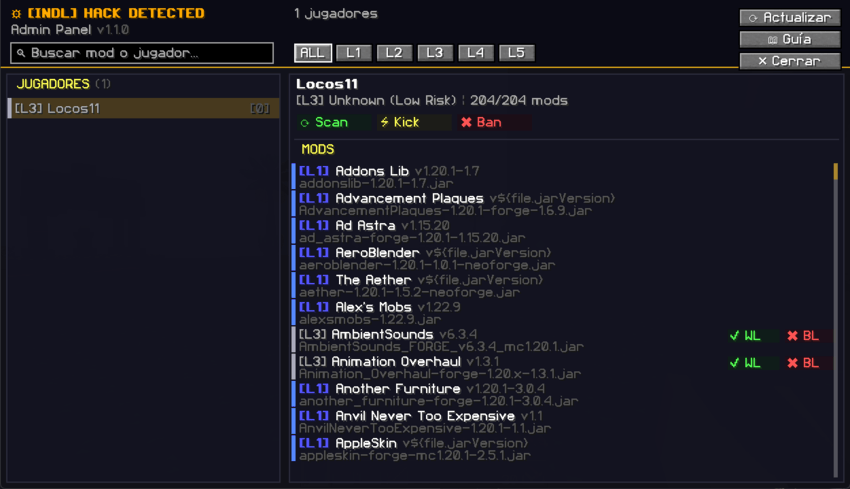
Open the Admin Panel with /hkd gui for a real-time visual overview of all players and their mods.
Features:
- Player list with color-coded trust badges (L1-L5)
- Strike counter and ban status per player
- Per-mod inspector showing hash, filename, risk level, and reason
- One-click actions: Whitelist, Blacklist, Remove from WL/BL
- Scan, Kick, and Ban buttons directly from the panel
- Mutually exclusive lists — whitelisting auto-removes from blacklist and vice versa
- Instant UI refresh — changes reflect immediately without manual rescanning
⚡ Key Features
- ✅ Automatic Scans — Runs on join and at configurable intervals
- ✅ Real-Time Admin Alerts — OPs receive detailed notifications with mod names and reasons
- ✅ Progressive Strike System — Fair warnings before kick/ban
- ✅ SHA-256 Hash Blacklist — Instantly detect known hack mods
- ✅ Deep JAR Analysis — Scan class files, packages, and metadata inside JARs
- ✅ Auto-Whitelist Server Mods — Server-side mods are trusted automatically (Level 1)
- ✅ Manual Hash Whitelist — Approve specific client mods by hash (Level 2)
- ✅ Admin GUI Panel — Visual management with one-click approve/block actions
- ✅ Zero Lag — Async scanning with configurable JAR size limits
- ✅ Fully Configurable — Keywords, classes, packages, authors, and response actions
🛡️ Progressive Strike System
Instead of immediately kicking players, the mod can use a fair, progressive warning system:
| Strike | Action |
|---|---|
| 1st | ⚠️ Warning + Admin notification |
| 2nd | 🔴 Auto-kick (configurable) |
| 3rd | 🚫 Auto-ban (configurable) |
Strikes reset automatically after a configurable time period (default: 1 week).
🛠️ Commands & Permissions
| Command | Alias | Description |
|---|---|---|
/hackdetected help |
/hkd help |
Show help menu |
/hackdetected status |
/hkd status |
View mod status and configuration |
/hackdetected stats |
/hkd stats |
View global detection statistics |
/hackdetected list |
/hkd list |
List all scanned players with trust levels |
/hackdetected inspect <player> |
/hkd inspect |
Detailed mod list for a player |
/hackdetected scan <player> |
/hkd scan |
Force an immediate rescan on a player |
/hackdetected scanall |
/hkd scanall |
Force rescan on all online players |
/hackdetected whitelist list |
/hkd whitelist list |
View all whitelisted mod hashes |
/hackdetected whitelist add <hash> |
/hkd whitelist add |
Add a mod hash to the whitelist |
/hackdetected whitelist remove <hash> |
/hkd whitelist remove |
Remove a mod hash from the whitelist |
/hackdetected blacklist list |
/hkd blacklist list |
View all blacklisted hashes and names |
/hackdetected blacklist add <hash> |
/hkd blacklist add |
Add a mod hash to the blacklist |
/hackdetected blacklist remove <hash> |
/hkd blacklist remove |
Remove a mod hash from the blacklist |
/hackdetected kick <player> [reason] |
/hkd kick |
Kick a player with optional reason |
/hackdetected strikes <player> |
/hkd strikes |
View a player's current strike count |
/hackdetected strikes <player> clear |
/hkd strikes |
Reset a player's strikes |
/hackdetected reload |
/hkd reload |
Reload configuration and all lists |
/hackdetected gui |
/hkd gui |
Open the Admin Panel |
Note: All commands require OP Level 2 or higher.
⚙️ Configuration
File: config/hackdetected-common.toml
The mod is highly customizable. You control exactly what gets detected, what action is taken, and how aggressive the mod should be.
#=== Detection Settings ===
[detection]
    # Keywords in mod filenames/metadata that flag mods (case-insensitive)
    blacklistKeywords = ["wurst", "meteor-client", "killaura", "xray", "aimbot", "forgehax", ...]

    # Known hack mod authors
    blacklistAuthors = ["wurstimperium", "alexander01998", "meteordevelopment", ...]

    # Suspicious class names to search inside JARs (CamelCase-aware matching)
    suspiciousClasses = ["KillAura", "Nuker", "SpeedHack", "Xray", "ChestESP", "AimBot", ...]

    # Suspicious Java package prefixes
    suspiciousPackages = ["net.wurstclient", "meteordevelopment.meteorclient", ...]

    # Named whitelist for client mods (partial match, case-insensitive)
    whitelistMods = ["sodium", "optifine", "journeymap", "jei", "jade", ...]

    # Enable deep JAR analysis (scans class files inside JARs)
    scanJarContent = true

    # Check loaded JVM classes for injected code
    checkLoadedClasses = true

    # Max JAR size to scan in MB (0 = unlimited)
    maxJarSizeMB = 50

    # Auto-whitelist all server mods (Level 1)
    autoWhitelistServerMods = true

    # Use SHA-256 hash database for instant L5 detection
    useHashDatabase = true

    # Re-check interval in minutes (0 = only on join)
    checkIntervalMinutes = 5

#=== Response Level Settings ===
[responseLevels]
    # Action for Level 4 (Unknown High Risk). Options: LOG, NOTIFY, KICK
    unknownHighRisk = "NOTIFY"

    # Action for Level 5 (Confirmed Threat). Options: LOG, NOTIFY, KICK
    confirmedThreat = "KICK"

#=== Action Settings ===
[actions]
    notifyAdmins = true
    autoKick = true
    autoBan = false              # WARNING: Use with caution!
    actionDelaySeconds = 5
    kickMessage = "Unauthorized mod detected. Remove it and reconnect."
    banMessage = "Banned for using hack mods. Appeal on the server's Discord."

#=== Strike System ===
[strikes]
    useStrikeSystem = true
    strikesBeforeKick = 2
    strikesBeforeBan = 3
    strikeResetHours = 168       # Reset after 1 week

#=== Logging ===
[logging]
    logToFile = true             # Logs saved to config/hackdetected/logs/
    logToConsole = true
📁 File Structure
The mod generates the following files in config/hackdetected/:
| File | Description |
|---|---|
whitelist.json |
Manually approved mod hashes (Level 2). Managed via /hkd whitelist or the Admin Panel. |
blacklist_hashes.txt |
Known hack mod SHA-256 hashes (Level 5). One hash=name per line. |
blacklist_names.txt |
Blacklisted mod name patterns. Matched case-insensitively. |
logs/ |
Detection logs with timestamps, player names, and mod details. |
Example blacklist_hashes.txt:
# Known hack mod hashes
# Format: sha256hash=ModName.jar
7a875ad6f0f2ceda0bcabc54db01f02bc9e48c3ec2c843c22fce90fc6b59a0e8=MadXray-1.0.0-forge-1.20.1.jar
Example whitelist.json:
{
  "7980d4a0beed1dcd2c283cf65f3c93f6b0085833f3ac490014979c95f1dfaf67": "Bookshelf-Forge-1.20.1-20.2.15.jar"
}
⚠️ Important Notes
- Server + Client required: Players must have the mod installed client-side for scanning to work. The server collects mod data; the client reports it.
- False positives are rare thanks to CamelCase-aware class matching and configurable keyword lists. Any false positive can be whitelisted in one click from the Admin Panel.
- Renaming won't help cheaters — SHA-256 hashes are based on file content, not filenames.
- The Admin Panel provides full control — approve, block, scan, kick, and ban all from one screen.
- Lightweight & async — scanning runs off the main thread with configurable size limits.
- Edition: Minecraft Java
- File type: .jar
- Minecraft version listed: 1.20.1
- How to install: Install the matching mod loader (Forge, Fabric or NeoForge) for your Minecraft version. → Download the .jar. → Put it in the .minecraft/mods folder and launch that loader profile.
- Where to get it: Opens on CurseForge — not every file is mirrored on our own servers.
Install steps are the general flow for this file type — How to install Minecraft Java mods & modpacks walks through it step by step.
- Ships as indl_hack_detected-1.1.0.jar — drop this file into the mods folder
- Download size: 119 KB
- Download link checked 13 Sept 2026 — working
These come from our own check of the pack file, not from the source page.