
Epic Fight Progressive Difficulty
Java mod listed for Minecraft 1.20–1.21. Downloads from the MC Java Mods app on Android.
I don't know my version or loader
⚔️ Epic Fight: Progressive Difficulty




EF Progressive Difficulty is a lightweight Forge mod tailored for the Epic Fight Mod. It addresses a common late-game issue: combat becomes far too easy. In the later stages of a playthrough, players can effortlessly defeat basic monsters using only simple basic attacks, completely ignoring mechanics like dodging or weapon skills. This lack of challenge quickly leads to boredom.
To fix this, the mod introduces a Dynamic Area Difficulty system. Mobs dynamically scale their Epic Fight attributes based on the progression of the players around them, ensuring that combat remains just as engaging, strategic, and exciting as it was on day one.
"Make late-game combat feel like a real challenge again."
✨ Key Features
📈 Dynamic Area Difficulty & Player Progression
Difficulty is no longer tied to server up-time. Instead, each player has their own progression score. When a mob spawns, it checks the average difficulty of all players nearby. The higher the players' scores, the tougher the mob becomes!
It buffs the following Epic Fight Attributes:
- 💥 Impact: Enemies hit harder and break your guard faster.
- ⚖️ Weight: Enemies become heavier and harder to knock back (prevents stun-locking bosses).
- 🛡️ Stun Armor: Enemies are more resistant to being stunned by your attacks.
- ⚔️ Armor Negation: Enemy attacks penetrate your armor more effectively.
- 🔄 Max Strikes: Enemies can chain more attacks together.
🌟 Dynamic EXP Bonus (New in 1.2.0!)
Reward players for taking on tougher challenges. Mobs will drop extra experience points scaled by the current area difficulty.
🖥️ Difficulty HUD
Keep track of your current progression with a sleek, built-in visual HUD.
- Press
H(Default Keybind) to toggle the Difficulty Bar on or off.
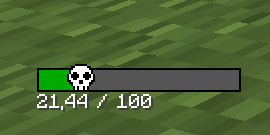
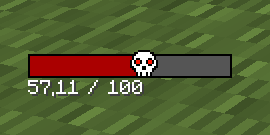
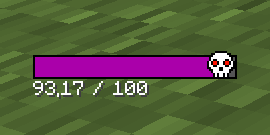
- Note that the value shown on the bar is the area difficulty, not your own difficulty.
📦 Advanced Datapack Configuration (For Modpack Makers)
Starting from v1.2.0, EF Progressive Difficulty fully supports deep customization via Datapacks. You can now dynamically alter the core mechanics without touching the base code!
Using JSON files (attributes.json, difficulty.json, and multipliers.json), modpack creators can fine-tune:
- Difficulty increments per action (killing mobs, AFK penalties, waking up).
- Dimension and Biome-specific difficulty multipliers.
- The base values and scaling multipliers for every single Epic Fight attribute.
Safe Fallback: If a datapack is missing, disabled, or incomplete, the mod will seamlessly fall back to the default config/efprogressivediff-common.toml file.
📥 Get Started Quick: You don't need to build from scratch! Download the efpd_template_datapack and drop it into your world's datapacks folder to start customizing!
🧮 How it Works
The mod applies a bonus to mob attributes using this formula:
FinalValue = OriginalValue + Bonus
Where Bonus is calculated as:
Bonus = BaseValue * (1 + Multiplier * AreaDifficulty)
Area Difficulty is calculated by multiplying the average player difficulty by various modifiers configured in the settings.
🛠️ Commands
The mod provides a set of admin commands (Requires Permission Level 2) to easily monitor and test the difficulty system.
| Command | Description |
|---|---|
/efpd get <player> |
Displays the current difficulty value of the specified player. |
/efpd set [players] [amount] |
Sets the difficulty of the targeted player(s) to an exact number. |
/efpd add [players] [amount] |
Adds (or subtracts, using negative numbers) difficulty to the targeted player(s). |
/efpd around |
Calculates and shows the current Area Difficulty based on players near you. |
📥 Installation
- Install Minecraft Forge (1.20.1).
- Install Epic Fight Mod (Required dependency).
- Download EF Progressive Difficulty and drop it into your
modsfolder. (Note: Must be installed on BOTH the Server and the Client). - Run the game and enjoy the pain!
🤝 Credits
- Author: Minhhjjj
- Dependency: Epic Fight Mod by Yesman.
Found a bug? Please report it in the Issues tab!
- Edition: Minecraft Java
- File type: .jar
- Minecraft versions listed: 1.21.1, 1.20.1
- How to install: Install the matching mod loader (Forge, Fabric or NeoForge) for your Minecraft version. → Download the .jar. → Put it in the .minecraft/mods folder and launch that loader profile.
- Where to get it: Opens on CurseForge — not every file is mirrored on our own servers.
Install steps are the general flow for this file type — How to install Minecraft Java mods & modpacks walks through it step by step.
- Ships as efprogressivediff-1.2.1-forge-1.20.1.jar — drop this file into the mods folder
- Download size: 54 KB
- Download link checked 3 Oct 2026 — working
These come from our own check of the pack file, not from the source page.