
MC Extremo DeathSound
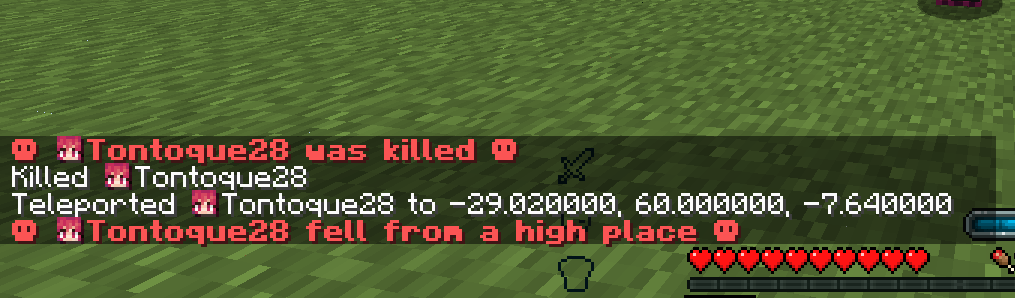
A Forge 1.20.1 modification that plays a custom sound effect upon death and alters the game's text components to display death messages in red, bold text…
⬇ Download on CurseForgeThe author built this one for Minecraft 1.20.1 on Forge. On other versions it may install and then do nothing.
Death Sound Mod
This mod alters the visual and auditory behavior of death events in Minecraft, standardizing notifications under a highly visible format inspired by Hardcore mode mechanics. Now enhanced with global audio broadcasting and robust stability improvements.
Key Features
Global Audio Event
Unlike client-side only implementations, this version utilizes server-side event handling (LivingDeathEvent) to broadcast the amplified hardcore death sound to all connected players.
- Cross-Dimension: The sound is audible to everyone, regardless of whether they are in the Overworld, Nether, or End.
- Concurrent Safety: Optimized to handle player lists safely, preventing crashes even if players disconnect during the event.
Strict Chat Formatting
The mod intercepts the chat stream (ClientChatReceivedEvent) to enforce a dramatic aesthetic:
- Visuals: Forces all death messages to render in BOLD RED, flanked by skull symbols (☠).
- Enhanced Detection: Now includes a fallback mechanism to detect death messages by text content, ensuring compatibility with mods that do not use standard "death.*" translation keys.
- False Positive Protection: Intelligently filters out standard chat messages (e.g., player messages containing ":") to avoid incorrect formatting.
Graphical Interface Modification
Utilizing Safe Java Reflection, the mod accesses private variables within the DeathScreen class to inject the same red and bold formatting into the subtitle indicating the cause of death.
- Crash Protection: The reflection logic is wrapped in robust error handling to ensure the game never crashes due to UI modifications, even in modded environments.
Utility Commands
- /testsound: Audits the correct loading of the sound resource and its volume level for the executing player, without requiring an actual death event.
Requirements and Compatibility
- Minecraft: 1.20.1
- Loader: Minecraft Forge (47.2.0 or higher)
- Side: Required on both Client and Server.
Installation
Drop the .jar file into the mods folder of both your Minecraft client and your server.
Developed by Tontoque28
- Edition: Minecraft Java
- File type: .jar
- Minecraft version listed: 1.20.1
- How to install: Install the matching mod loader (Forge, Fabric or NeoForge) for your Minecraft version. → Download the .jar. → Put it in the .minecraft/mods folder and launch that loader profile.
- Where to get it: Opens on CurseForge — not every file is mirrored on our own servers.
Install steps are the general flow for this file type — How to install Minecraft Java mods & modpacks walks through it step by step.
- Ships as deathsound-1.0.2.jar — drop this file into the mods folder
- Download size: 69 KB
- Download link checked 13 Sept 2026 — working
These come from our own check of the pack file, not from the source page.