The Market Board
Java mod listed for Minecraft 1.20–1.21. Downloads from the MC Java Mods app on Android.
This mod adds Market Boards (inspired by FinalFantasyXIV) that lets players trade items with each other on a server: buy, sell, remove listings, and…
I don't know my version or loader
Market Board
What does this mod?
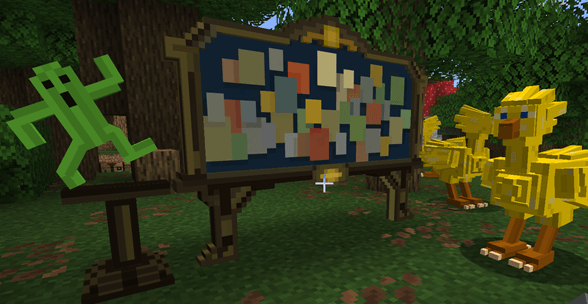
This mod adds Market Boards (inspired by FinalFantasyXIV) that lets players trade items with each other on a server: buy, sell, remove listings, and collect your currencies from your sales.
Just place the Market Board block and it’s ready to use.
New v2.0 : Choose your board
1-Market board, with a unique configurable currency, simple and easy to use (/give @s marketboard:market_board)
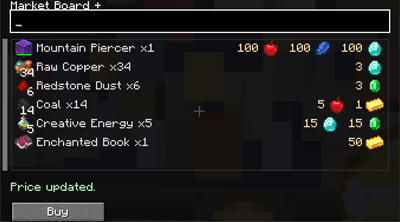
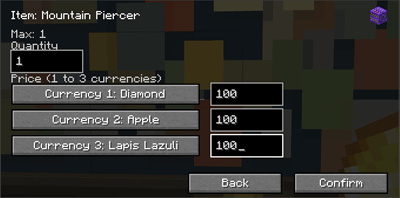
2-A new market board plus, slightly more complex UI that supports multiple currencies; admins can register up to 16 different currencies, and a sale can be made using up to 3 of these registered currencies on the same price (/give @s marketboard:market_board_plus)
How to use
-"/marketboard currency add" or "/marketboardplus currency add" to choose your currencies
⚠️The chosen currencies cannot be sold (anti-dup)
- Right-click to open the market interface (easy navigation with mouse wheel scrolling, slider buttons, sorting button and a search bar)
- Shift + right-click to open the manage interface (sell items, remove your listings, or collect your money from sales)
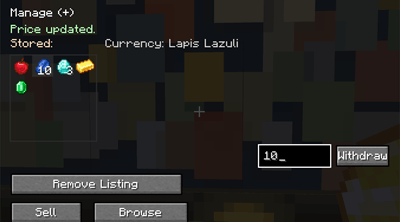
Features:
- All Market Boards placed in the world share the same global data
- All new Market Boards Plus placed in the world share the same global data
- Each player can list up to 20 items at the same time (configurable via commands: 1–80);
⚠️ Note that the default limits are designed to prevent disrupting the server economy; the more items a player can list for sale, the more unstable the server economy is likely become (an unique rich player can broke the economy with 80 sales, low prices on rare items, potencially longer listing loading times, etc.)
-Each player gets an account that safely stores:
- earned currencies
- items automatically removed from sale
- Unsold items are automatically removed from the Market after 15 days and returned to their owner the next time they join the server:
- if the player inventory is full, the items are dropped on the ground
- unsold items are kept for 21 days, then automatically deleted (15+21)
- Anti-duplication protection: the client always queries the server before any transaction
- If two players try to buy the same item, then the first-click rule applies.
- Transactions can be refused during heavy/prolonged server lag
- Transactions will be refused if the user inventory is full
- An ambient music plays when a player is nearby, the sound can be on/off with a command
Note:
It is recommended to place multiple Market Boards to avoid crowds gathering around a single spot.
The anti-duplication protects the server economy from glitches, not from players using hacks.
Possible additions if you have reasonable suggestions.
- Edition: Minecraft Java
- File type: .jar
- Minecraft versions listed: 1.21.11, 1.21.1, 1.20.1
- How to install: Install the matching mod loader (Forge, Fabric or NeoForge) for your Minecraft version. → Download the .jar. → Put it in the .minecraft/mods folder and launch that loader profile.
- Where to get it: Opens on CurseForge — not every file is mirrored on our own servers.
Install steps are the general flow for this file type — How to install Minecraft Java mods & modpacks walks through it step by step.
- Ships as marketboard-2.0.7-fabric-26.2.jar — drop this file into the mods folder
- Download size: 1.5 MB
- Download link checked 3 Oct 2026 — working
These come from our own check of the pack file, not from the source page.