
F-Sweep
Java mod listed for Minecraft 1.20–1.21. Downloads from the MC Java Mods app on Android.
F-Sweep is a quick-store helper mod for container workflows. When a container is open, click the button or press F to transfer eligible items into…
I don't know my version or loader


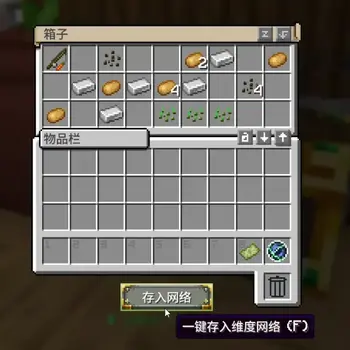
项目介绍
F-Sweep 是一个容器场景的一键存入辅助模组。
打开容器后,点击按钮或按 F,即可把可转移物品快速存入已兼容目标。

核心功能
- 容器界面新增
存入按钮。 - 支持快捷键
F一键存入。 - 已修复 Forge
1.20.1下 RS2、AE2、Tom's 终端在 Curios 饰品栏中的识别与使用。 存入:RS2现已同时支持原版 RS2 无线网格与 Refined Storage Addons 无线合成终端。- 右键按钮最多可轮切 8 种内置模式:
存入:默认存入:自定义存入:超越维度存入:RS2存入:AE2存入:Tom's 存储存入:精妙背包存入:机械动力背包
- 自动记住上次模式(
config/fsweep.properties)。 - 服主可通过
config/fsweep-server.properties或/fmode全服统一关闭不需要的模式。 - 统一前缀提示,快速识别本次存入目标。

默认模式逻辑(固定)
默认模式顺序:
超越维度 -> AE2 -> RS2 -> Tom's 存储 -> 精妙背包 -> 机械动力背包
说明:
- 前一个目标未完全存入时,会继续尝试下一个目标。
- 默认模式顺序固定,不通过
/fset修改。
自定义模式与命令
/fset 仅作用于“自定义模式”,并按玩家独立保存。
/fset list:查看模式轮切、默认顺序、自定义顺序、可用目标 ID。/fset set <id,id,id...>:设置自定义顺序。/fset swap <id1> <id2>:交换两个目标位置。/fset reset:重置自定义顺序为默认顺序。
可用目标 ID:network, ae2, rs2, toms, sb, fxnt
全服模式开关
服主可统一控制哪些内置模式对全服显示并允许使用。
/fmode list:查看当前启用模式。/fmode enable <mode>:启用一个模式。/fmode disable <mode>:禁用一个模式。/fmode reset:恢复默认启用列表。
服务端配置文件:config/fsweep-server.properties
按钮显示控制
- 服务端配置:
config/fsweep-server.properties - 规则文件:
config/fsweep-button-rules.json - 支持全局按钮/F 快捷键开关,以及
screen_rule/menu_rule/mod_rule自定义筛选 - 可通过
/fbutton重载配置并切换白名单/黑名单模式
兼容模组
- Beyond Dimensions(超越维度)
- Applied Energistics 2 (AE2)
- Refined Storage 2 (RS2)
- Refined Storage Addons(通过
存入:RS2使用无线合成终端) - Tom's Storage(高级无线终端)
- Sophisticated Backpacks(精妙背包)
- fxntstorage(机械动力背包)

使用方式
- 打开任意容器界面。
- 右键
存入按钮切换模式(可选)。 - 左键按钮或按
F执行存入。 - 查看提示确认结果。
运行环境
- Minecraft
1.20.1 - Forge
47.x
English Version
Overview
F-Sweep is a quick-store helper mod for container workflows.
When a container is open, click the button or press F to transfer eligible items into supported targets.
Core Features
- Adds a
Storebutton to container screens. - Supports hotkey
Ffor one-tap transfer. - Fixed Curios slot support on Forge
1.20.1for RS2, AE2, and Tom's portable terminals. Store: RS2now supports both the native RS2 wireless grid and Refined Storage Addons wireless crafting terminals.- Right-click mode cycling with up to 8 built-in modes:
Store: DefaultStore: CustomStore: BeyondStore: RS2Store: AE2Store: Tom's StorageStore: Sophisticated BackpackStore: Create Backpack
- Remembers the last mode in
config/fsweep.properties. - Server admins can hide unused modes globally with
config/fsweep-server.propertiesor/fmode. - Unified prefixed feedback messages for clear target/result recognition.
Default Mode Logic (Fixed)
Default order:
Beyond -> AE2 -> RS2 -> Tom's Storage -> Sophisticated Backpack -> Create Backpack
Notes:
- If a target cannot fully accept items, F-Sweep continues to the next target.
- Default mode order is fixed and not edited by
/fset.
Custom Mode & Commands
/fset configures Custom mode only, and settings are saved per player.
/fset list: show mode cycle, default order, custom order, and available target IDs./fset set <id,id,id...>: set custom order./fset swap <id1> <id2>: swap two targets./fset reset: reset custom order to default.
Available target IDs: network, ae2, rs2, toms, sb, fxnt
Server Mode Toggle
Server admins can control which built-in modes are visible and usable for the whole server.
/fmode list: view enabled modes./fmode enable <mode>: enable a mode./fmode disable <mode>: disable a mode./fmode reset: restore the default enabled list.
Server config file: config/fsweep-server.properties
Supported Mods
- Beyond Dimensions
- Applied Energistics 2 (AE2)
- Refined Storage 2 (RS2)
- Refined Storage Addons (wireless crafting terminal support through
Store: RS2) - Tom's Storage (Advanced Wireless Terminal)
- Sophisticated Backpacks
- fxntstorage (Create Backpack)
How To Use
- Open any container screen.
- Right-click the
Storebutton to switch mode (optional). - Left-click the button or press
Fto transfer. - Check the feedback message for results.
Environment
- Minecraft
1.20.1 - Forge
47.x
- Edition: Minecraft Java
- File type: .jar
- Minecraft versions listed: 1.21.1, 1.20.1
- How to install: Install the matching mod loader (Forge, Fabric or NeoForge) for your Minecraft version. → Download the .jar. → Put it in the .minecraft/mods folder and launch that loader profile.
- Where to get it: Opens on CurseForge — not every file is mirrored on our own servers.
Install steps are the general flow for this file type — How to install Minecraft Java mods & modpacks walks through it step by step.
- Ships as fsweep-forge-1.20.1-1.5.0.jar — drop this file into the mods folder
- Download size: 113 KB
- Download link checked 3 Oct 2026 — working
These come from our own check of the pack file, not from the source page.