Quickstack Backpacks Compat
Java mod listed for Minecraft 1.20. Downloads from the MC Java Mods app on Android.
⬇ Download on CurseForgeThe author built this one for Minecraft 1.20.1 on Forge. On other versions it may install and then do nothing.
🎒 Quickstack Backpacks Compat
Make managing backpack inventories fast, clean, and effortless — without opening chests one by one.
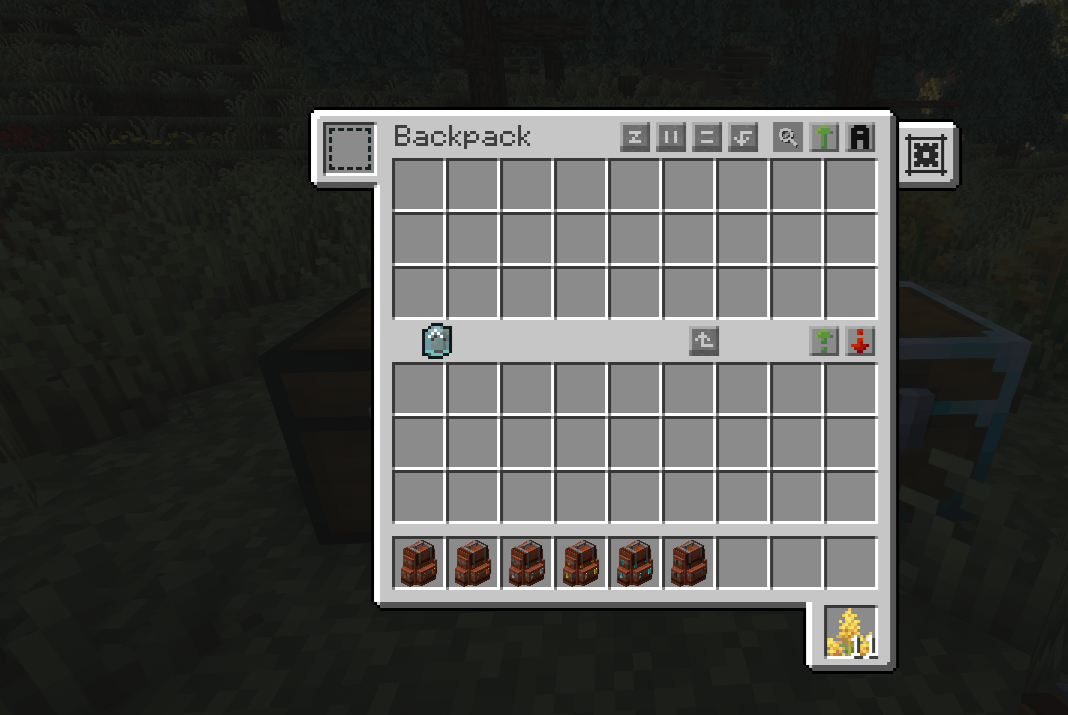
Quickstack Backpacks Compat is a Forge 1.20.1 addon that seamlessly integrates Quickstack/DropOff with Sophisticated Backpacks, adding Quickstack and Dump buttons directly to the backpack screen.
With a single click, items are moved from your backpack (and optionally your inventory) into nearby containers using Quickstack’s trusted logic.
🎥 Showcase
Sophisticated Backpacks Integration

Quickstack and Dump buttons appear naturally in the backpack UI, positioned per backpack tier for maximum usability.
Button positions are fully configurable and hot-reloaded — no client restart needed.
✨ Features
- Adds Quickstack and Dump buttons to Sophisticated Backpacks
- Uses Quickstack logic to move items into nearby containers
- Optional config to include player inventory in the operation
- Per-backpack button position profiles (item-id based)
- JSON-based layout config with fallback and defaults
- Hot-reload of button positions when reopening the backpack screen
- Zero changes to vanilla inventory behavior
📦 Requirements
- Minecraft: 1.20.1
- Forge: 47.x
- Java: 17
Runtime Mods (Required)
- Quickstack / DropOff (
quickstack) - Sophisticated Backpacks (
sophisticatedbackpacks)
⚙️ Configuration
🧩 Client Config (Forge TOML)
Generated file:
config/quickstackbackpackscompat-client.toml
includePlayerInventory(default: false)false: only backpack items are movedtrue: backpack + player inventory are moved (respects QuickstackignoreHotBar)
📐 Button Position Config (JSON)
File:
config/quickstackbackpackscompat_button_positions.json
- Profiles per backpack item id
- Fallback profile:
"*" - Missing values inherit from
defaults - Reloads automatically when reopening the GUI
This allows precise control over button placement for every backpack tier.
🐞 Bug Reports & Issues
Found a bug, UI misalignment, or compatibility issue?
Please report it on GitHub with logs, screenshots, and your mod list if possible:
➡️ Issues tracker:
https://github.com/Maeiro/Quickstack-Backpacks-Compat/issues
📜 Modpack & Code Usage
This mod is released under the GNU General Public License v3.0 (GPL-3.0).
You are free to:
- Use this mod in public or private modpacks
- Modify and redistribute the source code
- Distribute modified versions, provided they are also licensed under GPL-3.0
- Access the full source code of any distributed derivative work
Any redistribution or derivative work must remain open-source and comply with the terms of the GPL v3.0.
📄 License
This project is licensed under the GNU General Public License v3.0.
See the LICENSE file for the full license text.
- Edition: Minecraft Java
- File type: .jar
- Minecraft version listed: 1.20.1
- How to install: Install the matching mod loader (Forge, Fabric or NeoForge) for your Minecraft version. → Download the .jar. → Put it in the .minecraft/mods folder and launch that loader profile.
- Where to get it: Opens on CurseForge — not every file is mirrored on our own servers.
Install steps are the general flow for this file type — How to install Minecraft Java mods & modpacks walks through it step by step.
- Ships as quickstackbackpackscompat-1.0.0+forge-1.20.1.jar — drop this file into the mods folder
- Download size: 30 KB
- Download link checked 3 Oct 2026 — working
These come from our own check of the pack file, not from the source page.