Recycling Arrows
Java mod listed for Minecraft 1.20–1.21. Downloads from the MC Java Mods app on Android.
I don't know my version or loader
Recycling Arrows
Did you know that real-world hunters often recover arrows from their prey and reuse them?
Recycling Arrows brings that idea into Minecraft.
When a mob is hit by an arrow, the arrow is recorded on that entity. When the mob dies, those arrows are dropped back into the world, allowing you to pick them up and use them again. Arrows may sometimes break into its ingredients. This behavior can be configured with config options and datapacks.
This mod is especially useful in hardcore or survival-focused modpacks, where arrows can be expensive or limited. Recycling Arrows helps make bow combat less punishing in these setup.
Features
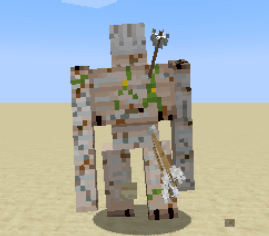
- Arrows that hit mobs are tracked and rendered on their body. When the mob dies, those arrows are returned as drops, or sometimes individual ingredients (configurable).
- You can use shears to remove arrows from a mob without killing it; mobs can also remove an arrow from themselves ocassionally over time.
- Arrows on player's body would also come off as time passes; they can also be removed by the player using shears against air when croughing.
Compatibility Issues
- This mod should work for most arrows, but some modded arrows might override certain method that this mod depends on to record the hit. If you find any arrows are not recorded normally, please report it in forum or issue tracker.
- This mod provides a render layer for arrows to render as if they're stuck on mobs. But the visual result might be weird on certain modded mobs. There is a client config that disables this render for certain mob types. You may list those entities' resource location in the config, and arrows won't be rendered on their model, but instead on your crosshair when you're close to them.
Datapack Support
Starting from 1.4.0, Recycling Arrows includes a simple datapack-based drop system.
This allows modpack authors and datapack creators to change what an embedded arrow drops when the target dies. If no matching datapack entry exists, the mod will automatically fall back to the original resolved arrow item.
There is also a config option to disable the datapack system entirely, in which case all drops always use the default fallback behavior.
For detailed usage, please check the wiki.
- Edition: Minecraft Java
- File type: .jar
- Minecraft versions listed: 1.21.1, 1.20.1
- How to install: Install the matching mod loader (Forge, Fabric or NeoForge) for your Minecraft version. → Download the .jar. → Put it in the .minecraft/mods folder and launch that loader profile.
- Where to get it: Opens on CurseForge — not every file is mirrored on our own servers.
Install steps are the general flow for this file type — How to install Minecraft Java mods & modpacks walks through it step by step.
- Ships as recyclingarrows-1.8.0-all.jar — drop this file into the mods folder
- Download size: 707 KB
- Download link checked 3 Oct 2026 — working
These come from our own check of the pack file, not from the source page.