ModsJava
Craft Down Under Client Companion
A client-side mod that adds multi-channel chat with tabbed channels, filtering, and context menus for CDU servers.
I don't know my version or loader
Open the Minecraft launcher and look at the profile you play on — it names both, like fabric-loader-1.21.4. The version also shows in the bottom-right corner of the game's main menu.
No loader in the profile name? Then it's plain Minecraft, and these mods won't run — you need Fabric or NeoForge installed first.
Quasar Client Companion
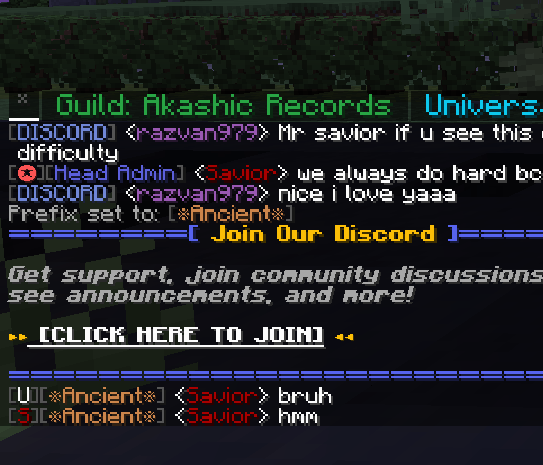
An optional client-side mod that provides multi-channel chat and quality-of-life features for players on CDU (Play CDU) servers. It works alongside the Quasar server plugin to add a richer chat experience directly in-game.
Features
Multi-Channel Chat
- Tabbed channels — Switch between party, global, and other channels with a single click
- Channel filtering — View messages from all channels or focus on one
- Collapsible tabs — Collapse channel names to save space
- Unread indicators — Red markers show channels with new messages
Context Menus
- Right-click usernames — Quick actions such as PM, Ignore/Unignore, and admin tools
- Right-click channel tabs — Close channels or collapse/expand tabs
Chat Experience
- Custom chat UI — Cleaner layout with a scrollbar and message history
- Persistent settings — Collapsed tab state is saved between sessions
- Cross-loader support — Works on both Fabric and Forge
Server List Integration
- CDU servers in your server list — CDU servers automatically appear at the top of the Multiplayer screen with gold-styled branding
- Live from the API — Server entries are fetched from the CDU API, so new servers show up without a mod update
- Protected entries — CDU server entries can't be edited or deleted from the list
In-Game Settings
- Quasar Settings screen — Accessible via the gold "Q" button in Minecraft's Options menu
- Toggle QChat — Turn the custom chat on or off without editing config files
- Toggle network tab list players — Show or hide players from other servers on the network in your tab list
Mod Compatibility
- Chat Heads support — Player heads render next to messages in QChat channel views when the Chat Heads mod is installed
Other
- Welcome toast — A configurable welcome notification shows on the title screen after launch
- Persistent config — All settings saved to
config/quasar_client/config.jsonand persist across sessions
Requirements
- Architectury API
- CDU server running the Quasar plugin (the mod only activates when channels are available)
Installation
- Install Architectury API for your loader (Fabric or Forge)
- Place Quasar Client Companion in your
modsfolder - Join a CDU server with Quasar enabled — the custom chat will appear when you have channels
Supported Loaders
| Loader | Supported |
|---|---|
| Fabric | ✅ |
| Forge | ✅ |
Quick facts
- Edition: Minecraft Java
- File type: .jar
- Minecraft versions listed: 1.20.1, 1.21.1
- How to install: Install the matching mod loader (Forge, Fabric or NeoForge) for your Minecraft version. → Download the .jar. → Put it in the .minecraft/mods folder and launch that loader profile.
- Where to get it: Opens on CurseForge — not every file is mirrored on our own servers.
Install steps are the general flow for this file type — How to install Minecraft Java mods & modpacks walks through it step by step.
Verified by MCModsHub
- Ships as QuasarCompanion-1.0.7-fabric-1.21.1.jar — drop this file into the mods folder
- Download size: 3.3 MB
- Download link checked 13 Sept 2026 — working
These come from our own check of the pack file, not from the source page.