
BluePAC
Java mod listed for Minecraft 1.20–1.21. Downloads from the MC Java Mods app on Android.
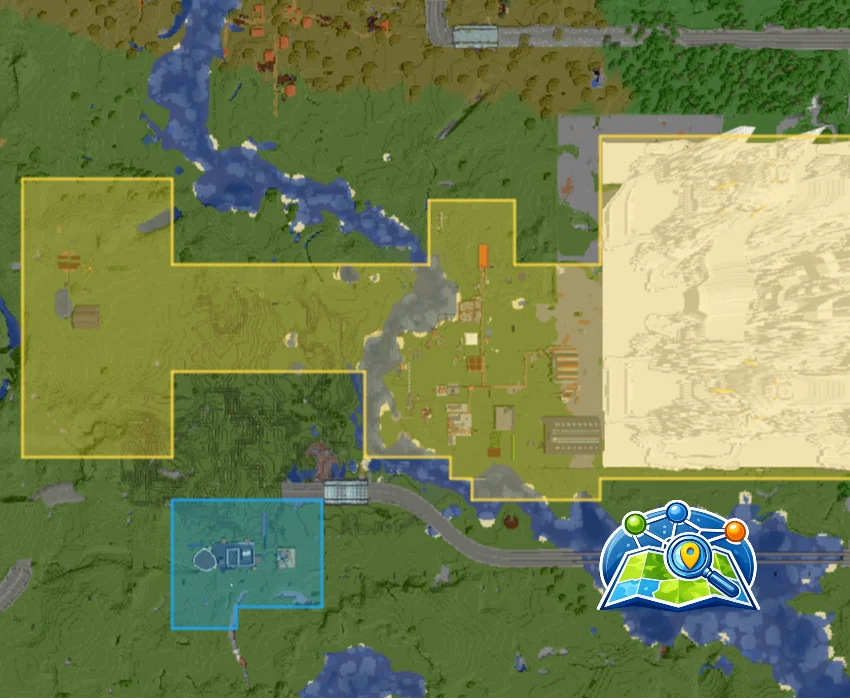
Display your server's claimed chunks directly on BlueMap. BluePAC bridges Open Parties and Claims (OpenPAC) with BlueMap to render color-coded claim…
I don't know my version or loader
BluePAC - BlueMap + OpenPAC Integration
Display your server's claimed chunks directly on BlueMap. BluePAC bridges
Open Parties and Claims (OpenPAC) with BlueMap to render color-coded claim
overlays on the web map, making it easy to see who owns what at a glance.
Features:
- Automatically displays all claimed chunks as colored regions on BlueMap
- Each player's claims use their OpenPAC-configured color
- Adjacent chunks from the same player are merged into clean polygonswith no internal borders
- Live updates — claims appear on the map within moments of being made
- Sub-claim support with distinct colors per sub-configuration
- Configurable marker appearance (fill/line opacity, line width, marker height)
- Per-dimension support (Overworld, Nether, End, and modded dimensions)
Configuration (bluepac-common.toml):
- fillOpacity (default: 0.3) — Fill transparency of claim regions
- lineOpacity (default: 0.8) — Border transparency of claim regions
- lineWidth (default: 2) — Border width in pixels
- markerYHeight (default: 64) — Y level at which markers are drawn
Disclaimer
BluePAC is an independent, third-party mod and is not affiliated with, endorsed by, or associated with the BlueMap or Open Parties and Claims projects. BlueMap and Open Parties and Claims are the property of their respective authors. All trademarks and registered trademarks are the property of their respective owners.

- Edition: Minecraft Java
- File type: .jar
- Minecraft versions listed: 1.20.1, 1.21.1
- How to install: Install the matching mod loader (Forge, Fabric or NeoForge) for your Minecraft version. → Download the .jar. → Put it in the .minecraft/mods folder and launch that loader profile.
- Where to get it: Opens on CurseForge — not every file is mirrored on our own servers.
Install steps are the general flow for this file type — How to install Minecraft Java mods & modpacks walks through it step by step.
- Ships as bluepac-1.0.1.jar — drop this file into the mods folder
- Download size: 17 KB
- Download link checked 3 Oct 2026 — working
These come from our own check of the pack file, not from the source page.