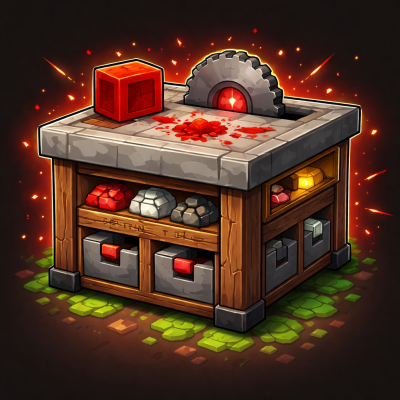
Pepsi's Redstone Table
Java mod listed for Minecraft 1.20–1.21. Downloads from the MC Java Mods app on Android.
Craft redstone components faster, cheaper, and smarter with a dedicated workstation that pulls from both your inventory and internal storage.
I don't know my version or loader
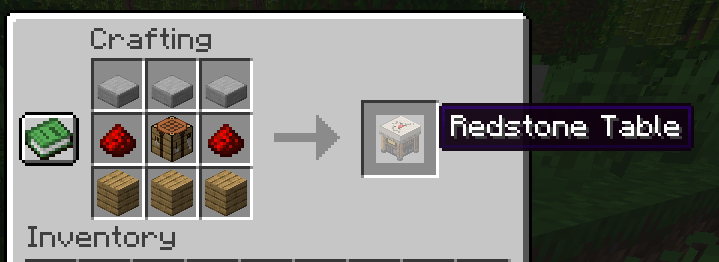
Redstone Table
Redstone Table is a dedicated workstation for survival redstone crafting.
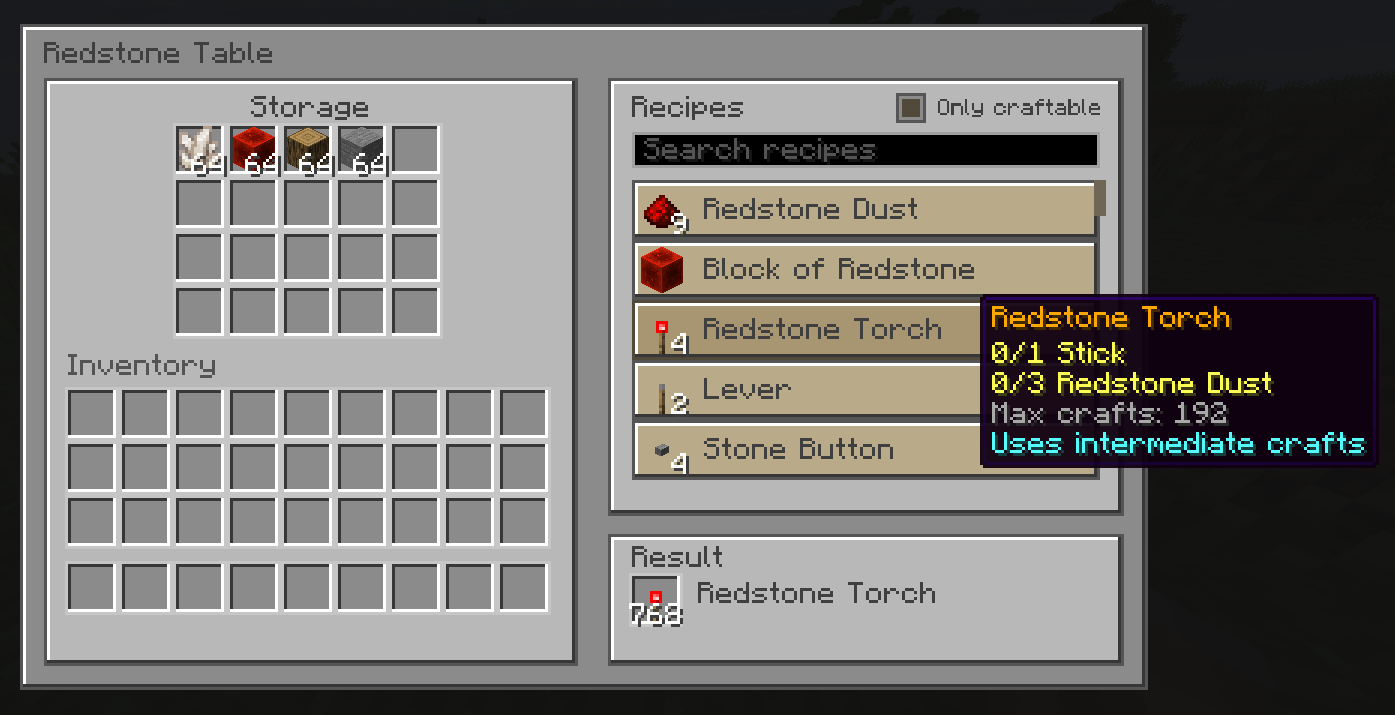
Instead of constantly bouncing between chests, your inventory, and a normal crafting table, you get one focused block that stores ingredients, shows a searchable list of redstone recipes, tells you exactly what you are missing, and lets you craft with a click.
It is built for the kinds of items players make over and over again: repeaters, comparators, pistons, hoppers, rails, redstone lamps, observers, minecart components, pressure plates, buttons, and more.
Highlights
- 20 internal storage slots for your common redstone ingredients
- Crafts using both the table's storage and your inventory
- Searchable recipe browser with an
Only craftablefilter - One-click craft and craft-max support
- Automatically handles many annoying prep steps in the background
- Supports alternate materials like stone variants, quartz variants, planks, logs, stems, and more
- Safe crafting behavior that avoids eating items when the result cannot be placed properly
- Comparator output based on how full the table is
- Optional
Redstonervillager profession for redstone-focused trading
Why Use It?
If you build anything with redstone, you already know the pain points:
- You keep remaking the same components.
- Important ingredients end up scattered between your inventory and nearby storage.
- You have the materials, but not in the exact form the recipe wants.
- Crafting basic infrastructure for a new build takes longer than the build itself.
Redstone Table fixes that loop. Stock it once, browse what you want, and let it handle the small conversion steps and ingredient juggling for you.
Getting Started
Craft the table, place it in your workshop, load it with the ingredients you use most often, and start crafting directly from its menu.
It is especially useful when stocked with things like:
- redstone dust
- stone
- wood and planks
- cobblestone
- iron
- gold
- quartz
- slime
A Proper Redstone Workstation
Redstone Table is not just another storage block with a recipe screen pasted onto it.
It is designed around survival redstone workflows:
- 20 dedicated internal slots for materials
- a recipe list focused on redstone and redstone-adjacent utility blocks
- fast crafting without rebuilding the same patterns by hand
- immediate feedback on what is craftable and what is still missing
It feels like a bench you keep stocked and return to whenever a project needs another stack of components.
Crafts From The Table And Your Inventory Together
The table can craft using:
- items stored inside the table
- items currently in your player inventory
That means you do not have to move every last ingredient into the block before using it.
It also prefers to consume the table's own storage first, which makes it much easier to keep your crafting setup organized instead of draining your hotbar and backpack before touching the workstation.
Searchable Recipe Browser
The built-in recipe list is made for quick use, not for digging through clutter.
You can:
- scroll through the full recipe catalog
- search by recipe name
- search by ingredient
- search by item ids and tagged material groups
- toggle an
Only craftablefilter when you just want to see what you can make right now
Hovering recipes also helps answer the most important survival question: "What am I still missing?"
Craft Once Or Craft A Full Batch
When you know what you want, the table stays fast.
It supports:
- single crafts for exact control
- craft-max behavior for quickly producing a full batch
- live previewing of how many crafts are currently possible
This makes it just as useful for making one comparator as it is for mass-producing stacks of repeaters, rails, or lamps before a big project.
Background Prep Crafting
One of the best parts of the table is that it can quietly handle intermediate steps for you.
Instead of forcing you to manually convert materials first, it can prepare many common inputs in the background so the final recipe can go through smoothly.
Examples include:
- redstone blocks back into redstone dust
- logs or stems into planks
- planks into slabs
- blocks back into useful components like ingots, gems, quartz, or slimeballs
- stone back into cobblestone
- wool back into string
That means the table can often make the item you wanted even when your materials are "close enough" rather than already perfectly pre-processed.
Plays Nicely With Alternate Materials
Redstone builds should not grind to a halt just because you used a different flavor of stone or wood.
Redstone Table supports flexible material groups where they make sense, including:
- stone variants
- quartz variants
- plank families
- logs and stems
- tagged equivalents from many modded items
This makes the station much more forgiving in real survival worlds and much friendlier to larger modpacks with lots of material overlap.
Focused Recipe Selection
The recipe list is curated around blocks and items that actually matter in redstone gameplay and base building.
That includes major categories like:
- logic components such as redstone torches, repeaters, comparators, observers, note blocks, and calibrated sculk sensors
- movement and transport pieces such as pistons, sticky pistons, rails, powered rails, detector rails, activator rails, and minecart variants
- utility and storage blocks such as droppers, dispensers, hoppers, lecterns, jukeboxes, barrels, trapped chests, and cauldrons
- controls and signal tools such as levers, buttons, pressure plates, target blocks, daylight detectors, lamps, TNT, lightning rods, and more
It is broad enough to cover real projects, but focused enough to stay useful.
Safe Crafting Behavior
The table is built to avoid messy survival moments.
It will not blindly consume your materials and hope for the best.
Instead, it checks whether the craft can be completed safely before going through, including whether the result has somewhere valid to go. That helps prevent accidental item loss and makes the workstation much more reliable during busy crafting sessions.
Redstone-Friendly Output Handling
Crafted results can be delivered in practical ways depending on how the table is configured.
That includes behavior centered around:
- placing the result onto your cursor for immediate manual use
- sending the result into your inventory
- routing the full crafted batch into a hopper below the table when that makes sense
This makes the block feel at home in both hand-crafted survival bases and tidier workshop setups.
Built For Survival Bases
Redstone Table is still a real block in the world, not just a floating menu.
It fits naturally into workshop spaces with useful block behavior:
- stored contents drop when the table is broken
- a comparator can read how full the table is
- it works well as a permanent workstation in a crafting room, villager hall, or redstone lab
It is easy to understand, easy to keep stocked, and easy to wire into the rest of a base.
Optional Redstoner Villager
If enabled, villagers can use the Redstone Table as a workstation and become Redstoners.
These villagers focus on redstone-themed trades across their leveling path, offering a progression built around useful components and technical-building supplies.
You can expect trades themed around items like:
- torches, levers, buttons, and rails early on
- repeaters, note blocks, lamps, targets, and comparators in the middle tiers
- pistons, hoppers, powered rails, observers, calibrated sculk sensors, and other advanced utility blocks later
It is a fun extra feature for worlds that lean into automation, workshop districts, or villager infrastructure.
Who This Mod Is For
Redstone Table is especially good for:
- survival players who craft redstone parts constantly
- technical players building farms, sorters, and contraptions
- base builders who want one clean workstation for their utility blocks
- multiplayer servers where shared workshops get used heavily
- modpack players who appreciate flexible ingredient handling and less crafting friction
If you like building with redstone but dislike repetitive crafting busywork, this block earns its place very quickly.
In Short
Redstone Table turns redstone crafting into something that feels organized, fast, and satisfying.
Stock the bench, search what you want, craft what you need, and get back to building.
- Edition: Minecraft Java
- File type: .jar
- Minecraft versions listed: 1.21.11, 1.20.1
- How to install: Install the matching mod loader (Forge, Fabric or NeoForge) for your Minecraft version. → Download the .jar. → Put it in the .minecraft/mods folder and launch that loader profile.
- Where to get it: Opens on CurseForge — not every file is mirrored on our own servers.
Install steps are the general flow for this file type — How to install Minecraft Java mods & modpacks walks through it step by step.
- Ships as redstone_table-forge-26.1-1.0.5.jar — drop this file into the mods folder
- Download size: 484 KB
- Download link checked 3 Oct 2026 — working
These come from our own check of the pack file, not from the source page.