QuickStack & Craft
Java mod listed for Minecraft 1.21. Downloads from the MC Java Mods app on Android.
All-in-one inventory QoL mod combining quick stack, dump all, slot-based favorites, and craft-from-nearby-storage. Inspired by Terraria's inventory…
I don't know my version or loader
QuickStack & Craft
Terraria-style inventory management for Minecraft. Quickly organize your inventory into nearby storage, protect important slots, and craft with ingredients stored in nearby containers.
QuickStack & Craft supports Minecraft 1.21.1 and 1.21.4 on Fabric and NeoForge.
Main Features
Quick Stack Nearby
Quick Stack moves matching items from your main inventory into nearby storage that already contains the same item.
- Your hotbar is left untouched.
- Native and ItemLocks-protected slots are skipped.
- Only storage with a matching item is considered.
- Matching storage is filled from the fullest stack collection first.
- Anything that cannot be inserted safely remains in your inventory.
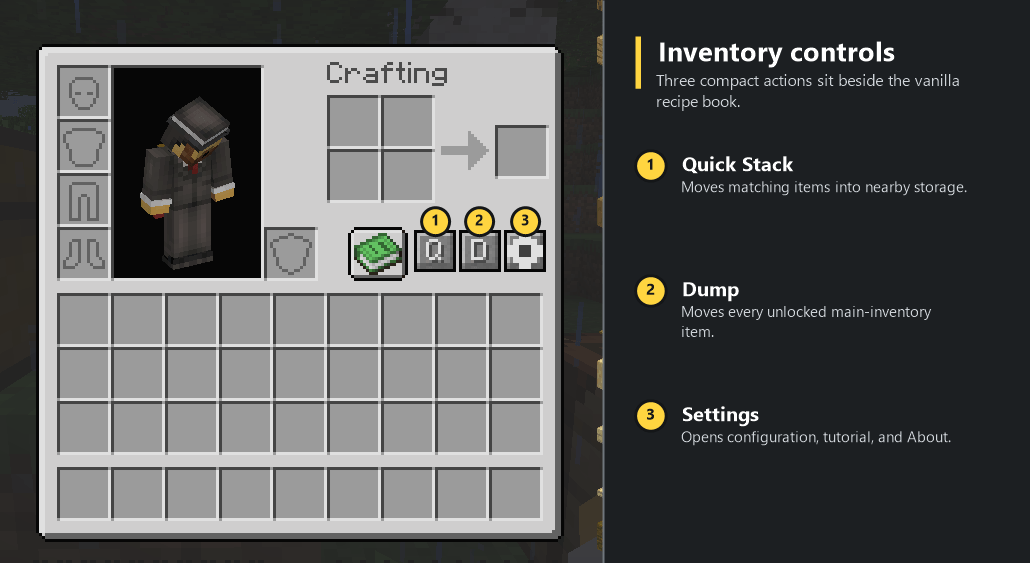
Use the compact Q button beside the vanilla recipe book, or bind Quick Stack Nearby under the QuickStack & Craft controls category.
Dump Unlocked Items
Dump moves the unlocked contents of your main inventory into eligible nearby storage with available space.
- Your hotbar is left untouched.
- Locked slots are never moved.
- Nearby storage is tried from closest to farthest.
- Items that do not fit remain in your inventory.
Use the compact D button in your inventory, or bind Dump Unlocked Items.
Work Directly From Open Storage
Supported storage screens receive Quick Stack, Dump, and Settings buttons. When a storage screen is open, Quick Stack and Dump act on that storage's contents directly instead of routing items through the player inventory.
This includes vanilla storage and supported modded storage screens such as Sophisticated Backpacks.
Native Slot Locks
Hold Alt and left-click a player inventory slot to lock or unlock it. Native locks display a small padlock and amber slot outline.
- Locks work from the inventory and container screens.
- Locked items are protected from Quick Stack, Dump, and nearby recipe transfers.
- Locks are stored by the server for each player and persist across sessions and death.
- If ItemLocks is installed, ItemLocks keeps control of its own Alt-click gesture. QuickStack & Craft respects both lock systems without toggling both from one click or drawing duplicate indicators.
Craft From Nearby Storage
Crafting recipes can use ingredients from your inventory and eligible nearby storage.
Vanilla recipe book:
- Nearby ingredients are included when the recipe book decides whether a recipe is craftable.
- Select a crafting recipe normally and the server fills the crafting grid from your inventory and nearby storage.
- Normal single-transfer and maximum-transfer behavior is preserved.
JEI and EMI:
- Their recipe transfer buttons use the same nearby-storage system when installed.
- Any valid ingredient variant you actually own can satisfy a recipe.
- The server validates the recipe, available items, protected slots, and crafting-grid return space before moving anything.
Existing crafting-grid items are handled safely, locked inventory slots remain untouched, and the storage that supplied ingredients is highlighted.
Storage-Safe Targeting
The default Safe Storage Only mode is designed to target real storage while avoiding machines, generators, furnaces, trash-style inventories, and other containers that may process or destroy inserted items.
Supported targets include:
- Vanilla chests, barrels, shulker boxes, and storage entities.
- Storage blocks identified through standard Minecraft storage tags.
- NeoForge item-handler storage.
- Fabric Transfer API storage.
- Common storage mods and namespaces, including Sophisticated Storage, Sophisticated Backpacks, Iron Chests, Storage Drawers, and Functional Storage.
Advanced users can allow additional item containers through Settings.
Storage Block Whitelist and Blacklist
Whitelist and blacklist entries apply to the block type everywhere, not to one coordinate.
You can manage these lists in two ways:
- Open Settings and add the storage block under your crosshair.
- Aim at storage and press Cycle Storage Block Whitelist / Blacklist.
The cycle is:
Default -> Whitelisted -> Blacklisted -> Default
World feedback confirms each state:
- Green: Whitelisted
- Red: Blacklisted
- Cyan: Default detection
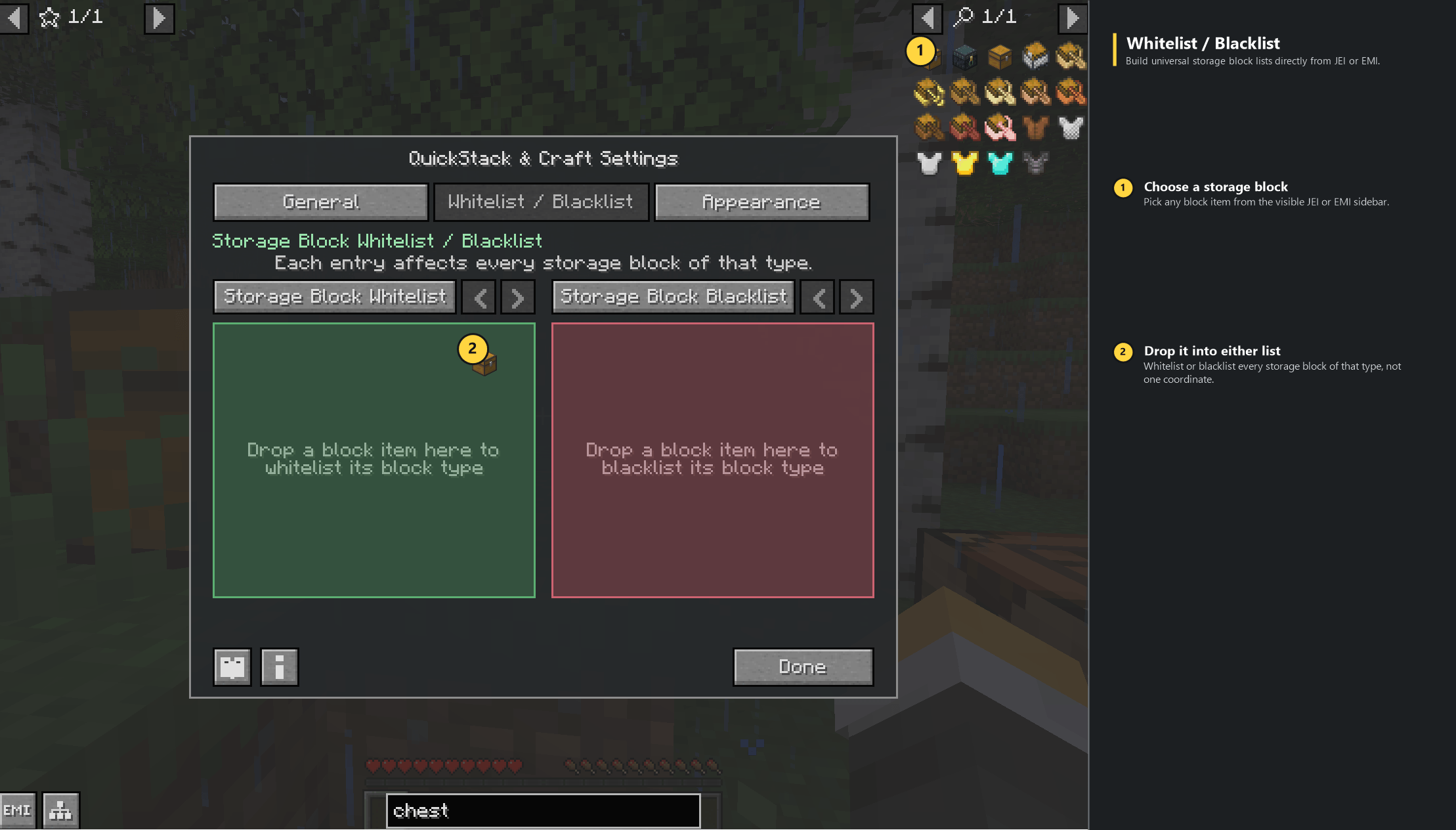
When JEI or EMI is installed, block items can also be dragged directly from the item sidebar into either list on the Settings screen.
Preview Nearby Storage
Bind Preview Nearby Storage to see every storage target currently eligible within range before moving or crafting any items.
Eligible storage receives the configured destination outline. This is a separate action from the whitelist/blacklist cycle.
In-Game Settings
Open Settings from the gear button beside Q and D, from supported storage screens, or with the optional settings keybind.
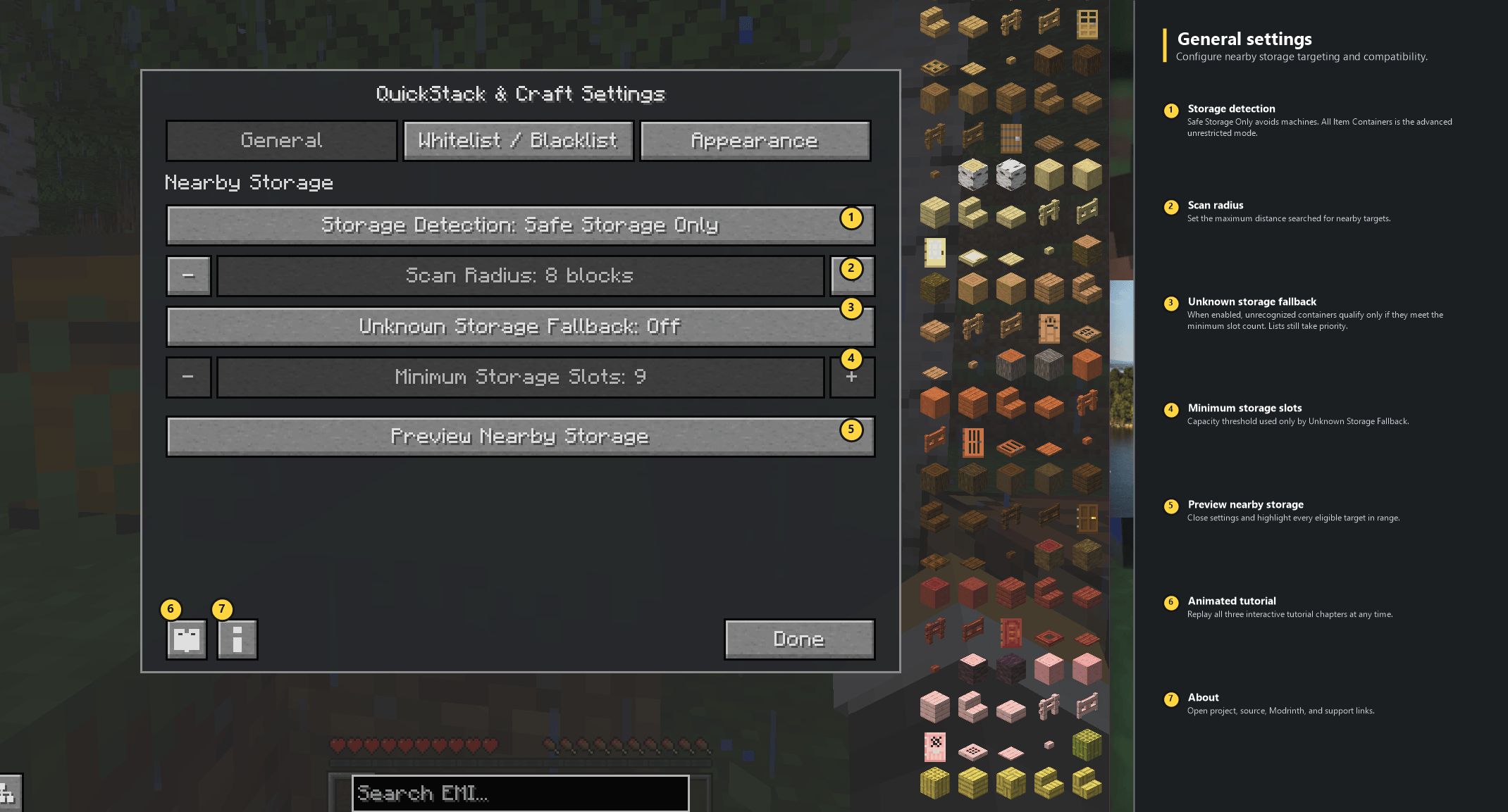
General
- Safe Storage Only or All Item Containers detection.
- Nearby scan radius.
- Unknown-storage fallback and minimum slot count.
- Preview Nearby Storage.
Whitelist / Blacklist
- Universal block-type whitelist and blacklist.
- Localized block names, icons, registry IDs, and removal controls.
- JEI and EMI drag-and-drop support.
Appearance
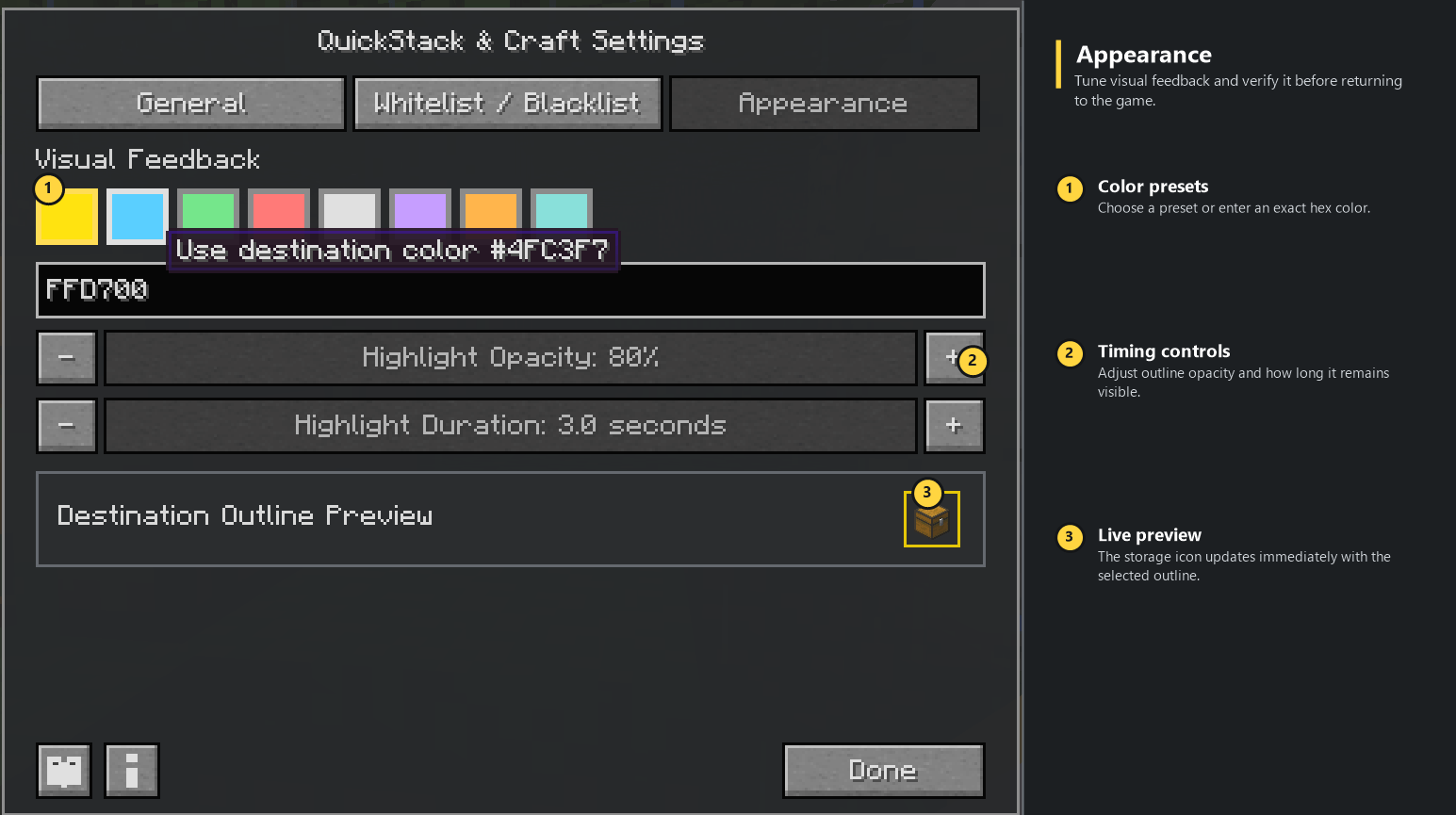
- Destination outline color presets and custom RGB hex entry.
- Outline opacity.
- Highlight duration.
- Live destination-outline preview.
Appearance preferences are client-local. In multiplayer, detection range, storage detection, and whitelist/blacklist settings are controlled by server operators.
One-Time Animated Tutorial
The tutorial opens automatically the first time each player opens their inventory in each save or server.
- It is shown only once automatically per save or server.
- Tutorial progress is stored per player.
- It uses deterministic demonstration inventories and never reads, moves, or changes your real items.
- Chapters cover Quick Stack, Dump, slot locks, Craft Nearby, whitelist/blacklist cycling, and storage preview.
- Playback includes pause, replay, previous, and next controls.
To watch it again, open the gear Settings button and select the tutorial book icon in the lower-left corner.
Keybind Setup
All keyboard actions are unbound by default to avoid conflicts with other mods.
Open:
Options -> Controls -> Key Binds -> QuickStack & Craft
Then bind any actions you want:
- Quick Stack Nearby
- Dump Unlocked Items
- Preview Nearby Storage
- Cycle Storage Block Whitelist / Blacklist
- Open QuickStack & Craft Settings
Native slot locking uses Alt + Left Click and does not require a keybind.
The Q, D, and gear buttons remain available even if no keys are bound.
Multiplayer and Safety
QuickStack & Craft is designed for server-authoritative item movement.
- The server rescans storage and validates each action.
- Clients request actions but do not decide or directly move server inventory contents.
- Recipe transfers are planned and validated before ingredients are moved.
- Locked slots are enforced by the transfer logic.
- Permission-aware settings synchronization prevents delayed server responses from overwriting active local edits.
Install the mod on both the server and participating clients for full functionality. A client without the mod can connect, but will not have QuickStack & Craft controls or features.
Visual Feedback
Successful transfers display an action-bar result and highlight every destination that received items.
- Destination storage uses a configurable outline color, opacity, and duration.
- The default destination highlight is gold for three seconds.
- A short particle trail points toward used storage.
- Whitelist, blacklist, and default states use fixed green, red, and cyan feedback so list state is never communicated by text or color alone.
Compatibility
Required:
- Architectury API on Fabric and NeoForge.
- Fabric API on Fabric.
Optional integrations:
- Vanilla recipe book, built in and always available.
- JEI recipe transfer and filter drag-and-drop.
- EMI recipe transfer and filter drag-and-drop where EMI is available.
- ItemLocks slot protection.
- Sophisticated Backpacks and Sophisticated Storage.
- Standard Fabric Transfer API and NeoForge item-handler storage.
The Minecraft 1.21.1 NeoForge build has also been tested with EMI, EMI Enchanting, EMI Loot, EMIffect, EMI Professions, and EMI Recipe Sharing installed together.
Supported Versions
- Minecraft 1.21.1, Fabric
- Minecraft 1.21.1, NeoForge
- Minecraft 1.21.4, Fabric
- Minecraft 1.21.4, NeoForge
Java 21 is required by Minecraft 1.21.x.
Links
- CurseForge: https://www.curseforge.com/minecraft/mc-mods/quickstack-craft
- Modrinth: https://modrinth.com/mod/quickstack-craft
- Source and issues: https://github.com/shikyo13/QuickStackCraft
- Buy Me a Coffee: https://buymeacoffee.com/zerotheabsolute
- Edition: Minecraft Java
- File type: .jar
- Minecraft versions listed: 1.21.4, 1.21.1
- How to install: Install the matching mod loader (Forge, Fabric or NeoForge) for your Minecraft version. → Download the .jar. → Put it in the .minecraft/mods folder and launch that loader profile.
- Where to get it: Opens on CurseForge — not every file is mirrored on our own servers.
Install steps are the general flow for this file type — How to install Minecraft Java mods & modpacks walks through it step by step.
- Ships as quickstackcraft-fabric-0.3.0+1.21.4.jar — drop this file into the mods folder
- Download size: 79 KB
- Download link checked 3 Oct 2026 — working
These come from our own check of the pack file, not from the source page.