
Back Tools (Fabric & NeoForge)
Java mod listed for Minecraft 1.20–1.21. Downloads from the MC Java Mods app on Android.
I don't know my version or loader
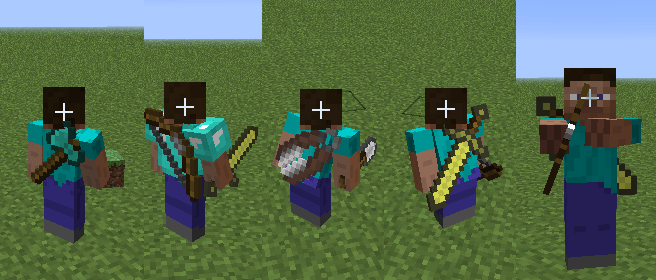
Back Tools
Back Tools is a lightweight visual utility mod that displays held tools and weapons on the player’s back when they are not in use, adding extra immersion without changing gameplay.
Designed to feel natural in vanilla-style play, the mod gives players a simple way to visually show off their equipment while keeping mechanics untouched.
Features
- Displays tools and weapons on the player’s back when not held
- Supports immersive visual equipment display
- Lightweight and performance-friendly
- Designed to work cleanly in normal gameplay
- Preserves vanilla mechanics with no gameplay changes
- Adds extra visual flair without clutter
About This Port
This project focuses on preserving the original Back Tools experience while updating it for newer Minecraft versions and modern loaders.
- Built for modern Minecraft versions
- Emphasis on stability and faithful behavior
- No gameplay changes—just a clean continuation of the original concept
Compatibility
- Works well in modpacks and alongside cosmetic and utility mods
- Designed to integrate cleanly with vanilla and modded equipment
- Safe for normal survival and multiplayer use
Original Mod
Check out the original Back Tools here:
https://www.curseforge.com/minecraft/mc-mods/back-tools
Notes
- This is a port/continuation, not a redesign
- Visual behavior is intended to remain faithful to the original mod
- Any issues or bugs can be reported, and fixes will be prioritized
Modpack Use
This mod is free to use in modpacks.
You are welcome to include it in public or private modpacks without permission.
- Edition: Minecraft Java
- File type: .jar
- Minecraft versions listed: 1.21.11, 1.21.10, 1.21.9
- How to install: Install the matching mod loader (Forge, Fabric or NeoForge) for your Minecraft version. → Download the .jar. → Put it in the .minecraft/mods folder and launch that loader profile.
- Where to get it: Opens on CurseForge — not every file is mirrored on our own servers.
Install steps are the general flow for this file type — How to install Minecraft Java mods & modpacks walks through it step by step.
- Ships as backtoolsforge-1.20.1-1.0.0.jar — drop this file into the mods folder
- Download size: 22 KB
- Download link checked 3 Oct 2026 — working
These come from our own check of the pack file, not from the source page.