
Papi Optimization
Java mod listed for Minecraft 1.20. Downloads from the MC Java Mods app on Android.
Adaptive all-in-one performance mod: smart entity & sound culling, mob AI throttling, leaf culling and dynamic settings that react to your FPS in real…
I don't know my version or loader
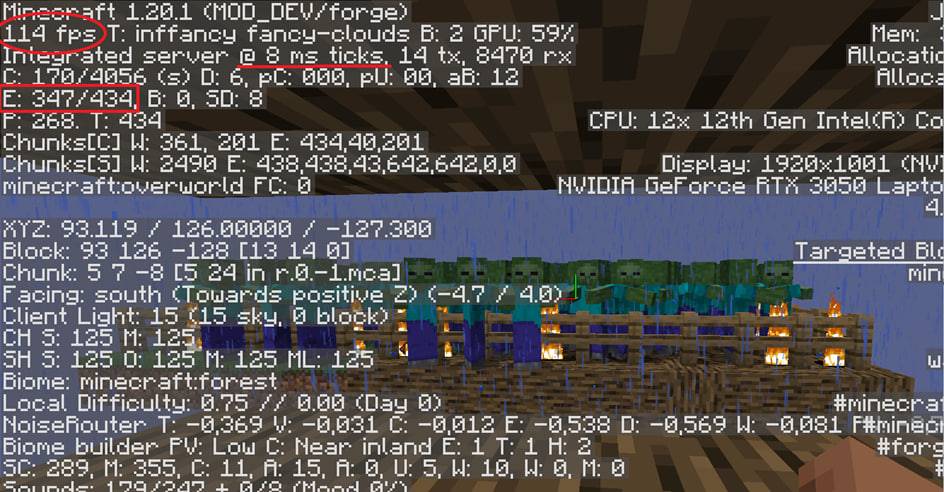
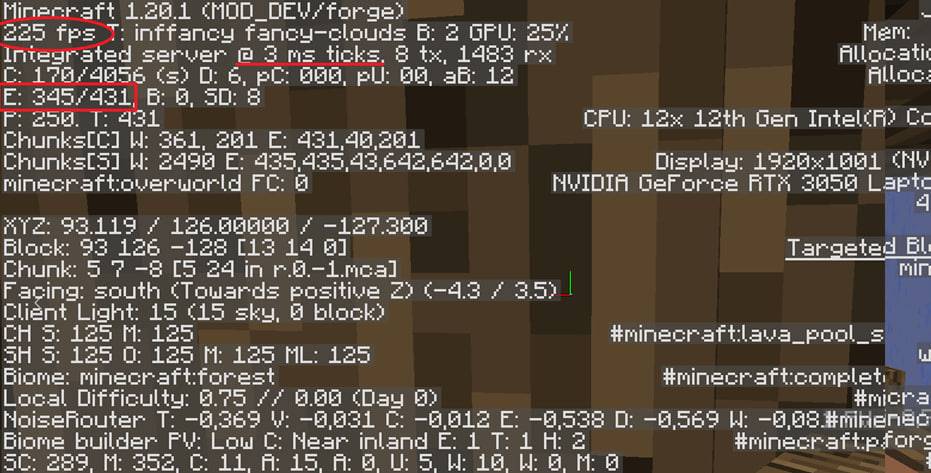
PapiOptimization
PapiOptimization is an adaptive, zero-config performance mod for Forge. Unlike most optimization mods that apply the same static tweaks all the time, PapiOptimization monitors your FPS in real time and automatically scales its optimizations up or down — staying invisible when your game runs smoothly and stepping in aggressively when frames start to drop.
Install it and forget it. No config files, no setup, no commands.
⚙️ How it works
The mod tracks your smoothed FPS and switches between three optimization levels:
| Level | When | What happens |
|---|---|---|
| 🟢 Normal | 60+ FPS | Light optimizations only, full visual quality |
| 🟡 Medium | 30–60 FPS | Moderate culling, reduced particles |
| 🔴 Aggressive | below 30 FPS | Maximum optimizations to recover playable framerates |
When your FPS recovers, everything (render distance, particles) is restored back to your original settings — the mod never permanently overrides your options.
✨ Features
🎯 Smart Entity Culling
Entities hidden behind walls are skipped from rendering using budgeted raycasts (no stutter from the checks themselves). Entities outside your field of view are culled too. Big FPS gains in mob farms, villages and caves.
📦 Block Entity Culling
Chests, barrels, furnaces and other block entities behind walls aren't rendered. Massive help in storage rooms and warehouses.
🌲 Fast Leaves
Leaf faces touching other leaves are not rendered — dramatically fewer faces in forests and jungles, where vanilla FPS usually tanks.
🐷 Distance-Based Mob LOD
When many mobs are on screen, far-away mobs are progressively hidden based on distance, keeping crowded areas (farms, raids) smooth.
🧠 Server-Side Mob AI Throttling
Mobs far from any player run their AI at reduced rates (down to 5% for very distant ones), smoothly scaling back to 100% as players approach. Mobs near you always behave completely normally. Works on servers and in singleplayer — reduces TPS lag from large mob counts.
🔇 Sound Culling
Distant hostile/neutral mob sounds that you'd barely hear anyway are skipped, reducing sound engine overhead.
🔭 Dynamic Render Distance
When FPS drops hard, render distance is gradually lowered; when performance recovers, it's gradually restored to your chosen value. Automatically disables itself if Voxy or Distant Horizons is installed to avoid conflicts.
✨ Adaptive Particles
Particle density is temporarily reduced under heavy load and restored when FPS is back to normal.
❓ Why PapiOptimization?
- ✅ Adaptive — only sacrifices visuals when you actually need the frames
- ✅ Respects your settings — everything is restored when FPS recovers
- ✅ Lightweight — optimization logic itself is heavily optimized (cached raycasts, pooled objects, fastutil collections)
- ✅ Client & server — helps both FPS and TPS
- Edition: Minecraft Java
- File type: .jar
- Minecraft version listed: 1.20.1
- How to install: Install the matching mod loader (Forge, Fabric or NeoForge) for your Minecraft version. → Download the .jar. → Put it in the .minecraft/mods folder and launch that loader profile.
- Where to get it: Opens on CurseForge — not every file is mirrored on our own servers.
Install steps are the general flow for this file type — How to install Minecraft Java mods & modpacks walks through it step by step.
- Ships as papiai-0.0.1-1.20.1.jar — drop this file into the mods folder
- Download size: 41 KB
- Download link checked 3 Oct 2026 — working
These come from our own check of the pack file, not from the source page.