
Sodium Profiles (Save Your Settings as Profiles)
Java mod listed for Minecraft 1.21. Download on the author's site.
Sodium Profiles adds one-click performance presets and custom settings profiles to Sodium's video settings. Swap between max FPS and best visuals…
⬇ Download on CurseForge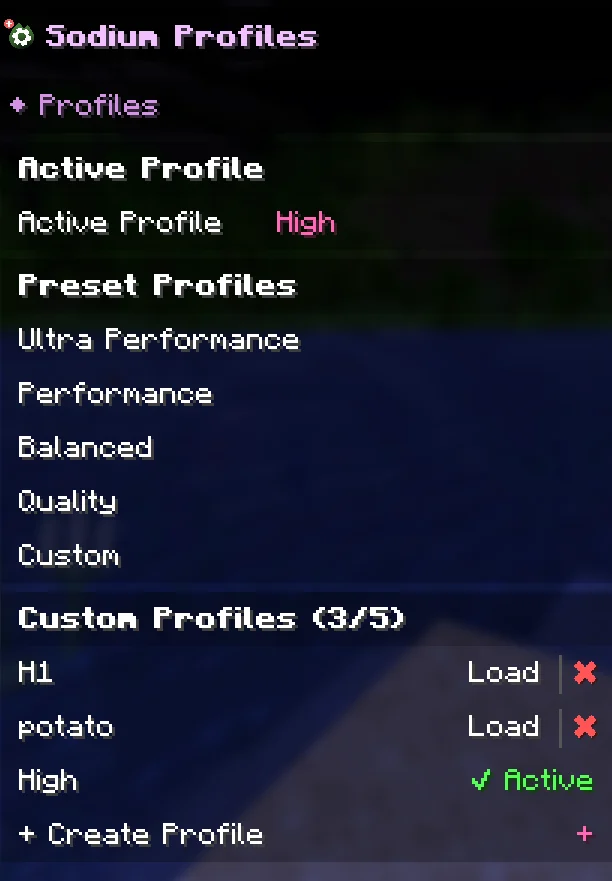
Sodium Profiles
Tired of manually adjusting dozens of Sodium settings every time you want to switch between performance and quality? Sodium Profiles adds built-in preset profiles and custom profile support directly inside Sodium's video settings menu.
━━━━━━━━━━━━━━━━━━━━━━━━━━━━━━
Features
• 4 Built-in Presets — Ultra Performance, Performance, Balanced, and Quality profiles that instantly configure all Sodium settings with one click.
• Custom Profiles — Save your current settings as a named profile (up to 5 custom profiles). Load them anytime with a single click.
• Delete Profiles — Easily remove custom profiles you no longer need.
• Active Profile Indicator — Always see which profile is currently active in the settings menu.
• Custom Detection — If you manually change settings without using a profile, the mod automatically shows "Custom" as your active profile.
• Native Integration — Profiles appear directly in Sodium's settings sidebar, fully integrated with the Apply/Undo workflow. No separate config screens.
━━━━━━━━━━━━━━━━━━━━━━━━━━━━━━
How It Works
- Open Minecraft Video Settings (Sodium's settings screen).
- You'll see preset profiles (Ultra Performance, Performance, Balanced, Quality) in the sidebar.
- Click a preset or custom profile to select it — settings won't change yet.
- Press "Apply" to activate the profile — all settings update at once.
- Press "Undo" if you change your mind before applying.
- To save your own profile, click "Create Profile", give it a name, and your current settings are saved.
━━━━━━━━━━━━━━━━━━━━━━━━━━━━━━
Important
This is an unofficial community add-on. It is not made by, affiliated with, or endorsed by CaffeineMC (the developers of Sodium).
And you need to use the sodium mod in order to be able to use this mod
- Edition: Minecraft Java
- File type: .jar
- Minecraft version listed: 1.21.11
- How to install: Install the matching mod loader (Forge, Fabric or NeoForge) for your Minecraft version. → Download the .jar. → Put it in the .minecraft/mods folder and launch that loader profile.
- Where to get it: Opens on CurseForge — not every file is mirrored on our own servers.
Install steps are the general flow for this file type — How to install Minecraft Java mods & modpacks walks through it step by step.
Sodium Profiles (Save Your Settings as Profiles) is a free Minecraft Java mod. Compatible with Minecraft 1.21.11. Downloaded 1,673 times (via CurseForge). Download it and open it directly in the game.