Simple Text to Speech
I don't know my version or loader
Simple Text to Speech
Simple Text to Speech lets you type a message and play it through Simple Voice Chat as spoken audio.
It is a client-side mod for Minecraft 1.20.1 with Fabric and Forge support. Speech is generated locally with the Voices library, and can be played into voice chat as if you were talking.
Features
- Type text and send it through Simple Voice Chat as speech
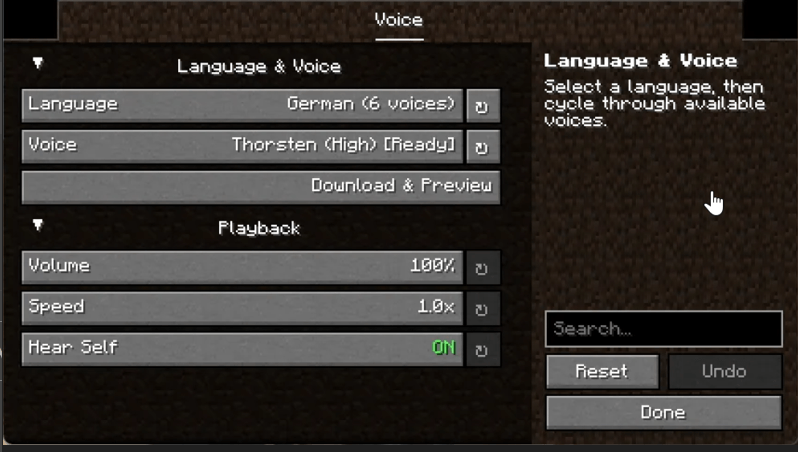
- Built in config screen with voice, volume, speed, and local playback options
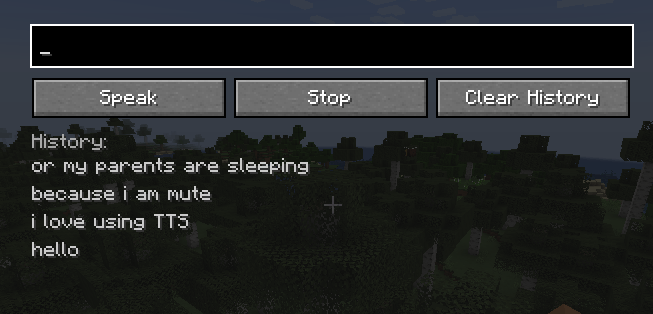
- Quick input screen for sending speech without opening the config
- Speech history for replaying common messages
- Downloadable voices with multiple language options
- Local preview button for testing a voice before using it in game
Screenshots
Requirements
- Minecraft 1.20.1
- Simple Voice Chat
- Fabric or Forge, depending on the build you use
How To Use
- Install Simple Voice Chat and Simple Text to Speech.
- Start the game and join a world or server where Simple Voice Chat is available.
- Open the config screen and choose a language and voice.
- If needed, use the preview button to download and test the selected voice.
- Open the speak screen with the configured keybind.
- Type a message and press
Speak.
You can also use commands:
/tts speak <text>/tts stop
Hear Self plays your generated speech locally in addition to sending it through voice chat.
Notes
- Voice generation happens on your client.
- Some voices are downloaded on first use.
- Voice quality and startup time depend on the selected model.
Support on Discord
If you'd like to support me and the development of my mods, I recommend trying out BisectHosting. Use code "project8gbderam" to get 25% off your first month of a gaming server for new customers. They offer 24/7 support and lightning-fast response times, ensuring you're in great hands and providing exceptional assistance for all your gaming needs. https://www.bisecthosting.com/project8gbderam
Bisect
- Edition: Minecraft Java
- File type: .jar
- Minecraft version listed: 1.20.1
- How to install: Install the matching mod loader (Forge, Fabric or NeoForge) for your Minecraft version. → Download the .jar. → Put it in the .minecraft/mods folder and launch that loader profile.
- Where to get it: Opens on CurseForge — not every file is mirrored on our own servers.
Install steps are the general flow for this file type — How to install Minecraft Java mods & modpacks walks through it step by step.
- Ships as simpletts-1.20.1-Forge-1.0.0.jar — drop this file into the mods folder
- Download size: 102.0 MB
- Download link checked 13 Sept 2026 — working
These come from our own check of the pack file, not from the source page.