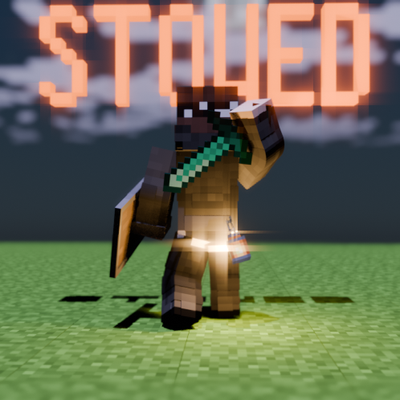
Stowed: Visible Back Slots
Java mod listed for Minecraft 1.21. Downloads from the MC Java Mods app on Android.
A standalone holster mod that lets you visually display and quick-swap weapons, tools, and items on your player's back
I don't know my version or loader
Stowed
IF UPDATING FROM pre 4.0 VERSION REMOVE YOUR ITEM FROM THE CURIOS HOLSTER SLOT SINCE THAT WILL BE DELETED
Stowed adds a dedicated holster slot to your player that requires no other mods — equip any item into it and it will be visually displayed on your player's back, like a sheathed sword, a slung rifle, or a stowed tool.
🌟 Features Standalone: No dependencies. The holster slot is built directly into the mod using NeoForge's own data attachment system.
Visual Display: Renders the holstered item on the player's back in third-person view.
Dynamic Animation: Item rendering seamlessly follows the player's body movements — crouching, riding, and swimming all look perfectly natural.
Quick Swap: Instantly swap your currently held item with your holstered item using a configurable keybind (Default: H).
At-a-Glance Slot Icon: An off-hand-styled slot icon shows your current holster contents next to the hotbar (only visible when the holster is occupied) and in the survival inventory screen.
In-Game Adjustment Screen: Open a live adjustment panel with a configurable keybind or from the mod's config button — drag sliders to fine-tune position, rotation, and scale in real time, both globally and per individual item, with copy/paste and reset support.
Customizable Model Rendering: Cycle through vanilla's model display contexts (fixed, held, ground, and more) to get the exact look you want for each item.
- Edition: Minecraft Java
- File type: .jar
- Minecraft version listed: 1.21.1
- How to install: Install the matching mod loader (Forge, Fabric or NeoForge) for your Minecraft version. → Download the .jar. → Put it in the .minecraft/mods folder and launch that loader profile.
- Where to get it: Opens on CurseForge — not every file is mirrored on our own servers.
Install steps are the general flow for this file type — How to install Minecraft Java mods & modpacks walks through it step by step.
- Ships as stowed-4.0.jar — drop this file into the mods folder
- Download size: 98 KB
- Download link checked 3 Oct 2026 — working
These come from our own check of the pack file, not from the source page.