
TidyInv
Java mod listed for Minecraft 1.20–1.21. Downloads from the MC Java Mods app on Android.
Smart, fast, server-friendly inventory sorting with 7 modes, vertical sort, locked slots, profiles, chest presets, deposit/restock/dump/take buttons…
I don't know my version or loader
TidyInv — Smart Inventory Sorting
Tired of dragging items around every time you open a chest? TidyInv sorts your inventory and any container in one click — or one keypress. Lightweight, server-friendly, and packed with quality-of-life features for Minecraft.
Overview
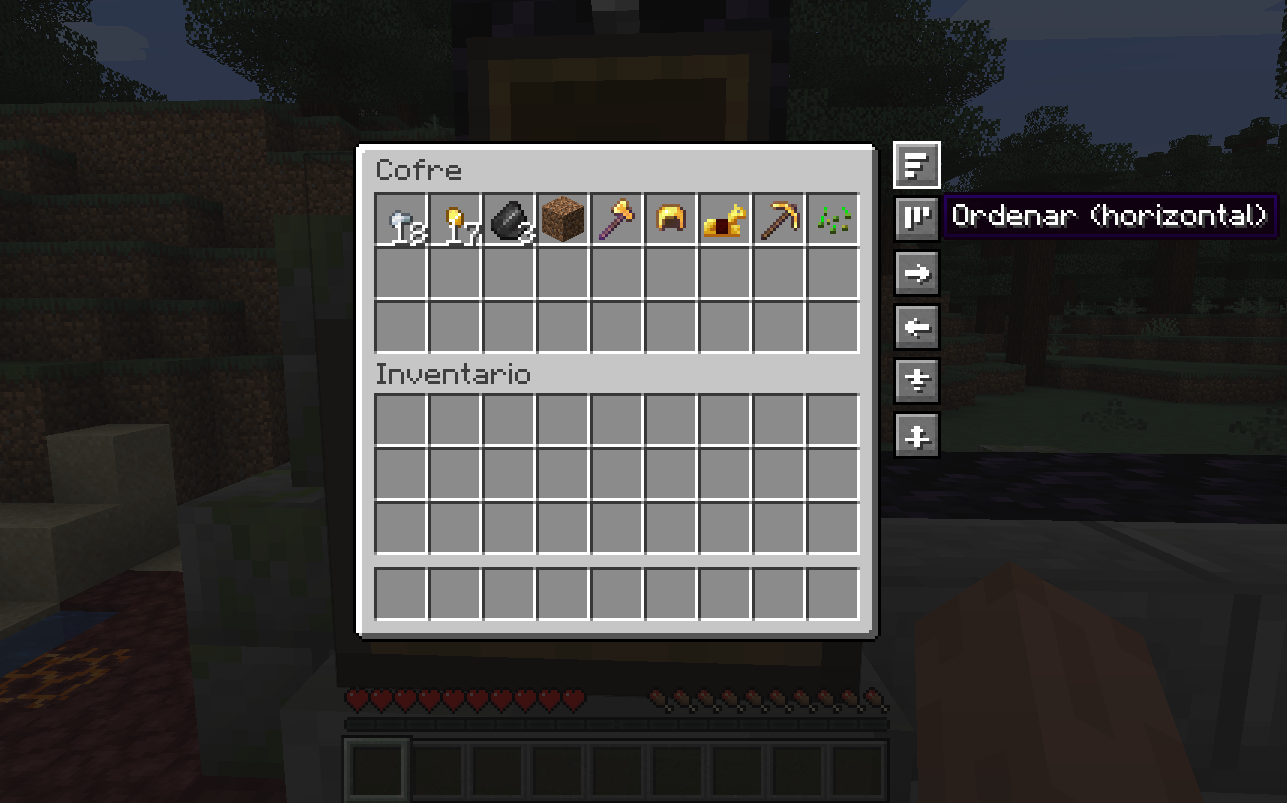
- 7 sort modes — Category, Name, Quantity, Rarity, By Mod, By Tag, Smart Affinity
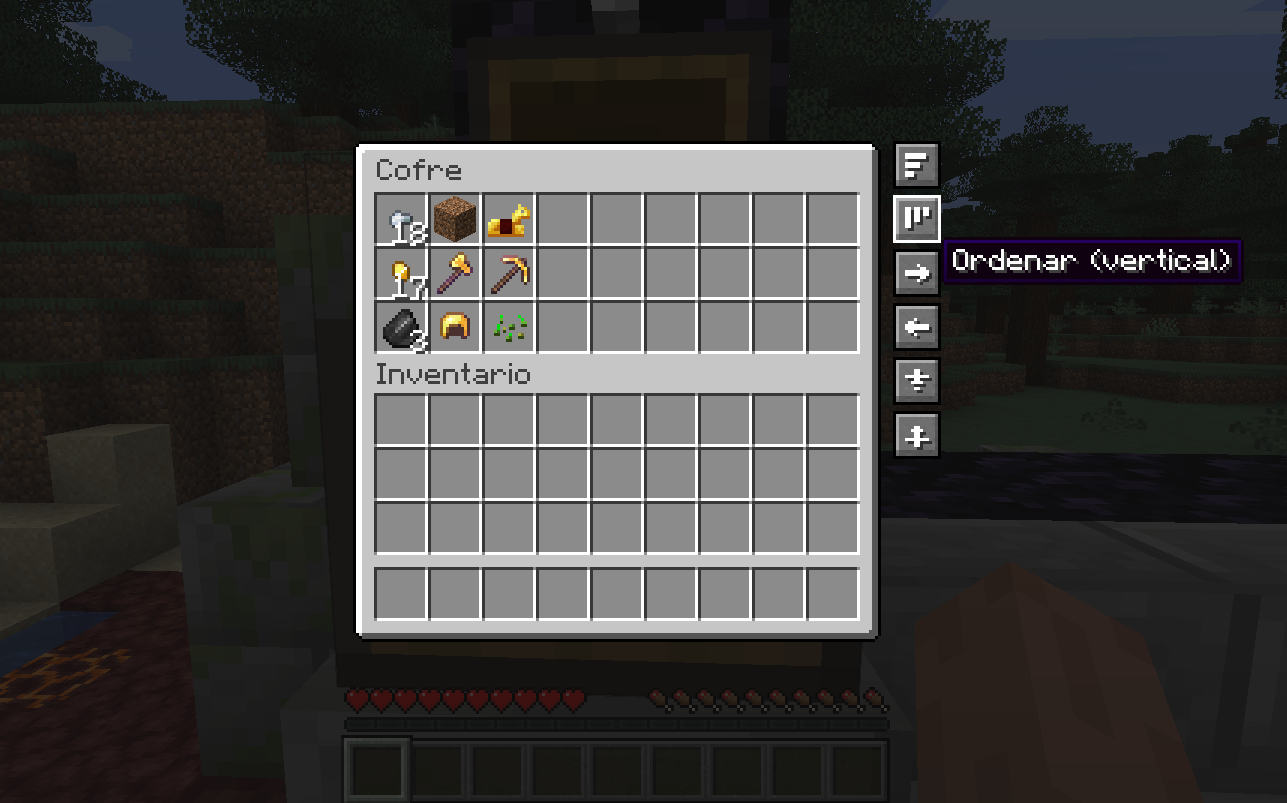
- Vertical sort — column-first layout, perfect for organized chests
- 5 chest presets — Food, Tools, Building, Combat, Storage
- 4 sort profiles — Default, Mining, PvP, Building (saved to disk)
- Quick chest actions — Sort, Vertical Sort, Deposit, Restock, Dump All, Take All
- Locked slots — pin items in place with a visual indicator and tooltip
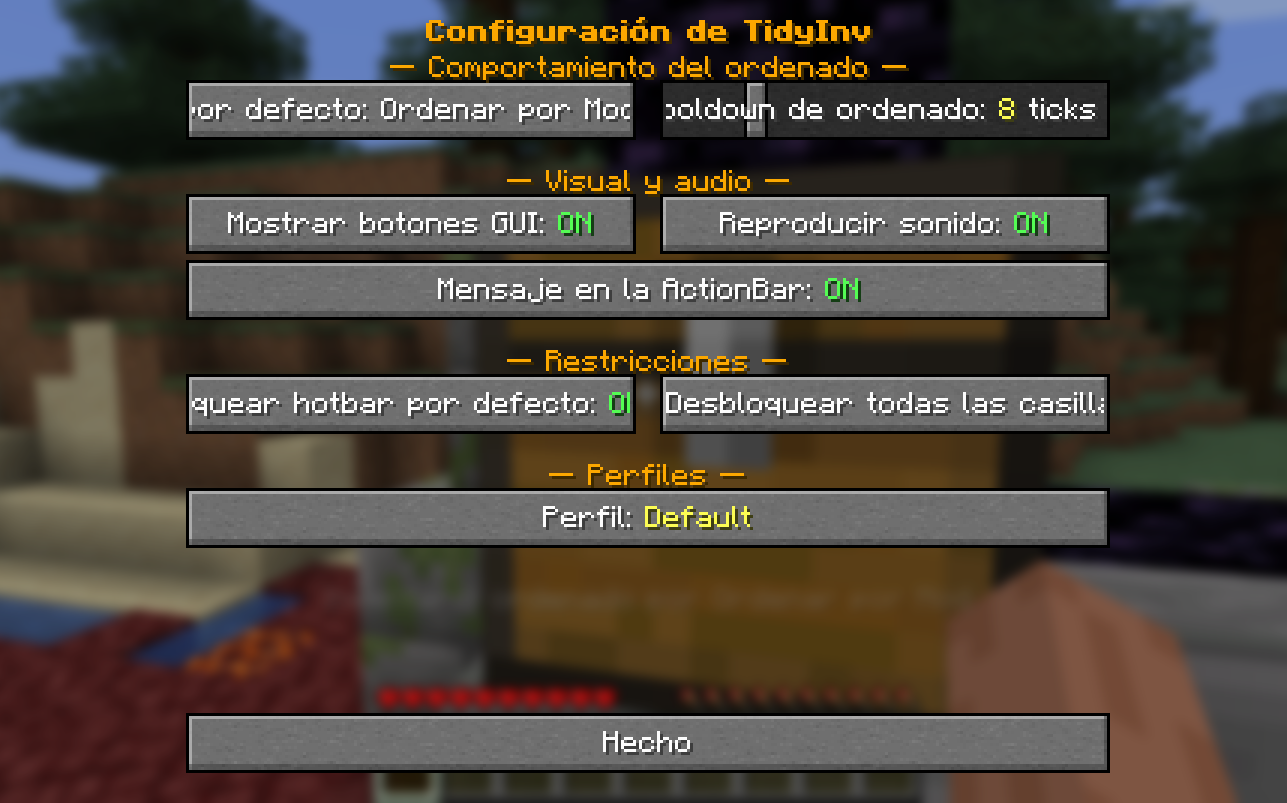
- In-game config GUI — press
Kto open, no JSON editing needed - Full command support —
/tidyinv …for everything - 6 languages — English, Spanish (ES / MX), Portuguese (BR), French, German
- Public API — other mods can register custom containers and categorizers
- Server-side sorting with anti-spam cooldown — safe for multiplayer
Keybinds
| Key | Action |
|---|---|
R |
Sort current inventory or chest |
K |
Open config menu |
| unbound | Quick Deposit |
| unbound | Quick Restock |
All keybinds can be reassigned in Minecraft's Controls menu.
Chest buttons
When you open any chest, six buttons appear on the right side of the GUI:
| Icon | Action |
|---|---|
| Three bars | Sort the chest |
| Vertical bars | Sort vertically (column-first) |
| Right arrow | Deposit — only items that already exist in the chest |
| Left arrow | Restock — only items you already carry |
| Double down arrow | Dump All — moves everything to the chest (locked slots stay) |
| Double up arrow | Take All — pulls everything from the chest into your inventory |
> Buttons follow the chest GUI when it shifts (e.g. when the recipe book opens).
Sort modes
| Mode | Description |
|---|---|
| Category | Weapons, tools, armor, food, combat, blocks, redstone, materials, misc |
| Name | Alphabetical by registry ID |
| Quantity | Largest stacks first |
| Rarity | Epic → Rare → Uncommon → Common |
| By Mod | Groups items by namespace (vanilla first) |
| By Tag | Groups items by their first tag (ores, logs, wool…) |
| Smart Affinity | Items with shared tags cluster together |
Chest presets
Open a chest and run /tidyinv preset <name>:
| Preset | Priority |
|---|---|
food |
FOOD → MATERIALS |
tools |
TOOLS → WEAPONS → ARMOR → MATERIALS |
building |
BLOCKS → REDSTONE → MATERIALS |
combat |
WEAPONS → ARMOR → FOOD → COMBAT |
storage |
General (default category order) |
Commands
/tidyinv sort [category|name|quantity|rarity|by_mod|by_tag|affinity]/tidyinv preset <food|tools|building|combat|storage>/tidyinv lock <slot 0-35>/tidyinv unlock <slot 0-35>/tidyinv profile list|switch <name>|next|current/tidyinv deposit/tidyinv restock/tidyinv dump/tidyinv take
Config
Press K in-game, or edit JSON files inside your config/ folder:
tidyinv.json— general optionstidyinv_locked_slots.json— locked slot indicestidyinv_profiles.json— sort profiles
In-game options:
- Default sort mode
- Show / hide chest buttons
- Sound ON / OFF
- ActionBar messages ON / OFF
- Lock hotbar by default
- Cooldown slider (0–40 ticks)
- Clear all locked slots
- Cycle between profiles
Public API
Other mods can extend TidyInv to support their own containers and item categories:
<pre><code>import com.luix1604.tidyinv.api.TidyInvAPI; import com.luix1604.tidyinv.sort.ItemCategory;
// Register a custom sortable container TidyInvAPI.registerContainerPredicate(menu -> menu instanceof MyCustomMenu);
// Register a custom item categorizer TidyInvAPI.registerCategorizer(stack -> { if (stack.getItem() instanceof MyMagicItem) return ItemCategory.MATERIALS; return null; // fall through to default }); </code></pre>
Compatibility
| Minecraft | Loaders | Java | Latest |
|---|---|---|---|
| 26.1.2 | Fabric · Forge · NeoForge | 25 | 1.5.2 |
| 1.21.1 | Fabric · Forge · NeoForge | 21 | 1.1.2 |
| 1.20.2 | NeoForge | 17 | 1.1.1 |
| 1.20.1 | Fabric · Forge | 17 | 1.1.1 |
> NeoForge does not exist for MC 1.20.1 (its first release shipped on 1.20.2). For Fabric or Forge on that MC era, use the 1.20.1 build.
> Mojang dropped the 1. prefix starting with 26.1 (released early 2026). The canonical ordering is 1.21.11 → 26.1 → 26.1.1 → 26.1.2.
Designed to be compatible with most other mods. Containers from other mods are auto-detected, and modders can register their own via the public API.
Installation
- Install the loader matching your setup (Fabric / Forge / NeoForge) for your Minecraft version.
- For Fabric, also install Fabric API.
- Drop the matching
tidyinv-<mc>-<version>-<loader>.jarinto yourmods/folder. - Launch the game. Press
Kin-game to open the config.
Source & Issues
GitHub: github.com/Luis1604/TidyInv
Each Minecraft version lives in its own branch. Per-version CHANGELOG.md files document everything that has shipped on that branch.
If you run into a bug, please open an issue on GitHub with your Minecraft version, loader, and the modlist you're using.
License
MIT License — free to use, modify and distribute.
Author
Luix1604 — luix1604
- Edition: Minecraft Java
- File type: .jar
- Minecraft versions listed: 1.20.1, 1.20.2, 1.21.1
- How to install: Install the matching mod loader (Forge, Fabric or NeoForge) for your Minecraft version. → Download the .jar. → Put it in the .minecraft/mods folder and launch that loader profile.
- Where to get it: Opens on CurseForge — not every file is mirrored on our own servers.
Install steps are the general flow for this file type — How to install Minecraft Java mods & modpacks walks through it step by step.
- Ships as tidyinv-1.20.2-1.1.1-neoforge.jar — drop this file into the mods folder
- Download size: 76 KB
- Download link checked 3 Oct 2026 — working
These come from our own check of the pack file, not from the source page.