PerfectAnvilTFG
A resource pack for TerraFirmaCraft (TFC) that provides a "Perfect Anvil" GUI helper.
Usage

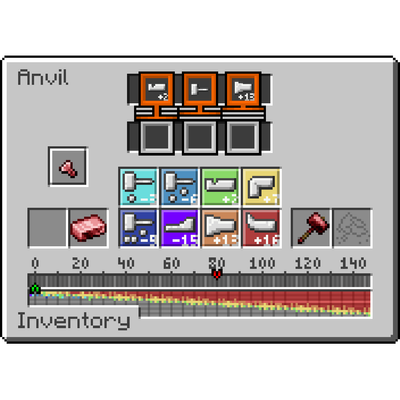
Check where the current red arrow is (in this case, 43, since each pixel counts as 1).

Subtract the red arrow value by the sum of the last three required actions highlighted in orange at the top (treating "Any Hit" as a Light Hit or -3, results in a total of -9). In this example, it would be 43 - (-3 - 3 - 3) = 43 - (-9) = 52. This value of 52 is where you want to place your green arrow.
Using the pixel guides, count the colors of the pixels and press the action corresponding to each color that many times. In this case: 2 Shrinks (Red), 1 Upset (Orange), and 1 Bend (Yellow).

Now, your green arrow should be placed at 52.

You can now finish forging by performing the highlighted actions in reverse (though in our case, they are all Light Hits), thus aligning the green arrow with the red arrow.

Credits
This resource pack is a derivative of Anvil GUI by Simon, used under CC BY 4.0.
Changes made
- Corrected the hit indicators for 3, 6, 19, and 22 hits in the anvil GUI texture.
License
This project is licensed under the Creative Commons Attribution 4.0 International License.
- Edition: Minecraft Java
- File type: .zip (resource pack)
- Minecraft version listed: 1.20.1
- How to install: Download the .zip resource pack — do not unzip it. → Put it in .minecraft/resourcepacks. → Enable it in Options → Resource Packs.
- Where to get it: Opens on CurseForge — not every file is mirrored on our own servers.
Install steps are the general flow for this file type — How to install Minecraft Java resource packs walks through it step by step.
- Downloads as Perfected Anvil Helper.zip
- Download size: 24 KB
- Download link checked 23 Aug 2026 — working
These come from our own check of the pack file, not from the source page.