
Apothic Filter Compat
Java mod listed for Minecraft 1.20. Downloads from the MC Java Mods app on Android.
⬇ Download on CurseForgeThe author built this one for Minecraft 1.20.1 on Forge. On other versions it may install and then do nothing.
What it does
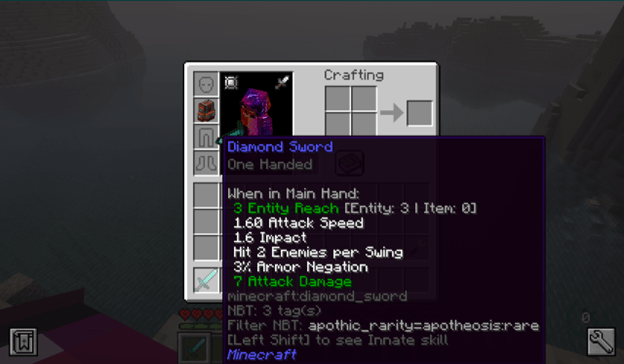
Apotheosis stores affix item rarity in nested NBT at affix_data.rarity. Most filter mods only read first-level NBT, which means players cannot filter affixed gear by rarity in storage and pipe systems. This has been a known pain point across many GitHub issues for years.
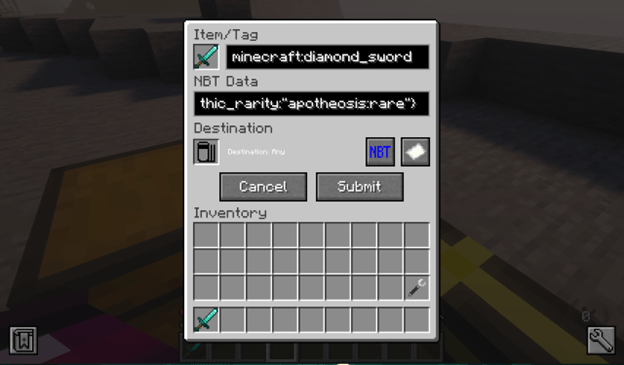
This mod copies the rarity value to a top-level NBT key called apothic_rarity. Once mirrored, any filter mod that reads top-level NBT can match items by rarity:
{apothic_rarity:"apotheosis:rare"}
A tooltip on affix items shows the value to make filter setup easier (toggleable in config).
Compatibility
Works with: Pipez, Refined Storage, Applied Energistics 2, XNet, Mekanism logistical transporters, EnderIO conduits, Functional Storage NBT lock, and any other filter mod that reads top-level NBT paths.
Does not work with: Sophisticated Backpacks or Sophisticated Storage. Their filter system requires full NBT match rather than path-based matching, which is a limitation of those mods.
Usage
- Install Apotheosis and its dependencies (Placebo, Patchouli, Apothic Attributes).
- Drop this jar into your mods folder.
- Pick up or generate any affixed item. Within one second it will have
apothic_rarityset at the top level of its NBT. - In your filter mod, set the NBT match to
{apothic_rarity:"apotheosis:rare"}(or any rarity ID:apotheosis:common,apotheosis:uncommon,apotheosis:rare,apotheosis:epic,apotheosis:mythic).
Config
Located at config/apothic_filter_compat-common.toml.
enabled: master switch, default truenbtKey: top-level NBT key, defaultapothic_raritytickInterval: how often to sweep inventory in ticks, default 20showTooltip: show the rarity value on tooltips, default true
Source
GitHub: https://github.com/nightwielder23/apothic-filter-compat
License
MIT.
- Edition: Minecraft Java
- File type: .jar
- Minecraft version listed: 1.20.1
- How to install: Install the matching mod loader (Forge, Fabric or NeoForge) for your Minecraft version. → Download the .jar. → Put it in the .minecraft/mods folder and launch that loader profile.
- Where to get it: Opens on CurseForge — not every file is mirrored on our own servers.
Install steps are the general flow for this file type — How to install Minecraft Java mods & modpacks walks through it step by step.
- Ships as apothic_filter_compat-1.0.1.jar — drop this file into the mods folder
- Download size: 9 KB
- Download link checked 3 Oct 2026 — working
These come from our own check of the pack file, not from the source page.
Related Java mods

VirtualFilter

DrArora Texture Pack

ShulkerDrops

Azurium : Tools - Armor

Domum Ornamentum