HBM Door Control addon
Java mod listed for Minecraft 1.20. File opened and checked on 11 Oct 2026; downloads from the MC Java Mods app on Android.
⬇ Download on CurseForgeThe author built this one for Minecraft 1.20.1 on Forge. On other versions it may install and then do nothing.
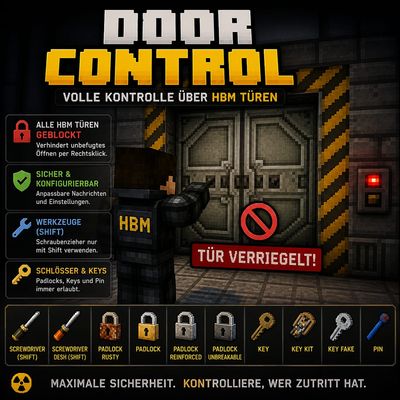
HBM Door Control is a mod that changes the door logic for HBM.
The mod is programmed to block the right-click function, allowing doors to be opened and closed exclusively with redstone.
Importantly, this add-on should work with almost all 1.12.2 HBM ports (no guarantee).
Guaranteed functionality with the following mods:
- HBM's Nuclear Tech Mod: Community Edition
- HBM NTM BS Edition
- Hbm's Nuclear Tech - Hamster Reloaded
- Hbm's Nuclear Tech Mod Reloaded
NEW.: 1.20.1 Version Ported for
"HBM's Nuclear Tech Modernized"
only !!!
Additionally, an in-game configuration menu is now available for the 1.20.1 version of the mod
"HBM's Nuclear Tech Modernized"
. You can also enable a whitelist or blacklist for doors or mods to prevent issues; the on-screen text can, of course, be disabled.
Please note that this applies only to version 1.20.1 and specifically to this one mod; due to differences in programming, this 1.20.1 version from the addon is incompatible with any other HBM-ported mod for 1.20.1.
The whitelist and blacklist features will also be added to the 1.12.2 version at a later date.
It's also important that you can use the screwdrivers to change the skin, at least in the Community Edition; the padlocks can also be used.
The "reactor door" from HBM's Nuclear Tech - Leafia's Cursed Addon mod remains unaffected, as it was specifically designed for right-click opening.
If you encounter any problems, please leave them in the comments.
It's possible that the addon will no longer be updated unless major issues arise or new doors are added through an update, but the system should be able to recognize new doors anyway.
Have fun!
As an extra, you can disable the red lock notification in the config file or change the text ;)
- Edition: Minecraft Java
- File type: .jar
- Minecraft version listed: 1.20.1
- How to install: Install the matching mod loader (Forge, Fabric or NeoForge) for your Minecraft version. → Download the .jar. → Put it in the .minecraft/mods folder and launch that loader profile.
- Where to get it: Opens on CurseForge — not every file is mirrored on our own servers.
Install steps are the general flow for this file type — How to install Minecraft Java mods & modpacks walks through it step by step.
- Ships as doorcontrol-1.1.4-1.12.2.jar — drop this file into the mods folder
- Download size: 6 KB
- Download link checked 3 Oct 2026 — working
These come from our own check of the pack file, not from the source page.