
HoloMobInfo
Java mod listed for Minecraft 1.19–1.21. Downloads from the MC Java Mods app on Android.
I don't know my version or loader
HoloMobInfo
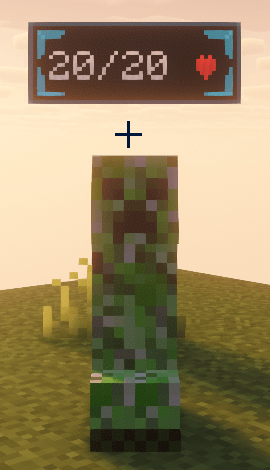
HoloMobInfo adds clean holographic information panels above mobs, turning simple health bars into a compact high-tech overlay.
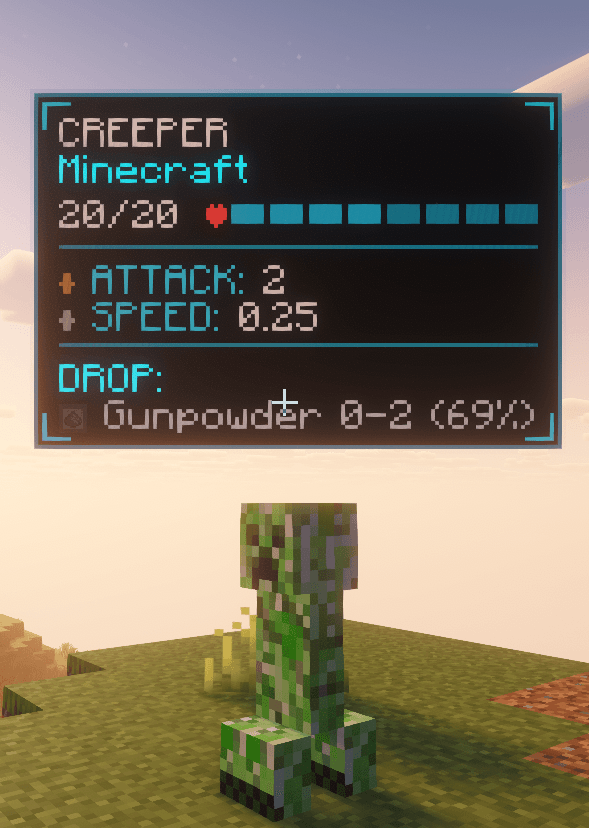
Instead of opening menus or guessing mob stats, you can see the most important information directly in the world: health, name, mod source, combat stats, movement speed, and optional drop information.
Features
- Holographic mob health panels
- Compact and expanded panel states
- Smooth animated transitions
- Optional attack damage, armor, and movement speed stats
- Optional server-backed mob drop scanning
- Lightweight and readable high-tech visual style
Drop Information
When supported by the server, HoloMobInfo can scan a mob's loot table and display possible drops directly in the expanded panel.
On multiplayer servers, install the mod on both the client and the server to enable full drop syncing.
Configuration
The mod includes options for:
- Max display distance
- Attack damage visibility
- Armor visibility
- Movement speed visibility
- Drop visibility
- Mod source visibility
- Panel scale
- Animation speed
- Collapse delay
- Color theme
Available themes:
- Cyan
- Green
- Red
- Minimal
Compatibility
HoloMobInfo is designed as a lightweight information overlay. It does not change mob behavior, combat mechanics, loot tables, world generation, or progression.
It is suitable for vanilla-style playthroughs, RPG modpacks, tech modpacks, adventure packs, and client-side quality-of-life setups.
Notes
Fabric versions require Fabric API.
For the best multiplayer experience, install HoloMobInfo on both the client and the server. Client-only usage is still useful for basic mob information, but server-backed drop scanning requires server support.
- Edition: Minecraft Java
- File type: .jar
- Minecraft versions listed: 1.21.1, 1.20.1, 1.19.2
- How to install: Install the matching mod loader (Forge, Fabric or NeoForge) for your Minecraft version. → Download the .jar. → Put it in the .minecraft/mods folder and launch that loader profile.
- Where to get it: Opens on CurseForge — not every file is mirrored on our own servers.
Install steps are the general flow for this file type — How to install Minecraft Java mods & modpacks walks through it step by step.
- Ships as holomobinfo-1.20.1-forge-1.5.0.jar — drop this file into the mods folder
- Download size: 167 KB
- Download link checked 3 Oct 2026 — working
These come from our own check of the pack file, not from the source page.