
EasyNPC x FTB Quests Compat
Java mod listed for Minecraft 1.21. Downloads from the MC Java Mods app on Android.
Link your NPCs to your progression! This compatibility mod allows you to condition EasyNPC dialogues based on the player's progress in FTB Quests, and to…
⬇ Download on CurseForgeThe author built this one for Minecraft 1.21.1 on Fabric. On other versions it may install and then do nothing.
EasyNPC x FTB Quests Compat is a mod that creates a seamless bridge between the EasyNPC and FTB Quests mods. It allows you to create interactive and evolving NPCs whose dialogue options adapt to the player's quest progression, while also offering new ways to complete those quests.
Main Features
- Conditional Dialogues: Make an NPC say a different line if the player has completed a specific FTB quest.
- Priority System: If multiple quests are completed, the NPC will automatically choose the dialogue associated with the rule having the highest priority.
- Fallback Dialogue: Define a default dialogue that will be displayed if the player does not meet any quest conditions.
- New FTB Quests Task: Add an "EasyNPC Dialogue" in FTB Quests. This task will automatically complete as soon as the player opens and reads the targeted dialogue with the NPC.
How to use it?
1. Modify a dialogue according to quest progression
- Use your EasyNPC wand to open your NPC's configuration menu.
- Go to the Advanced Dialog Configuration menu.
- Next to each dialogue entry, you will find a new "Q" button. Click it to link an FTB quest to this specific dialogue.
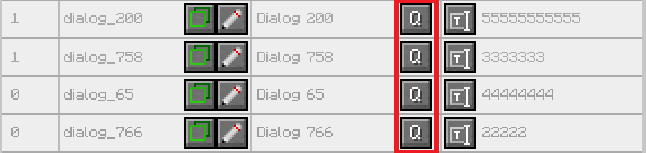
- In the menu that opens, enter the Quest Hex ID (which you can find in FTB Quests by editing a quest) as well as a Priority (a higher number indicates a higher priority).
- Save your changes. The NPC will only offer this dialogue if the corresponding FTB quest has been completed by the player.
2. Complete a quest by talking to an NPC
- In your EasyNPC dialogue configuration menu (via the "Q" button), use the "Copy Dialog ID" button to save the dialogue's unique identifier to your clipboard.
- Open the FTB Quests editor and create a new task.
- Select the new "EasyNPC Task" type (recognizable by its custom dialogue icon).
- In the configuration for this task, paste the dialogue ID into the
dialogIdfield. - As soon as the player interacts with the NPC and triggers this specific dialogue, the quest task will be marked as completed.
- Edition: Minecraft Java
- File type: .jar
- Minecraft version listed: 1.21.1
- How to install: Install the matching mod loader (Forge, Fabric or NeoForge) for your Minecraft version. → Download the .jar. → Put it in the .minecraft/mods folder and launch that loader profile.
- Where to get it: Opens on CurseForge — not every file is mirrored on our own servers.
Install steps are the general flow for this file type — How to install Minecraft Java mods & modpacks walks through it step by step.
- Ships as easynpc-x-ftb-quests-compat-1.0.0.jar — drop this file into the mods folder
- Download size: 51 KB
- Download link checked 3 Oct 2026 — working
These come from our own check of the pack file, not from the source page.