
ModsJava
Magnet Hoppers
Minecraft Java mod. Downloads from the MC Java Mods app on Android.
A hopper that vacuums dropped items in a 3D radius before depositing them. Solves item-despawn around mob farms in one dedicated block
⬇ Download on CurseForge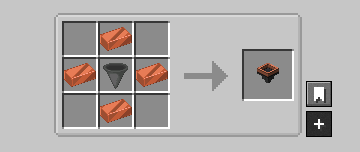

Magnet Hopper
A hopper variant that pulls dropped items in a 3D radius before depositing them into the container below. Solves the universal "items despawn around my mob farm" pain in one dedicated block.
Features
- Magnet pull — ItemEntities in the tier's 3D radius get vacuumed into the internal 5-slot storage and flow down into the container below.
- Vanilla hopper behavior always active — strict superset of a regular hopper: pulls from any container above, pushes to any container below at the standard 8-tick cadence.
- Magnet on/off toggle — UI button to disable just the magnet pull (block keeps acting as a normal hopper).
- 5-slot whitelist/blacklist filter — click a filter slot with an item to ghost-set (the item isn't consumed); empty-hand click to clear; toggle whitelist/blacklist in the UI.
- Redstone-disable — applying a redstone signal pauses everything (matches vanilla hopper convention).
- Placement preview — hold a magnet hopper in either hand and the affected radius draws as a cyan-mint wireframe over your cursor target, with a warm-green surface contour that follows terrain so the floor coverage is always legible.
- Pipe compatibility — exposes the 5-slot storage via Fabric
ItemStorage.SIDEDand the NeoForge item-handler capability. Filter slots are config, not exposed.

Compatibility
- Minecraft: 26.1.x
- Fabric: Loader 0.18.4+ with Fabric API
- NeoForge: 26.1+
- Java: 25
Known limitations
- Items in internal storage spill when the block is broken (the drops are still pickup-able). NBT carry-over planned for v0.2.
- Filter configuration is lost on break. Planned for v0.2.
- All magnet hoppers face down only; side-facing variant planned later.
License
CC0-1.0 (public domain). Use freely in modpacks and derivative works.
Links
Quick facts
- Edition: Minecraft Java
- File type: .jar
- How to install: Install the matching mod loader (Forge, Fabric or NeoForge) for your Minecraft version. → Download the .jar. → Put it in the .minecraft/mods folder and launch that loader profile.
- Where to get it: Opens on CurseForge — not every file is mirrored on our own servers.
Install steps are the general flow for this file type — How to install Minecraft Java mods & modpacks walks through it step by step.
File checked by MCModsHub
- Ships as magnethopper-fabric-0.2.3.jar — drop this file into the mods folder
- Download size: 161 KB
- Download link checked 3 Oct 2026 — working
These come from our own check of the pack file, not from the source page.