Iventory Vertical Swap
Java mod listed for Minecraft 1.21. Downloads from the MC Java Mods app on Android.
This is a simple client-side utility mod. Just hold the hotkey (Default: Left Ctrl) or long-press a number key, then scroll your mouse wheel to seamlessly…
⬇ Download on CurseForgeThe author built this one for Minecraft 1.21.1 on NeoForge. On other versions it may install and then do nothing.
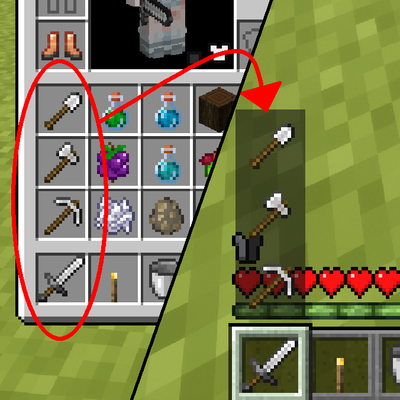
This mod introduces a brand-new way to swap items from your inventory to your hotbar. There are no complicated sorting rules—simply arrange your items vertically in your inventory, and the items in each column will appear in the alternative menu right above their corresponding hotbar slot.

Next, all you need to do is hold the hotkey (Default: Left Ctrl) or long-press the corresponding number key. This will bring up a vertical hotbar menu, allowing you to select an item using your mouse wheel. Once you release the key, that item will instantly swap places with the item in your main hand!

If you prefer a different style, you can use the command /ivs_swapmode to switch to the second mode: when the vertical hotbar is open, scrolling your mouse wheel will cause the entire vertical column (both the inventory items and your active hotbar slot) to cycle up or down by one slot.
If you don't want the item names to be displayed in the first mode, you can toggle it off using the /ivs_swapname command.
If you wish to disable the feature that opens the vertical hotbar by long-pressing number keys, you can turn it off using the /ivs_swapkey_number command.
You can also adjust the animation of the vertical hotbar and change the hold duration required for the number keys in the config file!
- Edition: Minecraft Java
- File type: .jar
- Minecraft version listed: 1.21.1
- How to install: Install the matching mod loader (Forge, Fabric or NeoForge) for your Minecraft version. → Download the .jar. → Put it in the .minecraft/mods folder and launch that loader profile.
- Where to get it: Opens on CurseForge — not every file is mirrored on our own servers.
Install steps are the general flow for this file type — How to install Minecraft Java mods & modpacks walks through it step by step.
- Ships as inventory_vertical_swap-1.0.0-neoforge-1.21.1.jar — drop this file into the mods folder
- Download size: 415 KB
- Download link checked 24 Oct 2026 — working
These come from our own check of the pack file, not from the source page.