
Create: Frogports Plus
Java mod listed for Minecraft 1.21. Downloads from the MC Java Mods app on Android.
Frogport Plus adds Frogport Signal, a Create-compatible frogport upgrade with built-in redstone control and a configurable pulse timer.
⬇ Download on CurseForgeThe author built this one for Minecraft 1.21.1 on NeoForge. On other versions it may install and then do nothing.

Frogport Plus is a Create addon for Minecraft 1.21.1 that expands the standard frogport with new utility blocks designed to feel like natural Create extensions.

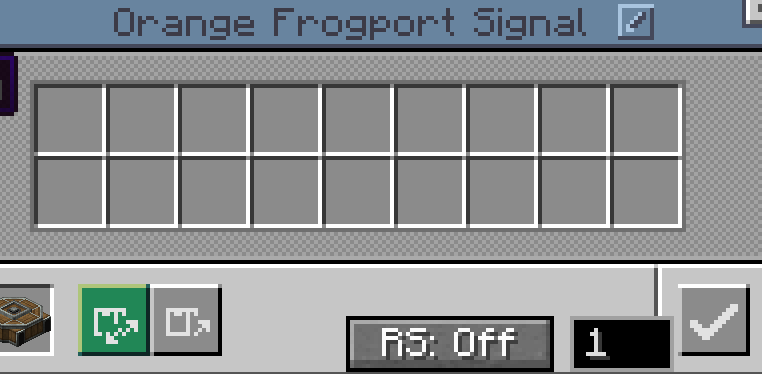
The mod currently adds two main variants:
Frogport Signal
Frogport Signal works like a normal Create frogport, but adds built-in redstone control directly into the frogport itself.
Features:
- Built-in redstone output toggle
- Pulse timer configured directly in the frogport GUI
- Works like a standard frogport in normal placement flows
- Supports chain conveyor targeting and standard Create package-port behavior
- Crafted from a normal frogport plus 1 redstone
Frogport Link
Frogport Link combines a normal frogport with a Stock Link.
It behaves like a standard frogport, but also works as an active Create logistics network link, making it possible to build cleaner package systems with fewer separate blocks.
Features:
- Works like a normal frogport
- Functions as a Stock Link in Create logistics networks
- Supports Stock Tickers and linked stock networks
- Supports chain conveyor targeting and standard package-port placement behavior
- Can tune to networks through Stock Links, Stock Tickers, and other Frogport Links
- Can be unlinked in a crafting table by placing it alone
- Crafted from a normal frogport plus 1 stock link
Vibrant Vaults Compatibility
If Create: Vibrant Vaults is installed, Frogport Plus also adds colored variants of Frogport Signal and Frogport Link so they fit naturally into colored logistics builds.
Why Use It
Frogport Plus is made for players who want cleaner Create logistics setups without losing the familiar frogport workflow.
It is especially useful for:
- automated package handling
- redstone-controlled logistics lines
- compact factory control systems
- cleaner stock-link and stock-ticker setups
- colorful logistics builds with Vibrant Vaults support
Compatibility
- Minecraft 1.21.1
- NeoForge 21.1.x
- Create 6.0.10
Creator
Created by Sini3092
Support
Patreon: https://www.patreon.com/cw/Sini3092
Buy Me a Coffee: https://buymeacoffee.com/sini3092
About Me
Hi, I'm Sini3092, a creator who enjoys building practical Minecraft automation tools and improving the small details that make modded factory gameplay feel better to use.
Frogport Plus started as a focused addon idea: keep the familiar Create frogport workflow, then expand it with useful built-in upgrades that feel like they belong in Create from the start.
- Edition: Minecraft Java
- File type: .jar
- Minecraft version listed: 1.21.1
- How to install: Install the matching mod loader (Forge, Fabric or NeoForge) for your Minecraft version. → Download the .jar. → Put it in the .minecraft/mods folder and launch that loader profile.
- Where to get it: Opens on CurseForge — not every file is mirrored on our own servers.
Install steps are the general flow for this file type — How to install Minecraft Java mods & modpacks walks through it step by step.
- Ships as frogportplus-0.3.0.jar — drop this file into the mods folder
- Download size: 175 KB
- Download link checked 3 Oct 2026 — working
These come from our own check of the pack file, not from the source page.