
cyanspeech
Java mod listed for Minecraft 1.21. Downloads from the MC Java Mods app on Android.
I don't know my version or loader
cyanspeech
Don't own a microphone, like my good friend TrierDude? You can use text-to-speech with cyanspeech!
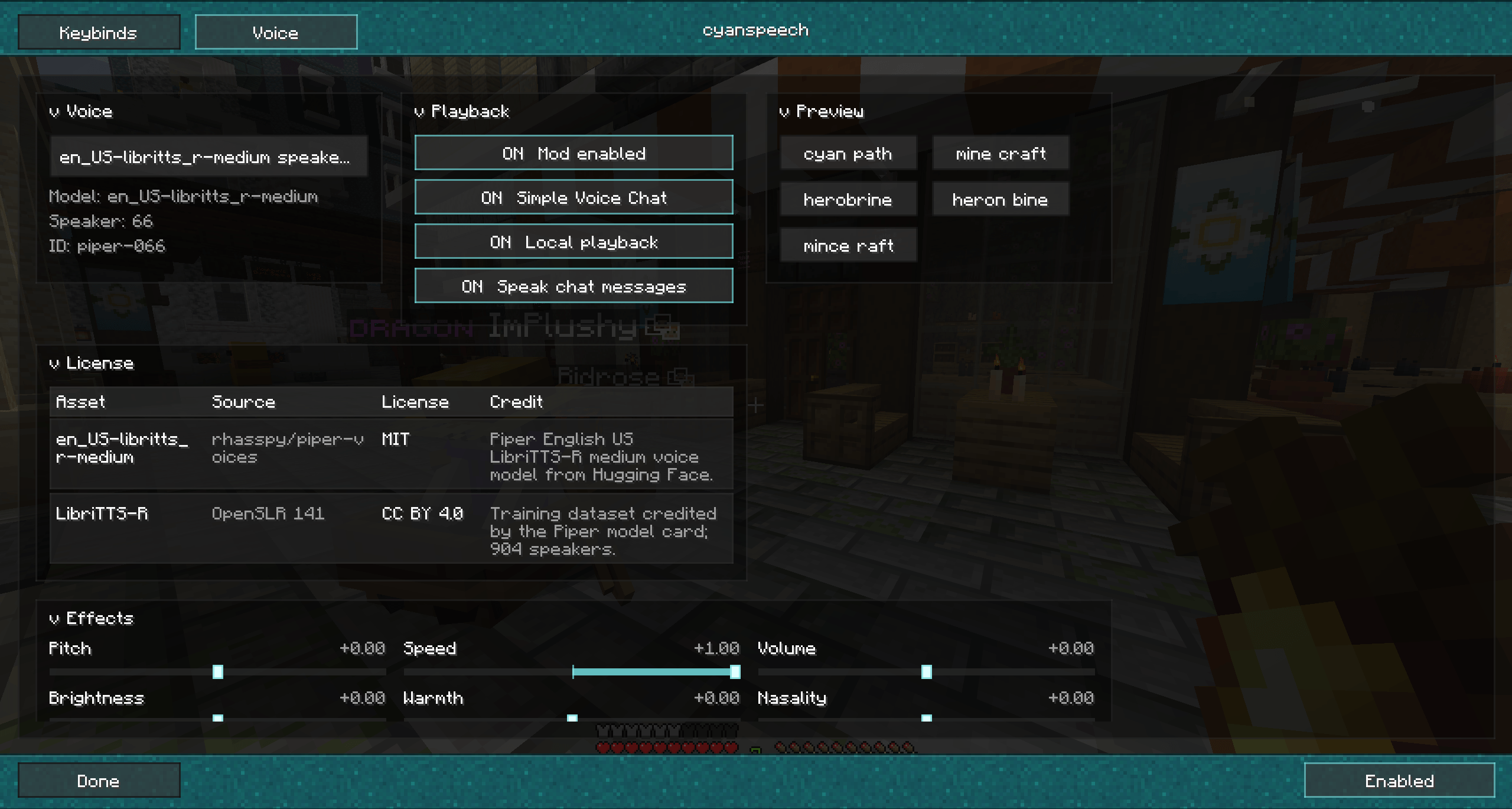
cyanspeech adds local text-to-speech to Minecraft with a large LibriTTS/Piper voice catalog, in-game voice controls, and optional playback through Simple Voice Chat. It is built for players who want typed chat, roleplay lines, accessibility speech, or quick client-side voice output without running a separate server.
WARNING
cyanspeech does not presently work well with Linux!
Features
- Local text-to-speech rendering prepared automatically when the mod loads.
- 904-speaker voice catalog based on the
en_US-libritts_r-mediumPiper voice model. - Voice IDs that support catalog names such as
libritts-...,piper-000,voice-0, and numeric speaker indexes. - Optional Simple Voice Chat output when Simple Voice Chat is installed and connected.
- Optional local desktop playback for hearing generated speech on your own client.
- Optional outgoing chat auto-speech for non-command chat messages.
- Persisted client settings for voice, playback, chat speech, keybinds, starred voices, star colors, and voice effects.
- Full in-game settings screen on Fabric, Quilt, and NeoForge builds.
- Collapsible settings sections for voice, playback, preview, effects, and licenses.
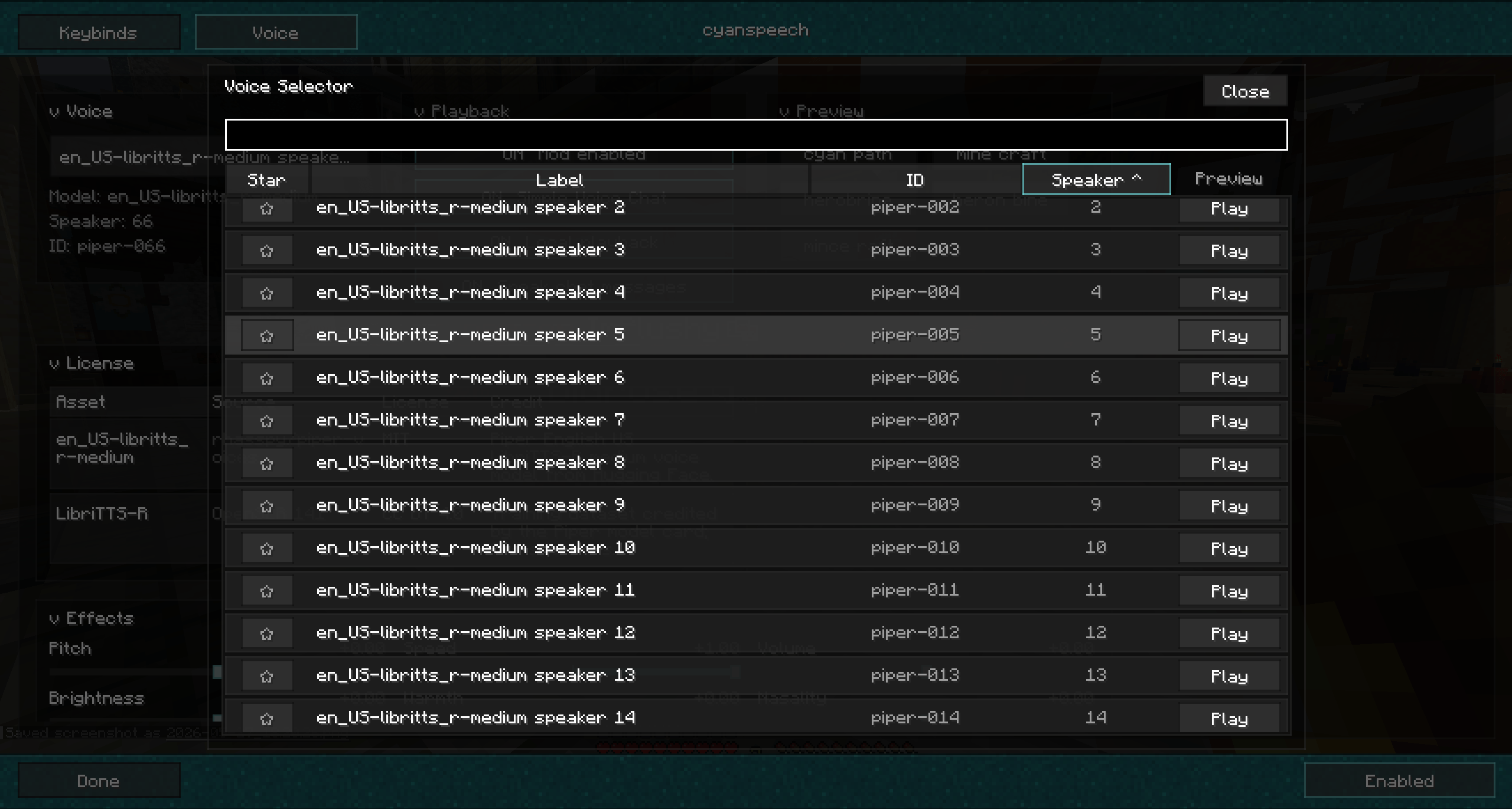
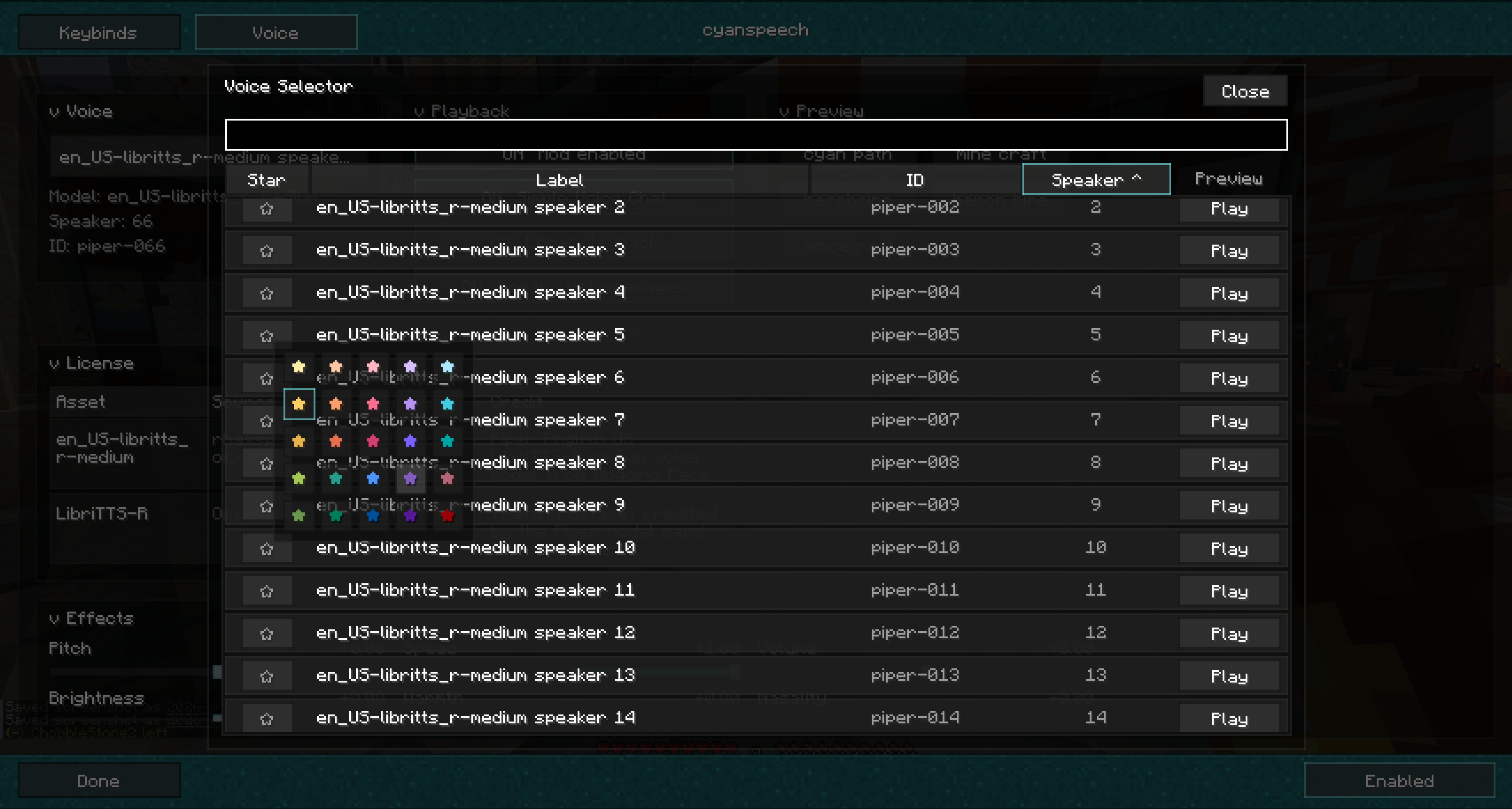
- Sortable voice selector popup with search, starred voices, star colors, voice metadata, and preview buttons.
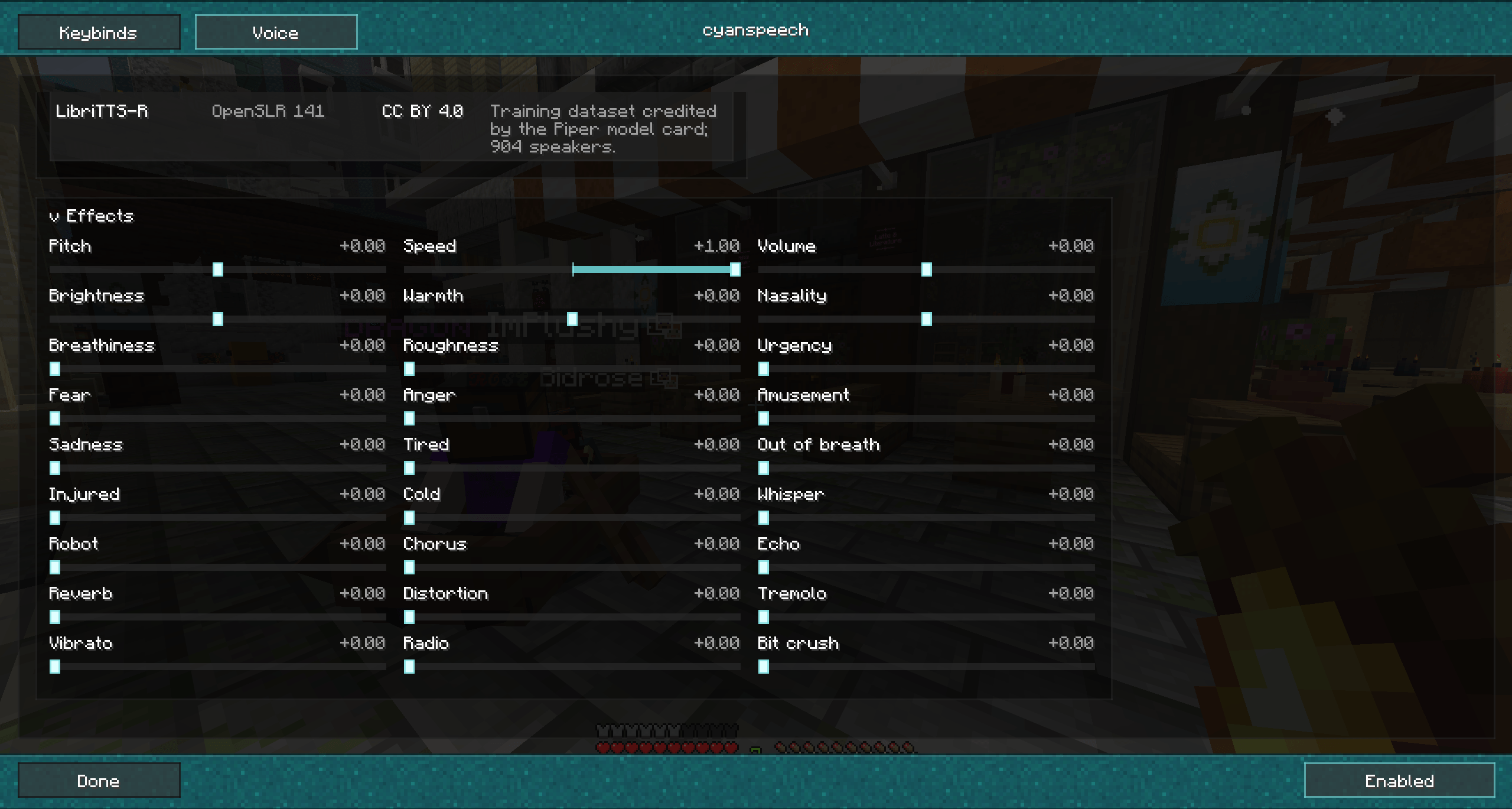
- Tiled voice effect controls for pitch, speed, volume, tone, texture, emotion, radio-style processing, echo, reverb, chorus, vibrato, tremolo, distortion, and bit crush.
- Built-in license and source attribution for the included voice model metadata and dataset lineage.
In-Game Controls
cyanspeech exposes a compact client command surface for speech, voice selection, playback toggles, and effects.
| Command | Description |
|---|---|
/cyanspeech |
Shows cyanspeech status and current settings. |
/cyanspeech <text> |
Speaks the provided text. |
/cyanspeech say <text> |
Speaks the provided text. |
/cyanspeech speak <text> |
Alias for speaking the provided text. |
/cyanspeech enable |
Enables generated speech output. |
/cyanspeech disable |
Disables generated speech output. |
/cyanspeech toggle |
Toggles generated speech output. |
/cyanspeech voice |
Shows the active voice and a preview of the available catalog. |
/cyanspeech voice <voice> |
Selects a voice from the cyanspeech catalog. |
/cyanspeech settings |
Shows current persisted settings. |
/cyanspeech settings voice <voice> |
Selects a voice through the settings command. |
/cyanspeech settings svc <on|off> |
Toggles Simple Voice Chat output. |
/cyanspeech settings local <on|off> |
Toggles local desktop playback. |
/cyanspeech settings chat <on|off> |
Toggles automatic speech for outgoing non-command chat messages. |
/cyanspeech settings effect <name> <value> |
Adjusts a voice effect value. |
/cyanspeech options |
Alias for /cyanspeech settings. |
Supported effect names include pitch, speed, volume, brightness, warmth, nasality, breathiness, roughness, urgency, fear, anger, amusement, sadness, tired, outOfBreath, injured, cold, whisper, robot, chorus, echo, reverb, distortion, tremolo, vibrato, radio, and bitcrush.
Settings Screen
The in-game settings screen brings the same controls into one place: voice selection, playback routing, preview phrases, effect sliders, starred voice management, and license attribution. The voice selector can search and sort the full catalog, preview a selected voice, filter starred voices, and customize star colors locally.
Compatibility
cyanspeech ships through the cyancore multi-loader build system and currently includes client adapters for:
- Fabric 1.21.11
- Fabric 26.1.2
- Quilt 1.21.11
- NeoForge 26.1.2
Older 26.1 and 26.1.1 target requests are routed to the available 26.1.2 adapter in the cyancore build matrix.
Notes
Simple Voice Chat is optional. When it is present and connected, cyanspeech can send generated speech through the voice chat route. Local playback can also be used independently for client-side listening.
Voice model and dataset attribution is shown in the in-game license section. The current catalog is based on Piper voice metadata and the LibriTTS-R/OpenSLR 141 source lineage.
- Edition: Minecraft Java
- File type: .jar
- Minecraft versions listed: 1.21, 1.21.8, 1.21.5
- How to install: Install the matching mod loader (Forge, Fabric or NeoForge) for your Minecraft version. → Download the .jar. → Put it in the .minecraft/mods folder and launch that loader profile.
- Where to get it: Opens on CurseForge — not every file is mirrored on our own servers.
Install steps are the general flow for this file type — How to install Minecraft Java mods & modpacks walks through it step by step.
- Ships as cyanspeech-0.1.1-0.1.3-forge-26.1.x.jar — drop this file into the mods folder
- Download size: 242 KB
- Download link checked 3 Oct 2026 — working
These come from our own check of the pack file, not from the source page.