The Gateways
Java mod listed for Minecraft 1.18. Downloads from the MC Java Mods app on Android.
⬇ Download on CurseForgeThe author built this one for Minecraft 1.18.2 on Forge. On other versions it may install and then do nothing.
Build secret entrances with magic.
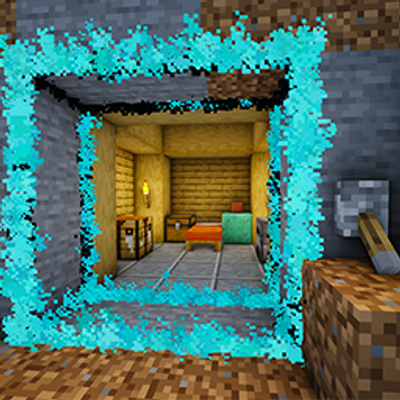
Gateways lets you transform any block into magical doorways that seamlessly disappear when activated. Instead of using pistons or complicated redstone contraptions, simply create a Gateway and watch solid walls fade away into shimmering portals. Perfect for hidden base entrances, convenient passages and of course: PRANKS!
The Gwand
This mod revolves around a single magical tool: the Gwand.
Use it to define the exact shape of your Gateway by selecting the blocks you want to become a magical passage. Once you're happy with the design, give it a redstone signal and watch the gateway open up.
How it works
Craft a Gwand; Click the blocks you want to become your Gateway; Power it with redstone; Watch the gateway open up!
Redstone Integration
Gateways work naturally with redstone. When a redstone signal is given:
The selected blocks magically disappear and you can walk straight through the glowing magical Gateway.
When the redstone signal ends, the Gateway closes and the blocks return exactly as they were.
A short pulse opens the Gateway temporarily. The longer the redstone signal, the longer it remains open. Use a lever to keep a Gateway open indefinitely. Compatible with buttons, pressure plates, redstone clocks, and your own automation systems.
Customizable
Every Gateway can be personalized to match your build.
Using the Gwand, you can customize:
The Outline color using dyes The visual effects The Gateway shape
Whether you're hiding your treasure room behind a bookshelf or just want to trap your friends, Gateways lets you replace any blocks with ease!
- Edition: Minecraft Java
- File type: .jar
- Minecraft version listed: 1.18.2
- How to install: Install the matching mod loader (Forge, Fabric or NeoForge) for your Minecraft version. → Download the .jar. → Put it in the .minecraft/mods folder and launch that loader profile.
- Where to get it: Opens on CurseForge — not every file is mirrored on our own servers.
Install steps are the general flow for this file type — How to install Minecraft Java mods & modpacks walks through it step by step.
- Ships as gateways-1.18.2-0.1.0.jar — drop this file into the mods folder
- Download size: 99 KB
- Download link checked 3 Oct 2026 — working
These come from our own check of the pack file, not from the source page.