
One_convenient_button
Java mod listed for Minecraft 1.20–1.21. Downloads from the MC Java Mods app on Android.
I don't know my version or loader
Hello, everyone. First of all, I strongly recommend that you download projects through the official curseforge and modrinth launchers—this will increase the reward for the creators. Thank you all very much for your support!!!

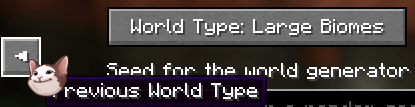
If you're tired of having to scroll through the world type options again after accidentally skipping the one you want, this mod lets you go back to the previous world type or to the very bottom of the list. If you were at the beginning



- Edition: Minecraft Java
- File type: .jar
- Minecraft versions listed: 1.20.1, 1.21.1
- How to install: Install the matching mod loader (Forge, Fabric or NeoForge) for your Minecraft version. → Download the .jar. → Put it in the .minecraft/mods folder and launch that loader profile.
- Where to get it: Opens on CurseForge — not every file is mirrored on our own servers.
Install steps are the general flow for this file type — How to install Minecraft Java mods & modpacks walks through it step by step.
- Ships as one_convenient_button-1.0.0.jar — drop this file into the mods folder
- Download size: 7 KB
- Download link checked 24 Oct 2026 — working
These come from our own check of the pack file, not from the source page.