Music Events
An event-based dynamic music engine with an intuitive and easy to use in-game GUI that grants control over game, mod, and custom music.
I don't know my version or loader
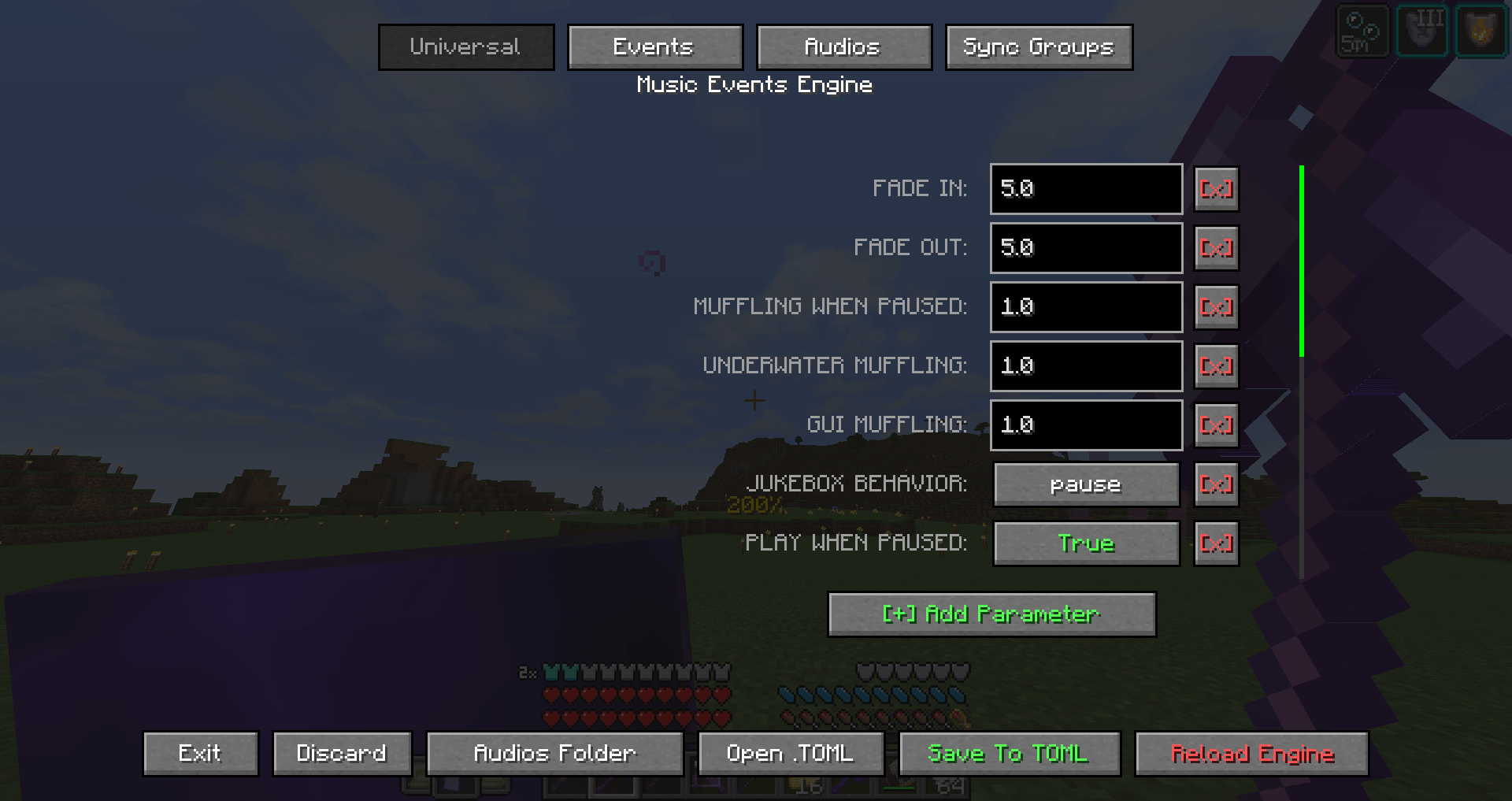
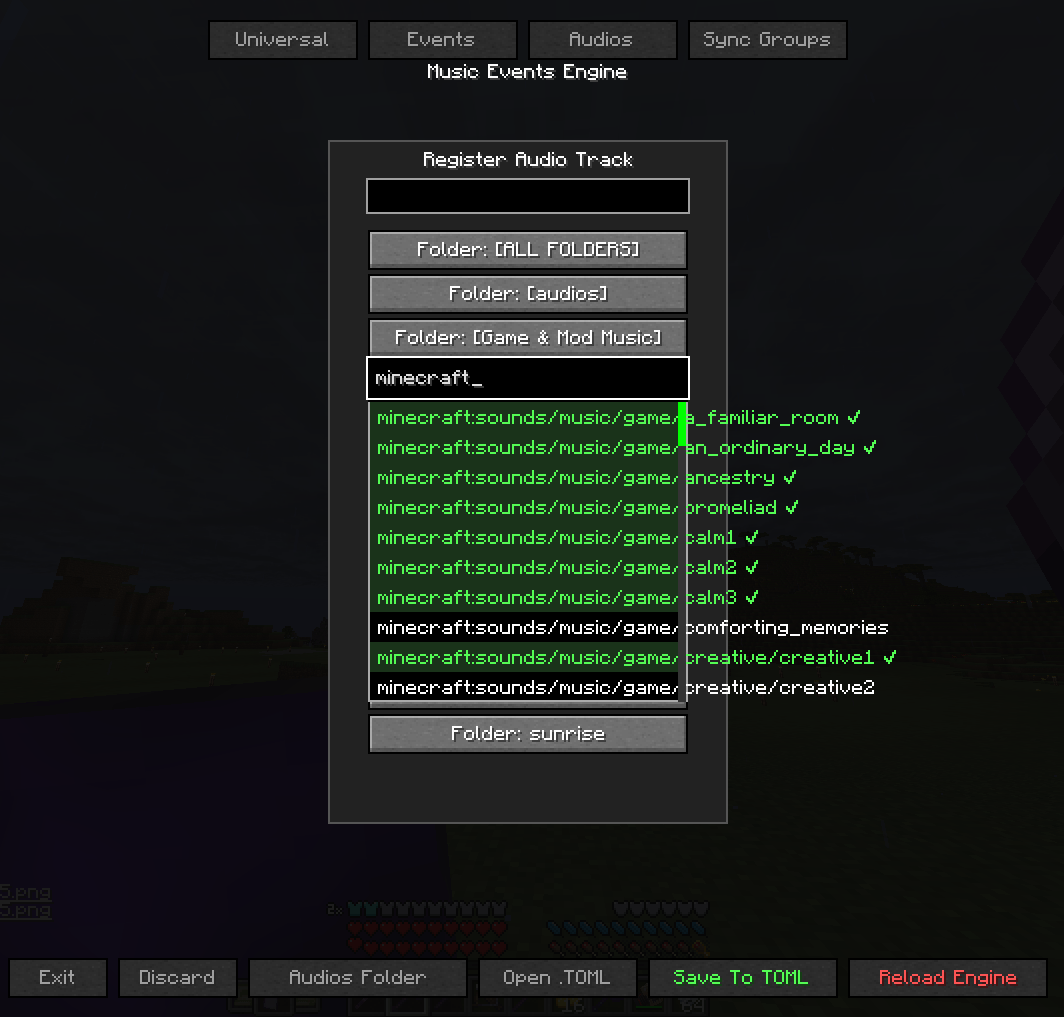
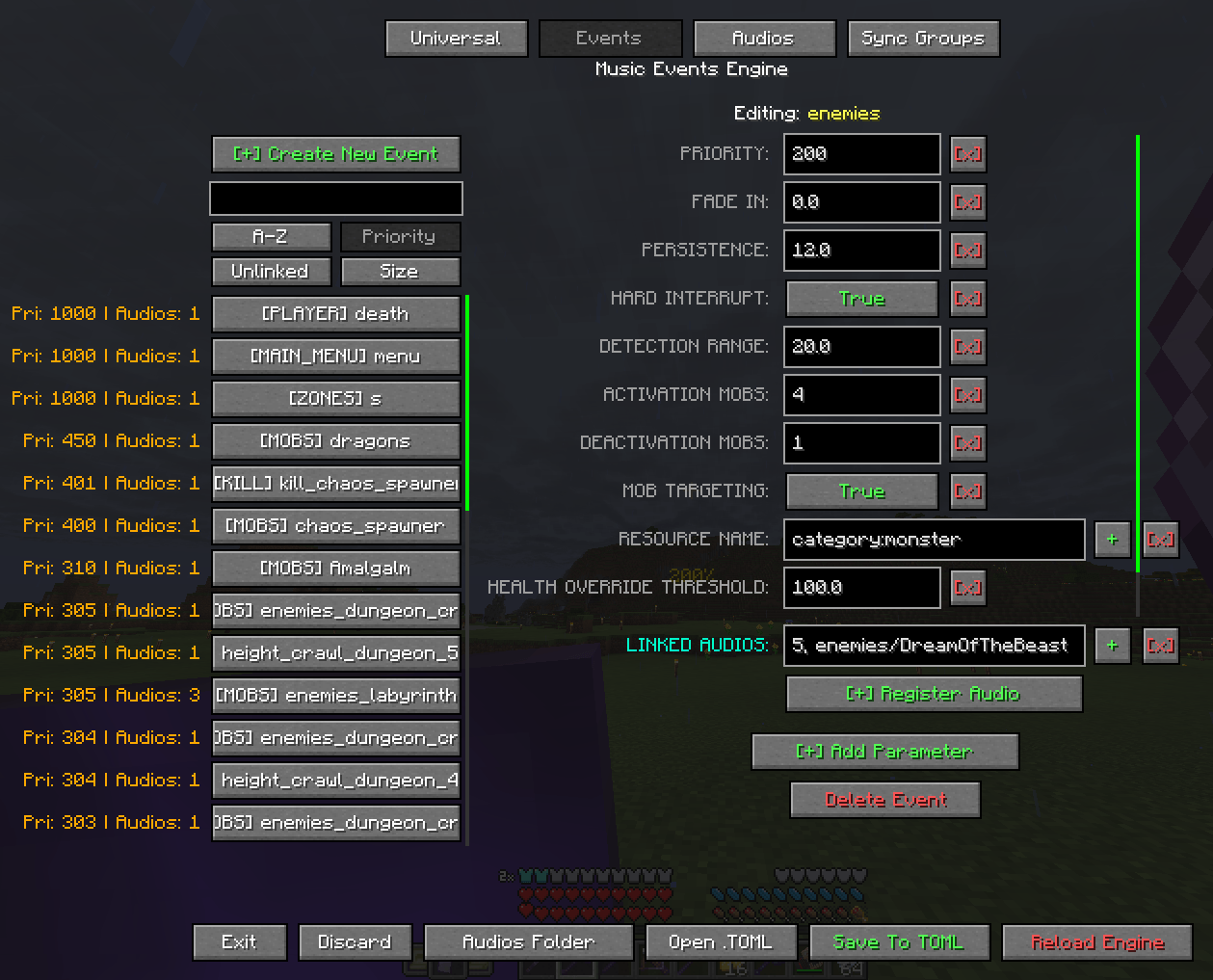
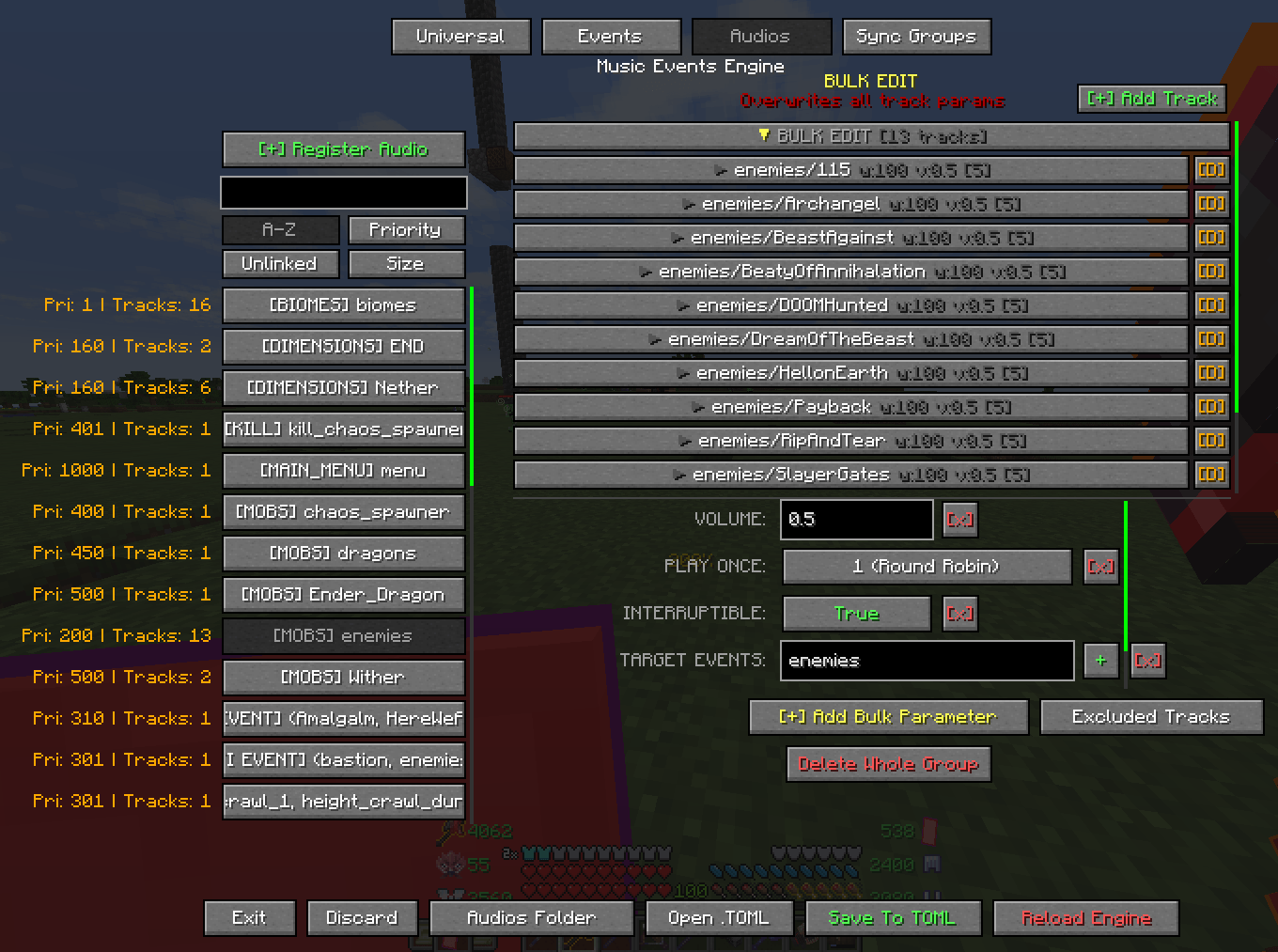
Music Events is a highly configurable mod that provides extensive control over both vanilla game and custom music. It allows for the creation of intricate, situational audio tracks such as ambient music, combat themes, or context-specific soundtracks. It features an intuitive and user friendly in-game GUI that vastly facilitates the mod's configuration and it's the primary way to setup the mod.
As a developer, YOUR FEEDBACK HELPS ME A LOT! Please feel free to leave a comment or report any issues. If you have questions, need help, or want clarification about my mod, you are welcome to join my Discord and i'll give you a detailed explanation as soon as i'm able to:

Watch a guide on how to setup Horror themed soundtracks:
https://www.youtube.com/watch?v=L5ew7yguK2Q
Syntax used for the Horror themed sountracks
# ==========================================
# UNIVERSAL SETTINGS
# ==========================================
[universal]
server_nbt_sync = ["warden_spawn_tracker"]

# ==========================================
# EVENTS (TRIGGERS)
# ==========================================
[[events.mobs]]
event_name = "warden_undetected_4"
priority = 204
detection_range = 25.0
sync_group = "warden_proximity"
resource_name = ["minecraft:warden"]


[[events.player]]
event_name = "shrieker"
priority = 300
event_delay = 6.0
nbt_match = ["{warden_spawn_tracker:{warning_level:3}}"]


[[events.mobs]]
event_name = "warden_undetected_3"
priority = 203
detection_range = 50.0
sync_group = "warden_proximity"
resource_name = ["minecraft:warden"]


[[events.mobs]]
event_name = "warden_undetected_2"
priority = 202
detection_range = 75.0
sync_group = "warden_proximity"
resource_name = ["minecraft:warden"]


[[events.mobs]]
event_name = "warden_detected_4"
priority = 214
detection_range = 25.0
mob_targeting = true
sync_group = "warden_proximity_detected"
resource_name = ["minecraft:warden"]


[[events.mobs]]
event_name = "warden_detected_3"
priority = 213
detection_range = 50.0
mob_targeting = true
sync_group = "warden_proximity_detected"
resource_name = ["minecraft:warden"]


[[events.mobs]]
event_name = "warden_detected_2"
priority = 212
detection_range = 75.0
mob_targeting = true
sync_group = "warden_proximity_detected"
resource_name = ["minecraft:warden"]


[[events.mobs]]
event_name = "warden_detected_1"
priority = 211
detection_range = 100.0
mob_targeting = true
sync_group = "warden_proximity_detected"
resource_name = ["minecraft:warden"]


[[events.mobs]]
event_name = "angel"
priority = 100
detection_range = 50.0
mob_targeting = true
require_fov = 2
resource_name = ["weeping_angels:weeping_angel"]


[[events.mobs]]
event_name = "warden_undetected_1"
priority = 201
detection_range = 100.0
sync_group = "warden_proximity"
resource_name = ["minecraft:warden"]


[[events.mobs]]
event_name = "dweller"
priority = 101
mob_targeting = true
require_fov = 1
resource_name = ["cave_dweller:cave_dweller"]
The mod strictly supports audio files in the .ogg format.
Configuration is handled primarily through a dedicated in-game GUI.
GUI ACCESS: Press the F6 key to open the interface.
MODIFYING VANILLA MUSIC:
- Navigate to the Events tab.
- Create a new event (e.g., dimensions) and assign its priority.
- Define the required parameters (e.g., add resource_name and set to minecraft:overworld).
- Select Register Audio and search for the desired audio file.
- Note: Searches use the internal file name (e.g., Haggstrom is stored as hal3).
- Note: Hover over a file in the dropdown list to preview the audio.
- Click Save and then Reload to apply the configuration.
USING CUSTOM AUDIO FILES:
- Open the Audios folder using the GUI.
- Place custom .ogg files (and create subfolders if you want to keep it more organized) into the designated directory.
- Link the tracks to events using the standard Register Audio procedure.
GUI Panels Overview:
- Universal: Manages default parameter values that apply globally across all newly created events. Event-specific parameters will override the Universal settings.
- Events: Handles the creation of custom events and the configuration of their respective parameters.
- Audios: Manages configuration settings for individual audio tracks.
- Sync Groups: Provides an overview and management interface for events bound together using the
sync_groupparameter.
Event Types, Modifiers, and Examples:
Each event evaluates contextual conditions before triggering audio playback.
Universal Parameters (Default event configuration pool):
play_when_paused = true/false: Determines if the audio track is allowed to play while the game menu is paused.muffling_when_paused = 1.0: A muffling effect multiplier applied during game pauses. (Recommended: 1.0).underwater_muffling = 1.0: A muffling effect multiplier applied when the player is submerged. (Recommended: 1.0).gui_muffling = 1.0: A muffling effect multiplier applied when a GUI screen is active. (Recommended: 1.0).gui_muffling_delay = 20: The delay (in seconds) before the GUI muffling effect takes place.gui_muffling_blacklist = ["InventoryScreen"]: A list of GUI classes that bypass the muffling effect.Use the mod's debug screen to know the GUI you're currently looking at.
pause_volume_multiplier = 0.5: A volume control multiplier applied when the game is paused.remember_track = true/false: If enabled, the event remembers the last track it played before going inactive and will replay it upon reactivation instead of picking a random new track.resume_from_timestamp = true/false: If enabled, when an event reactivates, it resumes playback straight from the exact point (timestamp) it was paused at.seamless_handoff = true/false: Enables smooth track transitions. If Event A transitions into Event B, and both share the currently playing track in their playlist, the track will seamlessly continue playing without restarting or fading out.fade_in = 2.0 / fade_out = 2.0: Specifies the audio volume transition duration (in seconds) when an event activates or deactivates.persistence = 10.0: Defines the duration (in seconds) the event will forcefully remain active and continue playing music after its activation requirements are no longer met (e.g., staying in combat for 10s after monsters are dead).time_between_audio = 60.0: Specifies the cooldown duration (in seconds) before the event can trigger subsequent track playbacks after a track has finished.jukebox_behavior = "ignore"/"pause"/"muffle": Determines how tracks react to nearby vanilla jukeboxes playing music discs.cooldown_group_time = 120.0 / cooldown_group_events = ["eventA", "eventB"]: Links track cooldowns across multiple distinct events. If one event finishes a track, all events listed incooldown_group_eventswill share the specifiedcooldown_group_timebefore they are permitted to play again.mob_blacklist = ["minecraft:slime", "minecraft:vex"]: A list of entity IDs that are prevented from activating the mobs events globally.priority = 50: Integer value determining the playback hierarchy when multiple events are active simultaneously. Higher values take precedence.hard_interrupt = true/false: Enforces immediate termination of the current audio track, bypassing and ignoring standard persistance and fade-out parameters.locked = true / unlocks_event = "phase_2" / relock_when_inactive = true: State management parameters allowing sequential event activations. An event can belockedby default and only become active when another event calls itsunlocks_event.sync_group = "battlefield_crescendo": Assigns events to a synchronized group. Sequential events within the samesync_groupwill inherit the exact playback timestamp of the previously active track. Useful for layered or multi-phase audio files that share the same tempo/layout.
Audio Track Parameters:
volume = 1.0: Multiplier for the audio track's volume level.weight = 50: Determines the playback probability when an event has multiple registered audio tracks. Higher weights drastically increase the chance of selection.require_all_events = true/false: If true, it requires all events strictly listed within thetarget_eventsarray to be active simultaneously for the track to play.target_events = ["overworld_day", "overworld_night"]: Defines a specific list of events to which the track belongs and checks for activation.upgrade_delay = 5.0 / upgrade_fade_in = 3.0 / upgrade_fade_out = 3.0: Easing configurations for dynamic track upgrades. A track currently playing can seamlessly 'upgrade' to this track if the event conditions are met, utilizing these isolated crossfade timings specifically bypassing standard event fading.start_time = 15.5: Dictates the timestamp (in seconds) where the track playback initiates. By setting it to 15.5, the track will always start playing 15 and a half seconds inwards, skipping the intro.start_x = 2: Configures repetition. The track will repeat exactly 2 times before completing.loop_start = 10.0 / loop_end = 60.0: Creates an isolated internal playback loop. The track starts normally, but when the playback reachesloop_end(e.g., 60.0 seconds), it will seamlessly teleport back toloop_start(e.g., 10.0 seconds) and repeat that sub-section endlessly based on thestart_xvalue.play_once = 1/2/3/4/5: Determines how frequently a track can be replayed. It accepts the following numerical values:- 1 (Round Robin): The track will not play again until all other available tracks for the active event have been played.
- 2 (Event Lifetime): The track plays only once as long as the event remains continuously active.
- 3 (Session): The track plays only once per world join. Resets when logging out and back in.
- 4 (JVM Session): The track plays only once per game launch. Resets when Minecraft is completely restarted.
- 5 (Persistent World): The track plays only once in a given world, ever. Stored persistently.
interruptible = true/false: Specifies whether the track can be forcefully interrupted by a higher-priority event. Tracks flagged asfalseact as a shield and will refuse to be paused, always playing from start to finish.breakthrough_priority = 500: Overrides the track's uninterruptible state. Even if the track acts as a shield, any event with a priority equal to or higher than 500 can forcefully break through and interrupt it.interrupt_whitelist = ["boss_phase_2"]: An exclusive list of event names permitted to bypass the interruptible flag and pause the track, regardless of priorities.
Specific Event Types and Constraints:
Mobs: Activates based on entity proximity.
resource_name = ["minecraft:zombie", "category:monster", "regex:.*zombie.*", "player:Name"]: Target entity IDs, tags, or wildcards to monitor.nbt_match = "{IsBaby:1b}": Evaluates string-matched NBT properties the entity must possess.detection_range = 16.0: Radius extending around the player evaluating entity presence.activation_mobs = 5 / deactivation_mobs = 2: Strict numerical thresholds. The event activates only when 5 or more matching entities are present, and stops when the count drops to 2 or below.max_health = 10.0: Event activates only if the targeted matching entities possess health beneath this designated threshold.health_override_threshold = 100.0: Permits the event to instantly bypass theactivation_mobsnumeric threshold if even a single matching entity vastly exceeds this maximum health value (useful for boss variants).mob_targeting = true/false: Restricts activation only to entities that are actively aggressive and targeting the player.require_fov = "Spotted"/"Constant": Limits activation to entities currently within the player's line of sight.
Kill: Activates upon entity death.
resource_name = ["minecraft:ender_dragon"]: The specific entity type being killed.attacker_name = ["minecraft:player"]: The entity type required to deliver the final blow.nbt_match = "{...}", detection_range = 128.0, require_fov = "Spotted": Applies constraints similarly to Mob events.
Inventory: Activates when items reside in specific inventory locations.
resource_name = ["minecraft:diamond", "slot:head|regex:.*_helmet"]: Target item ID or regex pattern. Can be prefixed withslot:xxx|to evaluate that item exclusively in a specific slot.target_slots = ["mainhand", "offhand", "head", "chest", "legs", "feet", "any"]: Array designating valid slots to check as a global fallback. If an item inresource_namelacks aslot:prefix, it will be evaluated across all slots defined here.require_all_resources = true/false: If true, enforces possession of all sequentially listed items simultaneously rather than any single item.
Player: Evaluates player's exact internal condition.
is_dead = true/false: Strict requirement for the player to be dead.max_health = 6.0: Event activates when the player's health strictly drops to or below this point.min_y = -64.0 / max_y = 0.0: Vertical elevation constraint boundaries limiting where the event triggers.min_light = 0 / max_light = 7 / light_type = "sky"/"block"/"total": Bounds checking maximum environmental light exposure based on the chosen emission source.require_underwater = true/false: Forces a direct liquid submersion check.nbt_match = "{...}": Player data NBT conditions.
Zones: Fixed coordinate-based volumetric trigger.
min_x = -50 / max_x = 50 / min_y = 64 / max_y = 120 / min_z = -50 / max_z = 50: Establishes a permanent 3D geographic bounding box strictly enforcing coordinate-based activation.
Raid: Evaluates pillager raid variables.
min_wave = 1 / max_wave = 5: Enforces upper and lower bounds on the active pillager raid wave levels.status = "active"/"victory"/"loss"/"stopped"/"any": Verifies a specific raid progression state.
Statistic: Evaluates internal player statistics tracking.
resource_name = ["minecraft:mined:minecraft:diamond_ore=100"]: Defines the target metric tracking. The format explicitly requires a core category, mod ID, object, and value limitation (e.g.,minecraft:used:minecraft:elytra=50orminecraft:custom:minecraft:play_time=12000).require_all_resources = true/false: Enforces fulfillment of every numerical statistic tracking requirement simultaneously.
Dimensions / Biomes / Time / Weather / Gamemode / Difficulty / Structure / Advancement / PvP / Riding / GUI / Effect: Evaluated through a unified
resource_nameparameter providing standard string matching arrays.- Dimensions defaults:
["minecraft:overworld", "minecraft:the_nether", "minecraft:the_end"] - Biomes defaults:
["minecraft:plains", "minecraft:desert", "minecraft:badlands"] - Time defaults:
["day", "night", "sunrise", "sunset"] - Weather defaults:
["clear", "rain", "thunder"] - Gamemode defaults:
["survival", "creative", "adventure", "spectator"] - Difficulty defaults:
["peaceful", "easy", "normal", "hard"] - Structure defaults:
["minecraft:bastion_remnant", "minecraft:village", "minecraft:stronghold"] - Advancement defaults:
["minecraft:story/enter_the_nether", "minecraft:end/kill_dragon"] - PvP defaults:
["player:Name", "any"] - Riding defaults:
["minecraft:horse", "minecraft:minecart"] - GUI defaults:
["InventoryScreen", "ChatScreen", "TitleScreen"] Use the mod's debug screen to know the GUI you're currently looking at.
- Effect defaults:
["minecraft:poison", "minecraft:regeneration"]
- Dimensions defaults:
Commands & Debugging:
/musicevents reload: Instructs the mod to perform a hard reset of the audio engine and reload all configurations and audio memory caches from the file system./musicevents skip: Immediately skips the currently playing audio track and evaluates the next best track or event priority./musicevents unlock event_name: Unlocks a locked state machine event, marking it as active/evaluable./musicevents relock event_name: Relocks a specific state machine event, preventing it from activating unless its unlock condition is met again. You can also use/musicevents relock allto reset the entire state progression./musicevents zone pos1//musicevents zone pos2: Sets the first and second corners of a dimensional bounding box around your exact player coordinates./musicevents zone save event_name: Writes the internal pos1 and pos2 bounding coordinates to a specific zone event permanently!
Additionally, a built-in debug screen can be toggled with the F4 key by default. The debug screen acts as an active overlay to help you configure parameters, understand how the mod calculates priorities, which audio track is playing, and what parameters are forcefully affecting track behavior during runtime.
- Ships as music_events-forge-1.20.1-1.1.4.jar — drop this file into the mods folder
- Download size: 274 KB
- Download link checked 23 Aug 2026 — working
These come from our own check of the pack file, not from the source page.