
create:sonar
Java mod listed for Minecraft 1.21. Downloads from the MC Java Mods app on Android.
A Create addon that introduces a Sonar block. When powered by rotational force and a redstone signal, it helps players clearly navigate the world in…
⬇ Download on CurseForgeThe author built this one for Minecraft 1.21.1 on NeoForge. On other versions it may install and then do nothing.
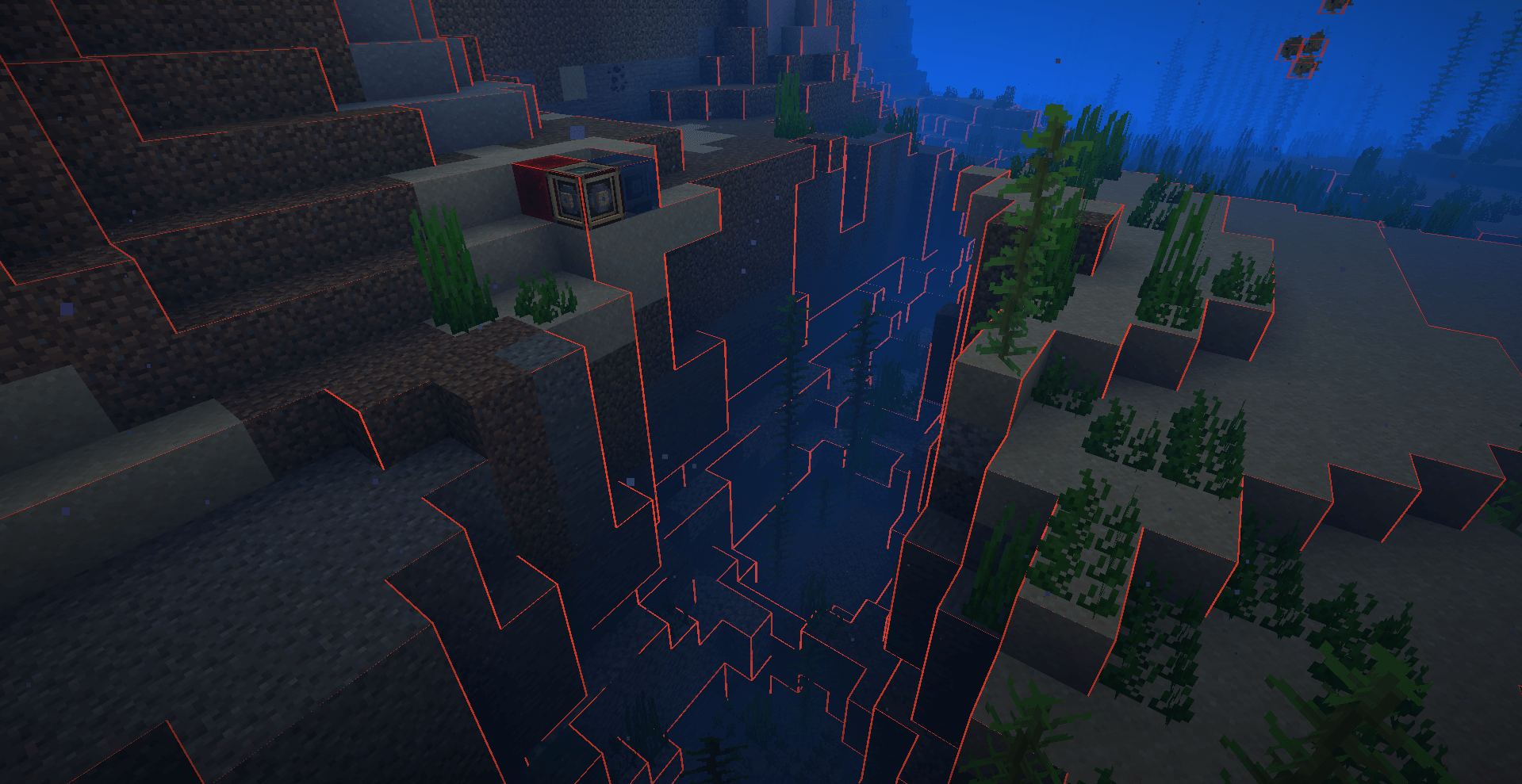
Create: Sonar is an addon for the Create mod that adds a functional sonar system for real-time terrain visualization.
Core Features:
Sonar Device: The core block that generates scanning pulses.
AR Goggles: Wear them to visualize the sonar waves and terrain grid.
Display Module: A crafting component used in the sonar and goggles.
How it works:
-
Craft: Use the Display Module alongside other Create components to build the Sonar block and AR Goggles.
-
Configure: Right-click the Sonar to open its GUI. Customize the scan mode (Outline, Full Detail, Contour), adjust the range, toggle entity scanning, and fine-tune the RGB color.
-
Activate: Supply the Sonar with rotational power (Stress) from Create's kinetic network and a redstone signal.
-
Observe: Put on the AR Goggles to see the sonar waves sweep across the terrain, clearly outlining blocks, mobs, and dropped items in real-time.
Key Highlights:
Enhanced Visibility: The glowing wireframe pulses are rendered independently of world lighting, penetrating darkness, deep oceans, rain, and even the Nether fog.
Aeronautics Compatible: Full support for vehicle physics! Sonars can be placed on contraptions, dynamically tracking the vessel's movement.
Highly Customizable: Everything from the scan radius to the exact color of the grid lines can be changed on the fly.
Performance Optimized: Advanced techniques like frustum culling, frame distribution, and edge tracking ensure smooth performance even at maximum range.
Never lose your way in the dark again.
- Edition: Minecraft Java
- File type: .jar
- Minecraft version listed: 1.21.1
- How to install: Install the matching mod loader (Forge, Fabric or NeoForge) for your Minecraft version. → Download the .jar. → Put it in the .minecraft/mods folder and launch that loader profile.
- Where to get it: Opens on CurseForge — not every file is mirrored on our own servers.
Install steps are the general flow for this file type — How to install Minecraft Java mods & modpacks walks through it step by step.
- Ships as create_sonar-1.3.1.jar — drop this file into the mods folder
- Download size: 277 KB
- Download link checked 3 Oct 2026 — working
These come from our own check of the pack file, not from the source page.