ModsJava
Smart Books
Java mod listed for Minecraft 1.20. Downloads from the MC Java Mods app on Android.
Create fully customizable books with images, custom fonts, and templates right inside Minecraft! A modern, canvas-based book editor.
I don't know my version or loader
Open the Minecraft launcher and look at the profile you play on — it names both, like fabric-loader-1.21.4. The version also shows in the bottom-right corner of the game's main menu.
No loader in the profile name? Then it's plain Minecraft, and these mods won't run — you need Fabric or NeoForge installed first.
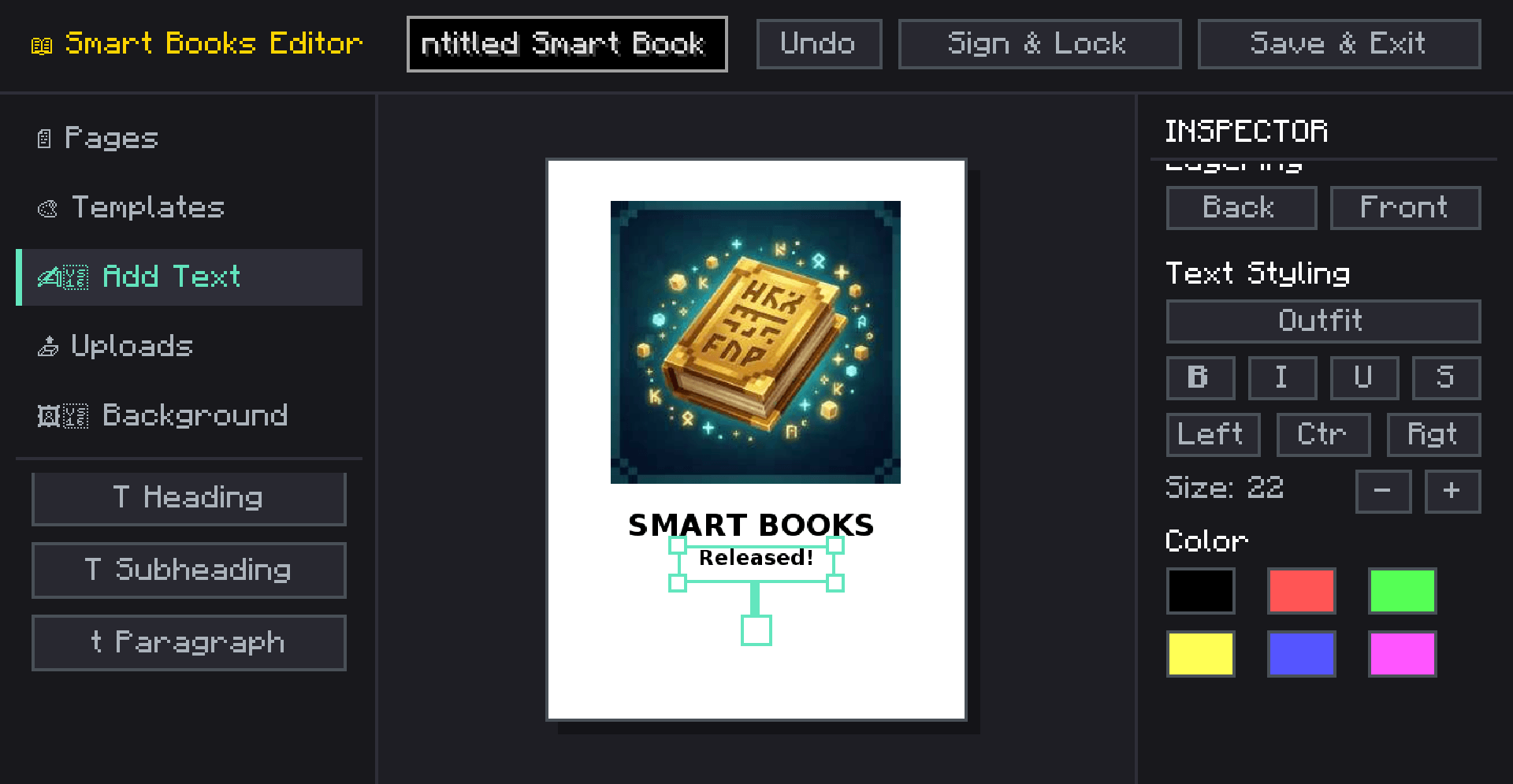
SmartBooks is an advanced, in-game book creation and editing mod that takes Minecraft's traditional book and quill to a whole new level. Whether you are creating a detailed server guide, a rich quest log, a comic book, or an encyclopedia, SmartBooks provides a modern, canvas-like editor directly in the game.
✨ Key Features
- Modern Canvas Editor: Move, resize, and rotate text and image elements anywhere on the page, just like professional design software.
- Rich Text Formatting: Choose from built-in fonts, change font sizes, colors, and apply formatting (bold, italics, underline, strikethrough). Supports left, center, and right text alignment.
- Custom Images: Upload images directly from your computer or import them using a URL! Adjust image opacity, add rounded corners, and customize border styles.
- Page Backgrounds & Colors: Customize each page with specific background colors or styles like lined paper, grid, or classic parchment.
- 10+ Pre-made Templates: Don't want to start from scratch? Use built-in templates like Comic, Magazine, Guide, Encyclopedia, Quest Log, Manual, and Newspaper to instantly format your pages.
- Layering System: Bring elements to the front or send them to the back with a simple click.
📖 How to Use
- Get a Smart Book.
- Right-click to open the editor. (If the book is empty, or you sneak-right-click an unsigned book, the editor opens. Otherwise, it opens in reader mode).
- Use the left sidebar to add text, images, pages, or apply templates.
- Use the right inspector panel to customize the properties of the selected element.
- Click Save to keep your progress or Sign to lock the book permanently!
⚙️ Technical Details
- Version: Minecraft 1.20.1
- Loaders: Available natively for both Fabric and Forge.
NOTE: THERE ARE NO RECIPE FOR NOW. IN NEXT UPDATE
Quick facts
- Edition: Minecraft Java
- File type: .jar
- Minecraft version listed: 1.20.1
- How to install: Install the matching mod loader (Forge, Fabric or NeoForge) for your Minecraft version. → Download the .jar. → Put it in the .minecraft/mods folder and launch that loader profile.
- Where to get it: Opens on CurseForge — not every file is mirrored on our own servers.
Install steps are the general flow for this file type — How to install Minecraft Java mods & modpacks walks through it step by step.
File checked by MCModsHub
- Ships as smartbooks-forge-1.20.1-1.2.jar — drop this file into the mods folder
- Download size: 6.7 MB
- Download link checked 3 Oct 2026 — working
These come from our own check of the pack file, not from the source page.