
FALSITY: Reimagined
Java mod listed for Minecraft 1.20. File opened and checked on 10 Oct 2026; downloads from the MC Java Mods app on Android.
⬇ Download on CurseForgeThe author built this one for Minecraft 1.20.1 on Forge. On other versions it may install and then do nothing.
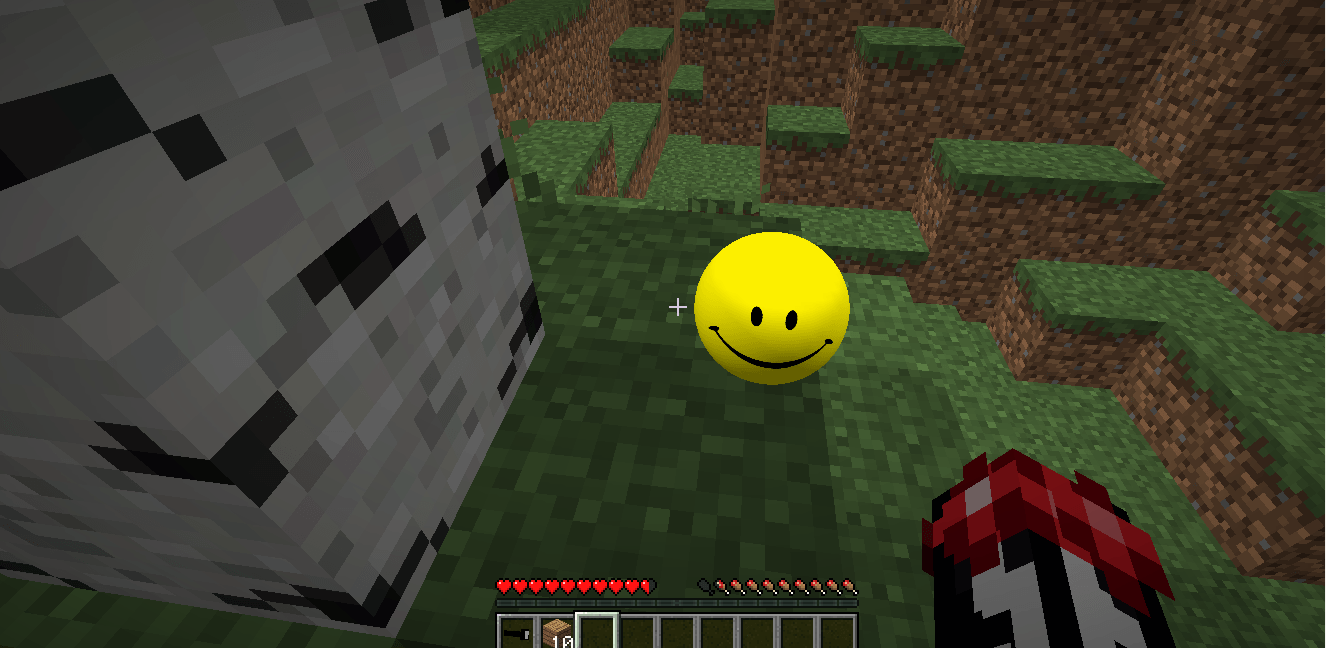

FALSITY [SMILEY ARCHIVE EDITION]
info on discord (SMILEY archive)


use /connectfalsity to change falsity language
use /falsitysetup to give a custom name to your companion!
when making a video about it, please put the link in the description
This contains the analog horror faces from SMILEY ARCHIVE and my custom model for the monster entity!
USE [G] to throw him
DISCLAIMER
- Optional external AI / TTS / STT provider support
Microphone usage is optional. The mod will ask for permission before using microphone input. If you select No, microphone input will remain disabled.
External AI features are optional and are not required to play the mod. By default, the mod can run using its built-in local behavior systems and packaged voice lines. If players choose to enable external providers, they must configure their own API keys.
THE MOD CAN TALK TO YOU IN THE CHAT AND HAVE VOICE
SETUP
Required:
Optional:
- External LLM provider for advanced conversations
- External TTS provider for generated voice
- External STT provider for microphone transcription
Supported optional LLM providers:
- OpenAI-compatible APIs
- Gemini
- Groq
- Ollama
- Custom OpenAI-compatible endpoints, and openrouter.
Supported optional TTS providers:
- Packaged local voice lines
- FishAudio
- Groq TTS
- OpenAI-compatible TTS
Supported optional STT providers:
- OpenAI Whisper-compatible transcription
- Groq Whisper-compatible transcription
- Custom compatible endpoints
HOW TO CONFIGURE AI FEATURES
In-game, use:
/falsityconfig
The config menu lets you set:
- External LLM on/off
- LLM provid
REQUIRES GECKOLIB
Meet Falsity & SMILEY your AI companions!
Your companion who appears in your world with a simple goal: to help you! Over time this intelligent presence you share your Minecraft world with starts to remember, learn and sometimes make you wonder whether you're really alone...
At first, FALSITY or SMILEY feels like a helpful friend, but can you trust him?... He talks with a fully voiced AI system that remembers past events, recognizes your home and notices changes in your world. He even reacts differently depending on how you treat him!
But as the days pass... strange things begin to happen.
Late at night, FALSITY or SMILEY may become distracted and stare at distant places. Sometimes he talks about things he shouldn't know. Sometimes he notices something watching from the darkness.
And sometimes... he isn't the only thing out there.
As the story unfolds, mysterious anomaly events begin appearing around your world.

- Fully voiced AI companion
- Long-term memory system
- English support
- Dynamic personality development
- Facial expressions
- World observation and memory
- House recognition system
- Multiplayer support
- Anomaly events and encounters
- Dynamic chase system
- Survival-friendly integration
CREDITS
concept of falsity in https://www.tiktok.com/@thefalsity
SMILEY ARCHIVE CONCEPT FROM: https://videogaming.fandom.com/wiki/Smiley_(Smiley_Archive)/Gallery
https://villains.fandom.com/wiki/Smiley_(The_Smiley_Archive)
https://www.youtube.com/watch?v=dchQWVE9Vcw&list=PLWiQsJNvSESVTb_0Y4vHhGh68vZLoBQIm
SMILEY FACES ORIGINALLY FROM:
https://www.youtube.com/watch?v=dchQWVE9Vcw&list=PLWiQsJNvSESVTb_0Y4vHhGh68vZLoBQIm
https://videogaming.fandom.com/wiki/Smiley_(Smiley_Archive)/Gallery
https://villains.fandom.com/wiki/Smiley_(The_Smiley_Archive)
STORY INSPIRED BY KINITO PET.
FACES EXTRACTED AND MODIFIED FROM: https://videogaming.fandom.com/wiki/Smiley_(Smiley_Archive)/Gallery
progress of the model made in blender by me: https://www.youtube.com/shorts/1tBlfrrBA9w
MOD MADE by PKFL
Tester, contributor, and ideas Giox23yt
LOY091 made the box textures
TINGKH SECONDARY MAIN DEV
old 3d Monster model is made by TheWatcherMC and owned by our project.
- Edition: Minecraft Java
- File type: .jar
- Minecraft version listed: 1.20.1
- How to install: Install the matching mod loader (Forge, Fabric or NeoForge) for your Minecraft version. → Download the .jar. → Put it in the .minecraft/mods folder and launch that loader profile.
- Where to get it: Opens on CurseForge — not every file is mirrored on our own servers.
Install steps are the general flow for this file type — How to install Minecraft Java mods & modpacks walks through it step by step.
- Ships as FALSITY-1.20.1-v12.1.jar — drop this file into the mods folder
- Download size: 327.3 MB
- Download link checked 3 Oct 2026 — working
These come from our own check of the pack file, not from the source page.