Litematica RawMaterials
Java mod listed for Minecraft 1.21. File opened and checked on 14 Oct 2026; downloads from the MC Java Mods app on Android.
A Litematica addon that expands the material list into the raw materials you need to gather, following crafting recipes.
⬇ Download on CurseForgeThe author built this one for Minecraft 1.21.11 on Fabric. On other versions it may install and then do nothing.
Litematica RawMaterials
A Litematica addon that expands the material list into raw materials.
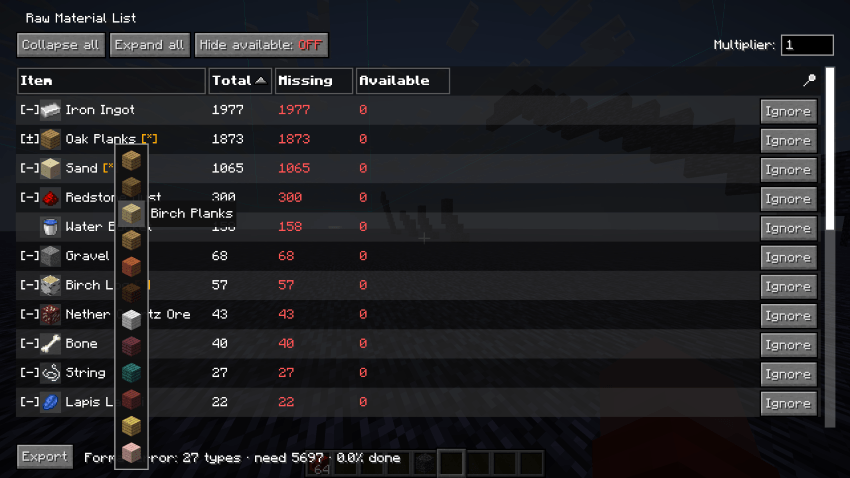
Litematica's material list shows what a schematic is made of, but anything you'd normally craft (a block of redstone, a hopper, a chest) is listed as-is. RawMaterials follows the crafting recipes and shows the total raw materials you need to gather, minus what's already in your inventory.
Requirements
- Minecraft 26.2 (Fabric)
- malilib 0.29.0+
- Litematica 0.28.0+
Features
Recipe expansion
Crafted items are broken down into their ingredients, recursively, down to raw materials.
Inventory netting
Items already in your inventory are subtracted, so the list shows what's actually left to gather. Fully covered branches stop expanding and turn green.
Expand and fold
Open or collapse individual rows, or the whole list at once.
Tag ingredients
When a recipe accepts a tag (any planks, any log), you choose which item to count toward it.
Usage
Open a material list in Litematica first; RawMaterials uses the most recently opened one. Then press M + K to open it as a raw-material list.
Inside the list:
- Left-click a row to expand it into its ingredients.
- Right-click a row to fold it back into the crafted item.
- Middle-click a tag row to pick which item to use.
Press M + J to open the settings screen, where you can rebind both keys.
Notes
Recipes come from your client's recipe book, the same source Litematica uses. On a vanilla multiplayer server, recipes you haven't unlocked won't expand, so some totals may not be fully broken down until you've unlocked them.
Building
./gradlew buildThe mod jar is written to build/libs/ (e.g. rawmats-fabric-26.2-0.1.0.jar). Put it in your mods folder along with malilib and Litematica for the same Minecraft version.
- Edition: Minecraft Java
- File type: .jar
- Minecraft version listed: 1.21.11
- How to install: Install the matching mod loader (Forge, Fabric or NeoForge) for your Minecraft version. → Download the .jar. → Put it in the .minecraft/mods folder and launch that loader profile.
- Where to get it: Opens on CurseForge — not every file is mirrored on our own servers.
Install steps are the general flow for this file type — How to install Minecraft Java mods & modpacks walks through it step by step.
- Ships as rawmats-fabric-1.21.11-0.4.1.jar — drop this file into the mods folder
- Download size: 89 KB
- Download link checked 3 Oct 2026 — working
These come from our own check of the pack file, not from the source page.