
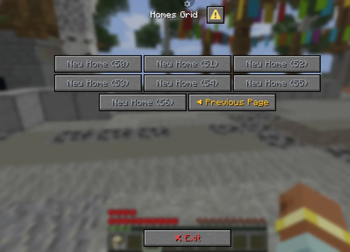
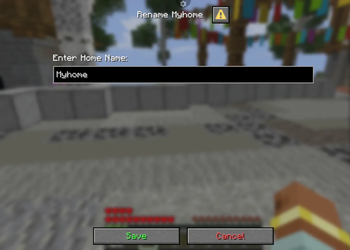
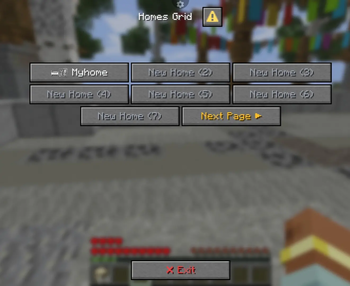
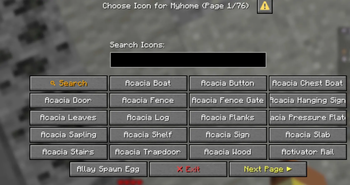
ButtonHome ðŸ ✨
ButtonHome is a next-generation, premium home management plugin designed exclusively for modern Paper servers (1.21.x – 1.22.x). By abandoning traditional, outdated chest-inventory-based GUIs and chat message spam, ButtonHome leverages modern Paper Native Dialog UIs, rich Kyori MiniMessage formatting, integrated 3D audio cue chimes, and an interactive, Searchable Paginated Icon Picker to provide an unmatched, highly immersive player experience without requiring any client-side mods, textures, or resource pack overlays.
🌟 Core Features
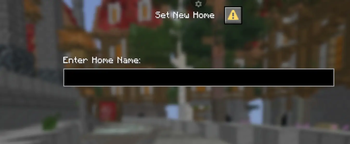
- ðŸ–¥ï¸ Native Paper Dialogs UI: Displays elegant, client-side dialogue cards directly in the player's viewport. Emojis and visual indicators are rendered directly on the first-page slots for effortless, high-contrast navigation.
- 🔠Searchable Icon Picker: Lists hundreds of valid Minecraft materials as selectable icons with real-time text query filtering and alpha-sorted pagination.
- â³ Action Bar Warmup HUD: Renders active teleport countdown timers cleanly on the player's action bar, completely avoiding chat window spam.
- 🔊 Synthesized Sound Effects: Incorporates delightful sound schemes (such as Enderman teleports, level-up chimes, and chimes) for interactive UI actions.
- ðŸ›¡ï¸ Movement & Damage Checks: Aborts pending warmups instantly if the player takes damage or moves away from their original coordinate block.
- ⌠Seamless Navigation: Handlers for escape keys and dedicated exit buttons are accessible on all dialogue screens for natural closure.
- 👑 Operator Inspection Panel: Administrators can view any player's slot grid using administrative commands and execute direct teleports.
ðŸ› ï¸ Command Reference
ButtonHome features a clean command architecture designed for high-performance tab-completion:
| Command | Syntax | Description | Default Permission |
|---|---|---|---|
/home |
/home [name] |
Opens the native Dialog grid or teleports directly to a home. | buttonhome.use |
/sethome |
/sethome [name] |
Triggers the creation input Dialog or saves current coordinates. | buttonhome.use |
/delhome |
/delhome <name> |
Permanently removes the selected home and vacates the slot. | buttonhome.use |
/homes |
/homes [page] |
Opens the paginated home slot grid index or shows a plain list. | buttonhome.use |
/homecancel |
/homecancel |
Aborts a pending teleportation warmup sequence. | buttonhome.use |
/adminhome |
/adminhome <player> |
Inspect and manage the active homes grid of a target player. | buttonhome.admin |
/buttonhome |
/buttonhome <reload> |
Reloads the configuration file and database structures. | buttonhome.admin |
🔑 Permissions & LuckPerms Limit Nodes
The plugin supports modern permission managers, with a soft dependency on LuckPerms for handling dynamic home slot limit calculations:
buttonhome.use(Default: true) — Allows access to basic home commands and interface interactions.buttonhome.admin(Default: op) — Grants access to target grid inspection and admin commands.buttonhome.bypass.warmup(Default: false) — Bypasses teleport warmups for instant travel.buttonhome.bypass.cooldown(Default: false) — Bypasses active teleportation cooldown timers.
📊 Dynamic Limits (1 to 50)
Configure custom player rank limits smoothly. ButtonHome parses and awards the highest numerical limit:
buttonhome.limit.1— Restricts the player or group to 1 home slot.buttonhome.limit.5— Restricts the player or group to 5 home slots.buttonhome.limit.10— Restricts the player or group to 10 home slots.buttonhome.limit.25— Restricts the player or group to 25 home slots.buttonhome.limit.50— Grants full access to all 50 available home slots.
âš™ï¸ Configuration (config.yml)
The primary configuration file supports rich MiniMessage styling, RGB hex color tags, and custom settings:
# Home limit for players without a specific permission node
default-max-homes: 2
# Warmup time (seconds) standing still before teleporting
warmup-seconds: 5
# Cancel teleport if the player moves or takes damage
cancel-on-move: true
cancel-on-damage: true
teleport-cooldown-seconds: 0
# Player-facing messages (formatted with MiniMessage)
messages:
no-permission: "<#ef4444>You do not have permission to use this command!</#ef4444>"
invalid-name: "<#ef4444>Invalid name! Use only letters, numbers, hyphens, and underscores.</#ef4444>"
home-set: "<#10b981>Home <#f9fafb>%home%</#f9fafb> has been set at your current location!</#10b981>"
home-deleted: "<#ef4444>Home <#f9fafb>%home%</#f9fafb> has been deleted.</#ef4444>"
warmup-start: "<#f59e0b>â³ Teleporting to %home% in %seconds% seconds. Do not move!</#f59e0b>"
teleport-success: "<#10b981>✔ Teleported to %home%.</#10b981>"
gui:
settings:
homes-per-page: 7
stage1:
title: "Homes Grid"
stage2:
title: "Manage %home%"
stage3:
title: "Set home %home%?"
# Interactive GUI Items configuration
items:
occupied:
name: "<#f9fafb>%icon% %home%</#f9fafb>"
lore:
- "<#9ca3af>World: <#f9fafb>%world%</#f9fafb></#9ca3af>"
- ""
- "<#fbbf24>âš¡ Click to manage this home!</#fbbf24>"
new:
name: "<#9ca3af>✚ Slot %index% (Vacant)</#9ca3af>"
locked:
name: "<#ef4444>🔒 Locked Slot %index%</#ef4444>"
💾 Storage Architecture (homes.yml)
Saves player coordinates cleanly under unique player UUID configurations in the flat-file database:
8f20349a-cf2a-4dbd-8151-54a8e0339a04:
  spawn:
    world: world
    x: 104.5
    y: 64.0
    z: -320.12
    yaw: 90.0
    pitch: 0.0
    icon: LIME_BED
    slot: 1
  base:
    world: world_nether
    x: -12.33
    y: 120.0
    z: 555.9
    yaw: -180.0
    pitch: 15.4
    icon: REDSTONE
    slot: 2
OAK_DOOR/IRON_DOOR`:** 🪧 / 🚪
GRASS_BLOCK/CRAFTING_TABLE/FURNACE: 🌱 / ðŸ› ï¸ / 🔥DIAMOND/EMERALD/NETHER_STAR: 💎 / 💚 / âGOLD_INGOT/IRON_INGOT/COAL/REDSTONE: 🟡 / ⚪ / âš« / 🔴LAPIS_LAZULI/AMETHYST_SHARD/ENDER_PEARL: 🔵 / 💜 / 🧿EYE_OF_ENDER/ELYTRA/WATER_BUCKET/LAVA_BUCKET: ðŸ‘ï¸ / 🦋 / 💧 / 🌋
- Edition: Minecraft Java
- File type: .jar
- Minecraft versions listed: 1.21, 1.21.1, 1.21.2
- How to install: Install the matching mod loader (Forge, Fabric or NeoForge) for your Minecraft version. → Download the .jar. → Put it in the .minecraft/mods folder and launch that loader profile.
- Where to get it: Opens on Modrinth — not every file is mirrored on our own servers.
Install steps are the general flow for this file type — How to install Minecraft Java mods & modpacks walks through it step by step.
- Ships as ButtonHome-2.0.0 (3).jar — drop this file into the mods folder
- Download size: 54 KB
- Download link checked 3 Oct 2026 — working
These come from our own check of the pack file, not from the source page.