
QCloudy Addition - Hypixel Skyblock
A client-only Fabric mod for Hypixel SkyBlock on Minecraft 26.1.2. The official website of this mod is www.qcloudy.net
⬇ Download on Modrinth
QCloudy_Addition
A client-only Hypixel SkyBlock utility mod for Fabric on Minecraft 26.1.2.
CLICK HERE to go to the official website of this mod
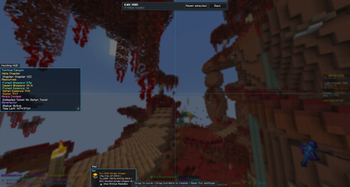
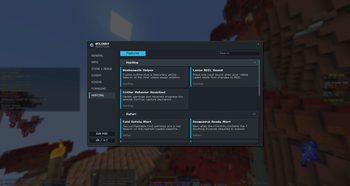
QCloudy_Addition brings maps, objective tracking, hunting and foraging helpers, pet information, an offline Attribute Shard Fusion browser, and deeply configurable HUDs into one clean bilingual interface.
The interface is English by default and can be switched to Simplified Chinese. Names received from Hypixel—locations, items, tasks, pets, skins, accessories, Shards, and player-renamed HOTM slots—remain in their original form so translations never change the meaning of game data.
Current channel: Beta 2.6.6. Beta means the build has passed automated and archive validation, but still needs broader real-server, resource-pack, GUI-scale, operating-system, and modpack testing.
Main features
Maps
- A deliberately simple, single-layer Dwarven Mines map with individually shaped regions and a live player arrow.
- Three coordinate-aligned Glacite Tunnels maps that switch automatically by player elevation.
- Optional pink Fairy Soul waypoint beams for Torrhus and Critter Safari, with locally saved collected state.
Items, menus, and pets
- A standalone, JEI-inspired Attribute Shard Fusion Guide covering the official 320-Shard catalog.
- Search by English Shard name, ID, effect, rarity, category, family, skill, mob type, or acquisition source.
- Separate Details, Recipes, and Uses views with ordered inputs, quantities, selectable outputs, Special Fusion yields, Chameleon behavior, and Pure Reptile information.
- Shard-specific bundled icons, documented natural/Fusion acquisition methods, semantic game colors, and complete reverse recipes—including Shards such as Queen Bee that have both natural and Fusion sources.
- An equipped Pet HUD with verified pet/skin heads, rarity-colored names, XP, progress to maximum level, supported overflow levels, skin names, and pet-item icons/names.
- Item creation timestamps, cursor-position memory, and configurable AOTE/AOTV teleport sounds.
The Shard database and fallback icons are bundled with the mod. The guide performs no runtime Wiki/API request and never clicks a menu or executes a Fusion. Use /qshard [English query] to open it locally.
Combat
- Configurable-color Ender Dragon outlines while in The End or Dragon's Nest.
- A complete, non-truncating Crimson Isle faction quest HUD built from the received Tab widget; completed tasks are hidden once confirmed complete.
Mining
- Full-name mining objectives with compact progress bars and percentage or current/target display modes.
- Mithril, Gemstone, and Glacite Powder tracking.
- Selected HOTM loadout-name display.
- Support for Dwarven Mines, Crystal Hollows, Glacite Tunnels, and Glacite Mineshafts.
Foraging
- A combined Torrhus HUD for Helia Chapter progress, Forest/Desert Whispers, Forest Essence, Safari Essence, Sweep, and Forest Fortune.
- A separate Galatea HUD with Hina Chapter and Agatha's Contest information.
- Tree Critter countdowns read from the visible Tree Protection Order state instead of a guessed local timer.
- Miria Contest tier/remaining-score information, Benefactor state, and personal rare Tree Gift alerts with per-loot controls.
Hunting and Critter Safari
- Beeheemoth outline, temporary spawn beacon, and independent spatial Beeheemoth-sound volume.
- Lasso
REELcue and center-screen Critter behavior instructions. - Safari session dashboard, optional Shard statistics, Critterdex progress, and biome-grouped results.
- Cold threshold alerts and nearest loaded campfire beacon.
- Doomspiral readiness, Warden cooldown, Sparkling Critter, Floor Drop, Quest Item, Wumpa, Snoozle-wall, and Safari Belt helpers.
- Real Critters use their Shard-rarity outline color; Armor Stand capture props are excluded.
- Experimental Wumpa route projection is optional and disabled by default.
General and chat
- A manual Reconnect button with no timer, retry loop, or automatic join.
- Chat Peek with keyboard, mouse-button, and modifier combinations.
- In-place hotkey editing, including mouse buttons and multi-key chords.
- Searchable, collapsible feature groups with each feature appearing in exactly one category.
HUD customization
Each HUD stores its own position and 50–200% scale. Background color and transparency, border visibility/width/color, title color, bold text, and text shadow are configured independently.
The HUD editor only exposes panels that are currently loaded and have real content. Drag a panel to move it or drag its border/corner to resize it; changes persist across restarts. Empty panels do not leave title-only boxes on screen.
Center-screen alerts have per-feature sound switches and 0–100% volume sliders. Alert volume defaults to 64%, with an additional General master mute.
Installation
Required:
- Minecraft 26.1.2
- Fabric Loader 0.19.3+
- Fabric API 0.155.2+26.1.2 or newer
- Java 25
Optional:
- Mod Menu 18.0.0
Put the playable QCloudy_Addition-Beta-2.6.6+26.1.2.jar in the instance's mods folder. Do not install the -sources.jar as the playable mod.
Press O, open QCA through Mod Menu, or enter /aca, /qca, /ca, or /qc to open settings. These settings aliases and /qshard are local client commands and are not sent to Hypixel.
Client-only boundary
QCA reads only information already available to the client, such as received Tab/scoreboard/chat/title text, currently open menus, local inventory, loaded entities, and already-loaded blocks. It contains no macro, automatic movement, automatic combat, automatic capture, telemetry, remote updater, hidden chunk request, or runtime Hypixel API dependency.
The only server-command payloads implemented by QCA are:
/th→warp torrhus/helia→chapter torrhus
Both are sent only after the player explicitly enters the corresponding local shortcut. Manual reconnect creates one normal Minecraft connection only after the player clicks the button.
Compatibility and disclaimer
QCloudy_Addition is standalone. Firmament, SkyHanni, Skyblocker, BabyzombieAddons, JEI, and Mod Menu are not required. When Firmament is installed, an optional handoff prevents selected duplicate inventory tools from running twice.
All Minecraft modifications are used at the player's own risk. Passive HUDs, outlines, waypoint beams, overlays, and predictions are not the same as official Hypixel approval. Review Hypixel's current modification rules and disable any feature you are not comfortable using.
QCloudy_Addition is not affiliated with or endorsed by Hypixel Studios, Mojang Studios, or Microsoft.
QCloudy Addition - Hypixel Skyblock is a free Minecraft Java mod. Compatible with Minecraft 26.2. Downloaded 3 times (via Modrinth). Download it and open it directly in the game.