One-slot only
Bedrock add-on listed for Minecraft 1.21–26.x (behavior pack only). File opened and checked on 23 Aug 2026; installs from the MC Bedrock Mods app on Android.
⬇ Download on CurseForge
One Slot Only
A hardcore inventory-restriction addon — you get exactly one slot. That's it.
Overview
One Slot Only locks your entire inventory down to a single usable slot. Every other slot — hotbar and main inventory alike — is permanently sealed with a locked Barrier block, so you can never pick up, hold, or carry more than one item stack at a time. No more magnet-spam of items flying in and out when you walk near a pile of drops — the game simply sees your inventory as full and leaves everything else on the ground.
Perfect for challenge runs, minimalist survival, custom minigames, or streamers looking for an extra layer of difficulty.
Features
🔒 Only 1 usable inventory slot — every other slot (35 total) is locked
🚫 No item-pickup flicker — filler blocks prevent the "hoover in/out" glitch entirely
🔗 Hotbar selection is permanently forced to your one usable slot — scrolling or number keys won't switch you away
🛡️ Filler items use ItemLockMode.slot — they cannot be dropped, moved, or used in crafting
♻️ Self-healing — if an item ever slips into a locked slot (chests, trading, etc.), it's automatically merged into your slot or dropped, and the slot re-locks itself
⚡ Fully script-driven, runs entirely server-side, no resource pack required
How it works
Built with the Minecraft Bedrock Script API (@minecraft/server). A lightweight tick loop checks each player's inventory 20 times a second, keeps every non-reserved slot filled with a locked Barrier item, and pins the selected hotbar slot in place.
Installation
Download the .mcpack file and open it — Minecraft will import it automatically.
In your world settings, enable Beta APIs under Experiments (required for scripting).
Turn on the "One Slot Only" behavior pack.
Join the world — you'll get a one-time message confirming the restriction is active.
Requirement:
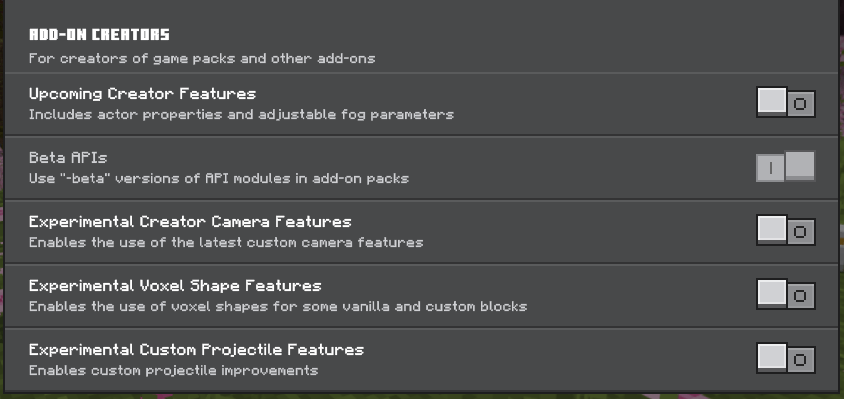
Enable beta API
Notes
Armor and offhand slots are not affected — this only restricts the main inventory + hotbar.
Safe to add to existing worlds; it will lock down the inventory the next time each player loads in
- Edition: Minecraft Bedrock
- File type: .mcpack or .mcaddon
- Minecraft versions listed: 26.0.02, 26.0, 26.3
- How to install: Download the .mcpack or .mcaddon file. → Open it — Minecraft imports it. → In your world: Behavior Packs → Available → Activate, then the same under Resource Packs.
- Where to get it: Opens on CurseForge — not every file is mirrored on our own servers.
Install steps are the general flow for this file type — How to install Minecraft Bedrock addons & mods walks through it step by step.
- Pack type: .mcpack — a single pack
- Manifest requires Minecraft 1.21.0 or newer
- Complete pack — everything it depends on is inside the file
- Download size: 335 KB
- Download link checked 4 Oct 2026 — working
These come from our own check of the pack file, not from the source page.