Ore_ESP
Java mod listed for Minecraft 1.20. Download on the author's site.
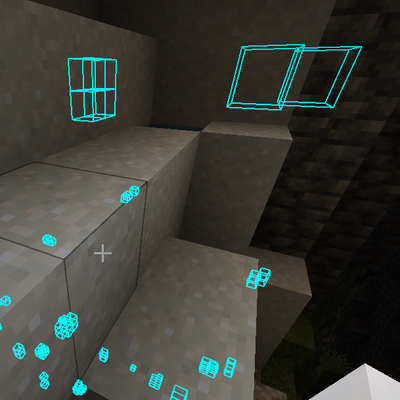
Client-side mod that outlines different ores. Features a GUI and JSON Config. See the description for all ores and details.
⬇ Download on CurseForge


All ores available for ESP:
- Diamond Ore (Regular and Deepslate)
- Gold ore (Regular, Deepslate, Nether)
- Emerald Ore (Regular and Deepslate)
- Iron Ore (Regular and Deepslate)
- Coal Ore (Regular and Deepslate)
- Redstone Ore
- Lapis Ore
Extra Blocks/Ores:
- Ancient Debris
- Amethyst
- Chests
- Lava
Colors for Each Ore:
- Diamonds - Cyan
- Gold - Gold
- Emerald - Lime Green
- Iron - White
- Coal - Purple
- Ancient Debris - Cyan
- Redstone - Red
- Lapis - Blue
- Chest - Brown
- Lava - Orange
- Amethyst - Purple
KeyBinds Available:
- Open GUI Config
- Clear Cache
- Toggle ESP
The way this mod works is by scanning a 3x3 chunk area with the player as the center. See the GUI section for info on the options available. See cache info section if you want to know more about how performance is handled.
GUI Options:
- Toggle ESP
- Toggle Scanning
- Clear Cache
- Toggle specific ores you want to scan for
Cache Info:
There is a cache for both the ores and the chunks so that it is not constantly scanning the chunks around the player. The caches are set up as an LRU cache which means least recently used entries get removed when the cache is full. You can manually clear the cache either via GUI or keybind if you need to.
The ore cache has a limit of 1500 entries.
The chunk cache has a limit of 200 entries.
The chunk cache may seem like a lot however in the nether there will not be many hits for things like ancient debris. The same goes for emerald ore as they are relatively scarce.
This mod is only available for fabric.
V1.1 Changes:
1) Fixed bug where ores would stay outlined after being destroyed when scan is turned off.
2) Added some more ores/blocks available for ESP
- redstone ore
- lapis ore
- amethyst
- chests
- lava
IMPORTANT: If switching from V1 -> V1.1 make sure to delete the old config (ore_esp.json) in your config directory so that the new one can be generated.
- Edition: Minecraft Java
- File type: .jar
- Minecraft version listed: 1.20.1
- How to install: Install the matching mod loader (Forge, Fabric or NeoForge) for your Minecraft version. → Download the .jar. → Put it in the .minecraft/mods folder and launch that loader profile.
- Where to get it: Opens on CurseForge — not every file is mirrored on our own servers.
Install steps are the general flow for this file type — How to install Minecraft Java mods & modpacks walks through it step by step.
Ore_ESP is a free Minecraft Java mod. Compatible with Minecraft 1.20.1. Downloaded 1,107 times (via CurseForge). Download it and open it directly in the game.