ModsJava
AE2 Favorites
Java mod listed for Minecraft 1.20–1.21. Downloads from the MC Java Mods app on Android.
I don't know my version or loader
Open the Minecraft launcher and look at the profile you play on — it names both, like fabric-loader-1.21.4. The version also shows in the bottom-right corner of the game's main menu.
No loader in the profile name? Then it's plain Minecraft, and these mods won't run — you need Fabric or NeoForge installed first.
AE2 Favorites

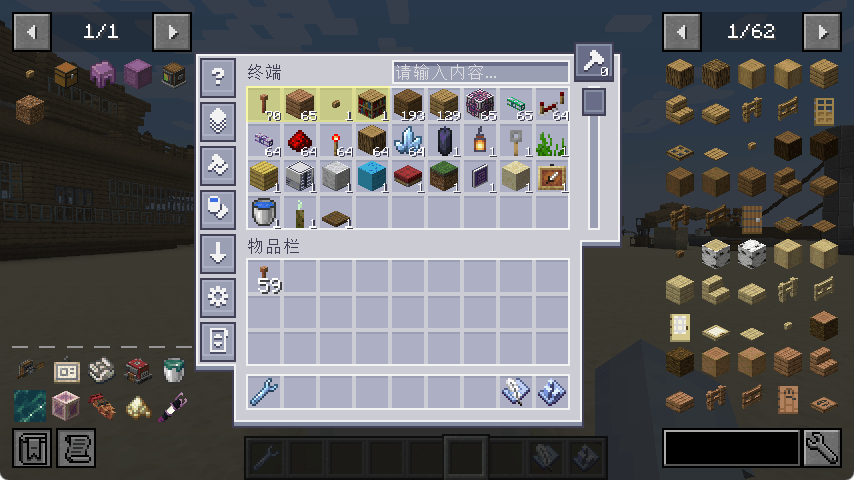
Adds a favorite items feature to AE2 terminals, allowing you to pin items to the very top of the list.
✨ Feature
- Press Shift + Middle Click to pin/unpin an item in the terminal.
- Pinned items will always appear at the top of the list.
📷 Screenshot
📄 LICENSE
MIT © 2026
Quick facts
- Edition: Minecraft Java
- File type: .jar
- Minecraft versions listed: 1.20.1, 1.21.1
- How to install: Install the matching mod loader (Forge, Fabric or NeoForge) for your Minecraft version. → Download the .jar. → Put it in the .minecraft/mods folder and launch that loader profile.
- Where to get it: Opens on CurseForge — not every file is mirrored on our own servers.
Install steps are the general flow for this file type — How to install Minecraft Java mods & modpacks walks through it step by step.
File checked by MCModsHub
- Ships as aef-1.0-neoforge-1.21.1.jar — drop this file into the mods folder
- Download size: 11 KB
- Download link checked 14 Nov 2026 — working
These come from our own check of the pack file, not from the source page.