
Metallified Rails
Java resource pack listed for Minecraft 26.x. Downloads from the MC Java Mods app on Android.
⬇ Download on Modrinth
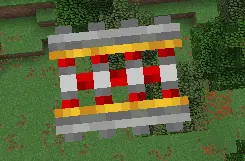

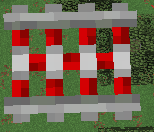
Metallified Rails
This resourcepack modifies rails so they are metal instead of the default ugly rails
How to install??
- Open the game, go to Options > Resource Packs.
- Click Open Resource Pack Folder, paste the .zip file inside, and return to the game.
- Select the pack from the "Available" list and click the arrow to move it to "Selected," then click Done.
Alternative Method
Manual Path: You can also manually paste the file into %appdata%.minecraft\resourcepacks on Windows, ~/.minecraft/resourcepacks on Linux, or ~/Library/Application Support/minecraft/resourcepacks on macOS.
Terms & Conditions
Metallified Rails: Terms & Conditions
By using this resource pack, you agree to be bound by these terms and conditions
EmanuelPlays is the creator and copyright owner of this resource pack
YOU MAY:
Use it for personal/commercial purposes as long you credit the author and have a link redirecting to the resourcepack modrinth page.
YOU MAY NOT: Redistribute this resourcepack with no explicit permission, To ask permission from the author contact via Discord: emanuelplaysofficial or the discord server
You can make this project work on Minecraft: Bedrock Edition as long you credit the project
- Edition: Minecraft Java
- File type: .zip (resource pack)
- Minecraft versions listed: 26.1, 26.1.1, 26.1.2
- How to install: Download the .zip resource pack — do not unzip it. → Put it in .minecraft/resourcepacks. → Enable it in Options → Resource Packs.
- Where to get it: Opens on Modrinth — not every file is mirrored on our own servers.
Install steps are the general flow for this file type — How to install Minecraft Java resource packs walks through it step by step.
- Downloads as Metallified Rails.zip
- Download size: 24 KB
- Download link checked 25 Oct 2026 — working
These come from our own check of the pack file, not from the source page.