
Item Hunters
Java data pack listed for Minecraft 26.x. Downloads from the MC Java Mods app on Android.
Action-packed Runner vs Seekers minigame data pack! The Runner must collect random target items while Seekers track and hunt them down.
⬇ Download on Modrinth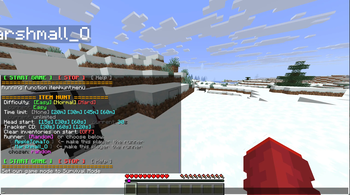
Item Hunt — Runner vs Seekers
Item Hunt is a thrilling Minecraft minigame data pack where one Runner attempts to collect assigned target items while a team of Seekers hunts them down!
Combining classic Manhunt suspense with random item collection challenges, Item Hunt brings fast-paced, highly customizable multiplayer fun to your server.
How It Works
- Assign Roles: One player is chosen as the Runner, and the rest become Seekers.
- Item Roulette: The Runner is assigned target items randomly selected from configured difficulty pools.
- The Hunt Begins: The Runner gets a configurable Head Start to gather resources and start crafting/finding the target item.
- Track & Survive: Seekers receive a Tracker Compass (with cooldowns) pointing toward the Runner.
- Winning Conditions:
- Runner Wins by obtaining the target items before time runs out or being killed.
- Seekers Win by eliminating the Runner before they complete the item goal!
Key Features
* Dynamic Item Pools (3 Difficulties): * Easy: 80 accessible survival items (Stone, Anvil, Campfire, Bow, etc.) * Normal: 97 intermediate & rare items (Ancient Debris, Netherite tools, Armor Trims, etc.) * Hard: 22 endgame items (Beacon, Elytra, Mace, Trident, Conduit, etc.) * Seeker Compass Tracker: Seekers can locate the Runner with configurable cooldowns. * In-Game Configuration Menu:
- Interactive chat GUI & Dialog sliders for easy setup.
- Adjust Time Limit (Unlimited, 20m, 30m, 45m, 60m, or custom up to 900 minutes).
- Adjust Head Start (15s, 30s, 60s, or custom).
- Adjust Tracker Cooldown (30s, 60s, 120s, or custom).
- Toggle inventory reset on game start.
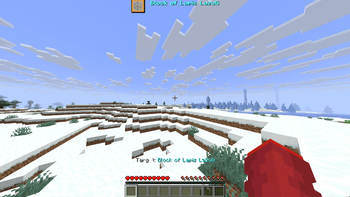
- Custom HUD Integration:** Pair with the official Item HUD Resource Pack to see target item icons and timers right on your screen!
How to Play
1. Installation
- Download the
.zipfile and place it inside your world'sdatapacksfolder (.minecraft/saves/<world_name>/datapacks/). - Run
/reloadin game.
2. Host Menu & Setup
- Run the following command to open the setup menu:
/function itemhunt:menu

### 3. Download Resource Pack
* Download the resource pack and place it inside your `resourcepacks` folder
https://www.curseforge.com/minecraft/texture-packs/item-hud-resource-pack
- Edition: Minecraft Java
- File type: .jar
- Minecraft version listed: 26.2
- How to install: Install the matching mod loader (Forge, Fabric or NeoForge) for your Minecraft version. → Download the .jar. → Put it in the .minecraft/mods folder and launch that loader profile.
- Where to get it: Opens on Modrinth — not every file is mirrored on our own servers.
Install steps are the general flow for this file type — see the MC Java Mods guides for the full walkthrough.
- Downloads as Item Hunt.zip
- Download size: 44 KB
- Download link checked 15 Nov 2026 — working
These come from our own check of the pack file, not from the source page.