
Easy Keybinds


A lightweight Minecraft mod that allows you to create custom command keybinds and execute them effortlessly with a single keypress on any server.
Notice: Always download Easy Keybinds from official sources like Modrinth or CurseForge to avoid unofficial or modified builds.
Features
- Command Keybinds – Assign any command to a key binding for instant execution.
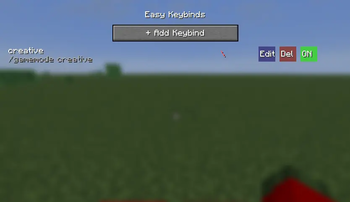
- GUI Manager – Easily manage your keybinds visually using the
/easykeybindsmenu. - Per-World or Global – Choose whether keybinds are saved per world or synced globally.
- Conflict Detection – Displays built-in warnings whenever a keybind overlaps with an existing action.
- Vanilla Style – Seamlessly integrates with Minecraft’s native user interface.
- Server Compatible – Works natively on all multiplayer servers, including Hypixel.
How to Use
- Install the mod for your specific Minecraft version and mod loader.
- Launch Minecraft and join a world or server.
- Type
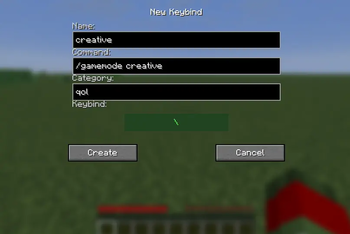
/easykeybindsin chat to open the manager. - Click + Add Keybind to start creating a new shortcut.
- Enter a name, specify your command (including the
/prefix), and set a keybind. - Press your designated key in-game to execute the command instantly!
Configuration & Usage
The keybind settings and management menu can be accessed in-game via command or menu integration.
| Action / Feature | Description |
|---|---|
/easykeybinds |
Opens the main GUI manager to create, edit, or delete keybinds. |
| Global Keybinds | Keybinds apply across all singleplayer worlds and multiplayer servers. |
| Per-World Keybinds | Restricts specific keybinds to the currently loaded world or server. |
| Conflict Alerts | Highlights keybinds in red when assigned keys overlap with vanilla controls. |
Supported Versions
| Loader | MC Version | Status |
|---|---|---|
| Fabric | 26.2 | Latest |
| Fabric | 26.1.2 | Release |
| Forge | 26.2 | Latest |
| Forge | 26.1.2 | Release |
Links & Support
- Source Code: GitHub
- Bug Reports: Issue Tracker
- Modrinth: Easy Keybinds
- CurseForge: Easy Keybinds
License
This project is licensed under the MIT License.
Quick facts
- Edition: Minecraft Java
- File type: .jar
- Minecraft version listed: 26.1.2
- How to install: Install the matching mod loader (Forge, Fabric or NeoForge) for your Minecraft version. → Download the .jar. → Put it in the .minecraft/mods folder and launch that loader profile.
- Where to get it: Opens on Modrinth — not every file is mirrored on our own servers.
Install steps are the general flow for this file type — How to install Minecraft Java mods & modpacks walks through it step by step.
Verified by MCModsHub
- Ships as EasyKeybinds-1.0.0-fabric-1.26.1.2.jar — drop this file into the mods folder
- Download size: 33 KB
- Download link checked 16 Sept 2026 — working
These come from our own check of the pack file, not from the source page.