
mjolnir-resource-pack
Java resource pack listed for Minecraft 26.x. Downloads from the MC Java Mods app on Android.
⬇ Download on Modrinth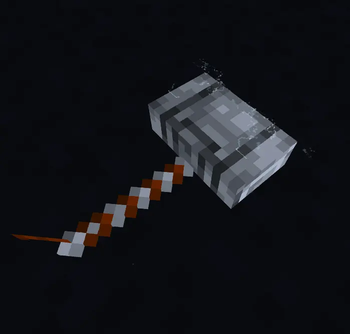
⚡ Mjolnir
A Thor-inspired custom weapon plugin for Paper Minecraft servers.
⚡ About
Mjolnir is a lightweight custom weapon plugin for Paper Minecraft servers.
The plugin adds a custom Trident-based weapon called Mjolnir, inspired by Thor's legendary hammer.
Mjolnir features two switchable gameplay modes:
- 🌊 Travel Mode
- ⚡ Fighting Mode
The weapon uses a persistent internal identifier rather than relying only on its visible name, making it impossible for a normal renamed Trident to accidentally activate Mjolnir's abilities.
Mjolnir is also permanently unbreakable and includes a dedicated resource pack for its custom appearance.
✨ Features
- ⚡ Custom Mjolnir weapon
- 🔱 Built on the vanilla Trident
- 🌊 Travel Mode
- ⚡ Fighting Mode
- 🌊 Riptide X
- 🌩 Channeling I
- 🗡 Impaling X
- 🔄 Loyalty X
- 🛡 Unbreaking X
- ✨ Mending I
- ♾️ Permanently unbreakable
- 🔐 Persistent Data Container item identification
- 🌩 Configurable thunderstorm
- ⏳ Configurable mode-switch cooldown
- ⚡ Cosmetic lightning effects
- ✨ Electric particles
- 🔊 Thunder and Trident sound effects
- 📦 Plugin-controlled resource pack
- 🔄 Designed to work alongside an existing server resource pack
- 🪶 Lightweight and suitable for small SMP servers
- 🖥️ Console-compatible
/mjolnir givecommand
🖥️ Requirements
| Requirement | Version |
|---|---|
| Minecraft Java Edition | 26.1.2 |
| Server Software | Paper |
| Paper | 26.1.2 |
| Java | 25 |
⚠️ Mjolnir is specifically developed and tested for Paper 26.1.2.
Older Minecraft/Paper 1.21.x versions are not supported.
📦 Installation
1. Install Paper
Create or use a Paper 26.1.2 server running Java 25.
Verify Java:
java --version
You should see Java 25.
2. Download Mjolnir
Download the latest:
Mjolnir-x.x.x.jar
from the project's release/download page.
Place the JAR inside:
plugins/
Your server should look like:
server/
├── plugins/
│   └── Mjolnir-x.x.x.jar
│
├── world/
├── world_nether/
├── world_the_end/
└── server.properties
3. Start the server
Start Paper normally.
On the first startup, Mjolnir will generate:
plugins/Mjolnir/
including:
plugins/Mjolnir/config.yml
🎨 Resource Pack
Mjolnir uses a dedicated resource pack for its custom weapon appearance.
The resource pack is controlled by the plugin and does not need to replace the server's main resource pack.
This allows a server to use:
Server Resource Pack
        +
Mjolnir Resource Pack
at the same time.
The Mjolnir resource pack is added to the client's resource-pack stack by the plugin.
You do not need to add the Mjolnir resource pack to:
server.properties
📦 Resource Pack Configuration
The resource pack settings are located in:
plugins/Mjolnir/config.yml
Example:
resource-pack:
  enabled: true
  url: "YOUR_RESOURCE_PACK_URL"
  sha1: "YOUR_RESOURCE_PACK_SHA1"
  required: true
  send-on-join: true
  send-delay-ticks: 40
Configuration options
| Setting | Description |
|---|---|
enabled |
Enables/disables the Mjolnir resource pack |
url |
Direct download URL of the resource pack |
sha1 |
SHA-1 hash of the resource-pack ZIP |
required |
Whether players must accept the resource pack |
send-on-join |
Automatically sends the pack when players join |
send-delay-ticks |
Delay before sending the resource pack |
🔐 SHA-1
The SHA-1 should match the exact resource-pack ZIP being hosted.
On Linux:
sha1sum Mjolnir-Resource-Pack-x.x.x.zip
Example:
aabbccddeeff00112233445566778899aabbccdd Mjolnir-Resource-Pack-1.0.0.zip
Then configure:
resource-pack:
  sha1: "aabbccddeeff00112233445566778899aabbccdd"
If you modify the resource pack after calculating the SHA-1, calculate the hash again.
🔨 Getting Mjolnir
Mjolnir can be given using the main plugin command.
Command
/mjolnir give <player>
Example:
/mjolnir give Steve
The player receives the custom Mjolnir Trident.
🔐 Permission
The administrative permission is:
mjolnir.admin
Players must have this permission to use administrative Mjolnir commands.
Server operators can use the command by default.
🌊 Travel Mode
Travel Mode is the movement-focused version of Mjolnir.
Enchantments
Riptide X
Unbreaking X
Mending I
Mjolnir behaves as a Riptide Trident while Travel Mode is active.
This makes it useful for:
- Fast movement
- Water travel
- Rain travel
- General exploration
🌊 Travel Mode Appearance
The Mjolnir resource pack provides the custom appearance for the weapon.
The plugin assigns the appropriate item model to the Mjolnir item.
⚡ Fighting Mode
Fighting Mode transforms Mjolnir into a combat-oriented Trident.
Enchantments
Channeling I
Impaling X
Loyalty X
Unbreaking X
Mending I
Riptide is removed when Fighting Mode is activated.
This allows:
- ⚡ Channeling
- 🗡 High-level Impaling
- 🔄 High-level Loyalty
- 🌩 Thunderstorm interaction
🔄 Switching Modes
Hold Mjolnir in your main hand.
Then:
Sneak + Right Click
Mjolnir switches between:
🌊 TRAVEL MODE
        ↕
⚡ FIGHTING MODE
The plugin automatically:
- Detects the real Mjolnir.
- Checks the player's cooldown.
- Prevents normal Trident interaction during the mode switch.
- Changes the mode.
- Removes incompatible enchantments.
- Applies the new enchantments.
- Updates the internal mode value.
- Updates the item lore.
- Plays the appropriate effects.
- Displays an actionbar message.
⏳ Mode Switch Cooldown
Mode switching has a configurable cooldown.
Default:
mode-switch-cooldown: 5
This means the player must wait 5 seconds between mode switches.
If the player attempts to switch during the cooldown, they receive an actionbar message similar to:
⏳ Mjolnir recharging: 3s
🌩 Fighting Mode Weather
When Mjolnir switches from Travel Mode to Fighting Mode, the plugin activates a thunderstorm in the player's current world.
Default:
storm-duration: 180
The value is measured in seconds.
For example:
storm-duration: 60
creates a 60-second storm.
🌩 Weather Behavior
The storm is applied to the world where Fighting Mode was activated.
The plugin does not intentionally create a permanent storm.
The configured duration controls the storm duration.
Example:
storm-duration: 60
means:
Fighting Mode activated
        ↓
Thunderstorm starts
        ↓
60 seconds
        ↓
Weather duration expires
⚡ Cosmetic Effects
When Fighting Mode is activated, Mjolnir can create cosmetic Thor-style effects.
These include:
Particles
ELECTRIC_SPARK
END_ROD
Lightning
The plugin uses a cosmetic lightning effect.
The cosmetic lightning effect is not intended to:
- Damage the player
- Damage entities
- Destroy blocks
- Create unwanted fire
Sounds
Mjolnir can use:
Trident thunder sounds
Lightning thunder sounds
Riptide sounds
✨ Travel Mode Effects
Switching back to Travel Mode creates movement-oriented cosmetic effects.
These include:
- End Rod particles
- Electric Spark particles
- Trident/Riptide sounds
⚙️ Configuration
The default configuration contains settings similar to:
storm-duration: 180

mode-switch-cooldown: 5

effects:
  enabled: true
  particles: true
  sounds: true

resource-pack:
  enabled: true
  url: "YOUR_RESOURCE_PACK_URL"
  sha1: "YOUR_RESOURCE_PACK_SHA1"
  required: true
  send-on-join: true
  send-delay-ticks: 40
Configuration Reference
storm-duration
storm-duration: 180
Duration of the Fighting Mode thunderstorm in seconds.
Example:
storm-duration: 60
mode-switch-cooldown
mode-switch-cooldown: 5
Cooldown between Travel Mode and Fighting Mode switches.
Value is measured in seconds.
effects.enabled
effects:
  enabled: true
Master switch for Mjolnir cosmetic effects.
Set:
enabled: false
to disable cosmetic effects.
effects.particles
particles: true
Controls Mjolnir's particle effects.
effects.sounds
sounds: true
Controls Mjolnir's sound effects.
🔐 Custom Item Identification
Mjolnir is not identified only by its name.
A normal Trident renamed to:
Mjolnir
cannot activate the plugin's Mjolnir abilities.
The plugin uses a Persistent Data Container marker to identify the custom weapon.
Conceptually:
mjolnir = true
mode = travel
This prevents ordinary renamed Tridents from being treated as Mjolnir.
🛡 Unbreakable
Mjolnir is permanently unbreakable.
The weapon displays:
Unbreaking X
Mending I
but also has its unbreakable property enabled.
The plugin additionally protects the weapon from durability damage.
Therefore Mjolnir should not lose durability during normal use.
🔱 Mjolnir Is a Trident
Mjolnir is intentionally based on:
Minecraft Trident
This allows the plugin to use Minecraft's existing Trident mechanics, including:
- Riptide
- Channeling
- Loyalty
- Impaling
- Trident throwing
The plugin modifies the Trident's gameplay data depending on the current mode.
🧩 Resource Pack Architecture
Mjolnir uses a separate resource pack instead of requiring the server owner to merge Mjolnir assets into their main server resource pack.
The intended structure is:
Minecraft Client
│
├── Server Resource Pack
│
└── Mjolnir Resource Pack
The plugin adds the Mjolnir pack using Paper's resource-pack API.
This means servers can continue using their existing resource pack.
🏗️ Building From Source
Requirements
You need:
- Java 25
- Git
- Internet connection for Gradle dependencies
Check Java:
java --version
Expected:
Java 25
Clone the repository
git clone YOUR_GITHUB_REPOSITORY_URL
Enter the project:
cd Mjolnir
Build
Run:
./gradlew clean build
If Gradle does not have executable permission:
chmod +x gradlew
Then:
./gradlew clean build
📁 Build Output
After a successful build, the compiled plugin will be located in:
build/libs/
For example:
build/libs/Mjolnir-1.0.0.jar
Copy that JAR into your Paper server:
plugins/
🧪 Testing
For testing, use a clean Paper 26.1.2 server.
Recommended test sequence:
1. Start the server
Verify that Mjolnir loads without errors.
2. Check the plugin
Use:
/plugins
Mjolnir should appear as enabled.
3. Give Mjolnir
/mjolnir give <player>
4. Test Travel Mode
Hold Mjolnir and use Riptide.
Verify:
Riptide X
Unbreaking X
Mending I
5. Switch to Fighting Mode
Hold Mjolnir.
Sneak and right-click.
Verify:
⚡ Mjolnir: FIGHTING MODE
6. Test weather
Verify that a thunderstorm starts.
Check the configured:
storm-duration
7. Test Fighting Mode
Verify:
Channeling I
Impaling X
Loyalty X
Unbreaking X
Mending I
8. Test cooldown
Immediately try switching again.
You should see:
⏳ Mjolnir recharging: Xs
9. Test resource pack
Verify that:
- The Mjolnir texture loads.
- The existing server resource pack still works.
- Mjolnir's resource pack does not replace the server's main pack.
- The correct Mjolnir model appears.
🐛 Troubleshooting
Mjolnir looks like a normal Trident
Check:
resource-pack:
  enabled: true
Then verify:
url: "..."
contains the correct direct download URL.
Also verify that the SHA-1 matches the current ZIP.
Resource pack fails to download
Check:
resource-pack:
  url: "YOUR_RESOURCE_PACK_URL"
The URL must point to the actual ZIP file.
You can test it with:
curl -I "YOUR_RESOURCE_PACK_URL"
Resource pack hash is invalid
Generate a new SHA-1:
sha1sum Mjolnir-Resource-Pack-1.0.0.zip
Update:
sha1: "..."
Server resource pack disappears
Make sure the plugin is using:
addResourcePack()
rather than:
setResourcePack()
setResourcePack() replaces the active resource-pack selection.
Mjolnir is intended to add its pack alongside the server pack.
Server resource pack and Mjolnir texture conflict
Resource packs can override the same Minecraft assets.
Check the contents of:
Mjolnir-Resource-Pack.zip
and make sure the pack contains only the assets required by Mjolnir.
Avoid unnecessarily overriding unrelated files from:
assets/minecraft/
Mjolnir cannot be given
Check the permission:
mjolnir.admin
Operators should normally have access.
📋 Commands
| Command | Description | Permission |
|---|---|---|
/mjolnir give <player> |
Gives the target player Mjolnir | mjolnir.admin |
🔐 Permissions
| Permission | Description |
|---|---|
mjolnir.admin |
Allows administrative Mjolnir commands |
📜 Versioning
Mjolnir uses semantic versioning where possible:
MAJOR.MINOR.PATCH
Example:
1.0.0
1.0.1
1.1.0
2.0.0
Patch
Bug fixes and small corrections.
1.0.1
Minor
New features that maintain compatibility.
1.1.0
Major
Major changes or breaking changes.
2.0.0
📝 Changelog
1.0.0
Initial release.
Added
- Custom Mjolnir Trident
- Travel Mode
- Fighting Mode
- Riptide X
- Channeling I
- Impaling X
- Loyalty X
- Unbreaking X
- Mending I
- Permanent unbreakable protection
- PDC-based item identification
- Mode switching
- Configurable cooldown
- Configurable thunderstorm
- Cosmetic lightning effects
- Particle effects
- Sound effects
- Plugin-controlled resource pack
- Server resource-pack coexistence
🤝 Contributing
Contributions, bug reports, and suggestions are welcome.
Before submitting a bug report, please provide:
- Minecraft version
- Paper version
- Java version
- Mjolnir version
- Relevant server console errors
- Relevant configuration
- Steps to reproduce the issue
🐛 Bug Reports
If you encounter a problem, please open an issue on GitHub.
Include:
Minecraft version:
Paper version:
Java version:
Mjolnir version:

Problem:

Steps to reproduce:

Console error:

config.yml:
Please remove private server information before posting logs.
💡 Feature Requests
Feature suggestions are welcome.
Possible future features may include:
- Additional Mjolnir abilities
- More cosmetic effects
- Configurable effects
- More resource-pack animations
- Additional combat abilities
- More customizable sounds
- Additional commands
📦 Project Structure
The project follows a standard Gradle/Paper plugin structure:
Mjolnir/
│
├── build.gradle.kts
├── settings.gradle.kts
├── gradlew
├── gradlew.bat
│
├── src/
│   └── main/
│       ├── java/
│       │   └── com/
│       │       └── istiak/
│       │           └── mjolnir/
│       │               ├── MjolnirPlugin.java
│       │               ├── MjolnirCommand.java
│       │               ├── MjolnirItem.java
│       │               ├── MjolnirListener.java
│       │               └── MjolnirResourcePack.java
│       │
│       └── resources/
│           ├── plugin.yml
│           └── config.yml
│
└── README.md
🌐 Links
GitHub
Source code, development, issues, and contributions:
GitHub: Mjolnir
Modrinth
Plugin downloads and releases:
Modrinth: YOUR_MODRINTH_PLUGIN_URL
Resource Pack
Official Mjolnir resource pack:
Mjolnir Resource Pack: YOUR_MODRINTH_RESOURCE_PACK_URL
⚠️ Compatibility
Mjolnir is designed specifically for:
Minecraft Java Edition 26.1.2
Paper 26.1.2
Java 25
Other Minecraft versions may not work correctly.
Do not assume compatibility with:
- Older Minecraft versions
- Older Paper versions
- Spigot
- Bukkit
- Other server implementations
unless explicitly tested and supported by a future release.
📄 License
Copyright ©Istiak-Alam
See the repository license for the terms under which the source code may be used, modified, and redistributed.
❤️ Credits
Inspired by Thor's Mjolnir from Norse mythology and popular culture.
Minecraft is a trademark of Mojang Studios.
This project is an independent community-made Minecraft plugin and is not affiliated with or endorsed by Mojang Studios.
- Edition: Minecraft Java
- File type: .zip (resource pack)
- Minecraft versions listed: 26.1.1, 26.1.2, 26.2
- How to install: Download the .zip resource pack — do not unzip it. → Put it in .minecraft/resourcepacks. → Enable it in Options → Resource Packs.
- Where to get it: Opens on Modrinth — not every file is mirrored on our own servers.
Install steps are the general flow for this file type — How to install Minecraft Java resource packs walks through it step by step.
- Downloads as Mjolnir-Resource-Pack-v13.zip
- Download size: 101 KB
- Download link checked 6 Oct 2026 — working
These come from our own check of the pack file, not from the source page.