Diesel Generators: Oil Info
Java mod listed for Minecraft 1.21. Downloads from the MC Java Mods app on Android.
⬇ Download on Modrinth
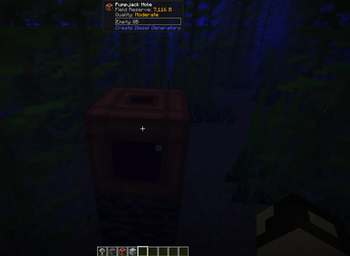
Diesel Generators: Oil Info is a small compatibility addon for Create Diesel Generators that makes oil exploration significantly more informative.
It improves the Oil Scanner with exact or rounded reserve amounts and five configurable deposit quality levels, and adds the shared oil-field reserve to Create's Engineer's Goggles overlay when inspecting a Pumpjack Hole.
Oil data is read directly from Create Diesel Generators' authoritative per-chunk reserve system. The mod does not change oil generation, depletion rates, Pumpjack mechanics, refinery recipes, or world generation.
Features
Exact oil reserve display Five deposit quality levels Pumpjack Hole field reserve with Engineer's Goggles Infinite-reserve detection Configurable thresholds and rounding English and Spanish localization No Jade dependency
Default Levels
| Reserve | Result |
|---|---|
| Below 4,000 B | No usable oil |
| 4,000-4,999 B | Almost Empty / Casi nada |
| 5,000-5,999 B | Trace |
| 6,000-6,999 B | Low |
| 7,000-7,999 B | Moderate |
| 8,000-8,999 B | High |
| 9,000 B or more | Very High |
Integer.MAX_VALUE |
Infinite |
Configuration
config/cdg_oil_info-common.toml is generated by NeoForge. Defaults:
[scanner]
showExactAmount = true
roundToBuckets = 100

[goggles]
showFieldReserve = true
showQuality = true

[levels]
noOilMax = 3999
residualMax = 4999
traceMax = 5999
lowMax = 6999
moderateMax = 7999
highMax = 8999
Required on both client and server.
Currently tested against Minecraft 1.21.1, NeoForge 21.1.x, Create 6.0.10, and Create Diesel Generators 1.21.1-1.3.15.
- Edition: Minecraft Java
- File type: .jar
- Minecraft version listed: 1.21.1
- How to install: Install the matching mod loader (Forge, Fabric or NeoForge) for your Minecraft version. → Download the .jar. → Put it in the .minecraft/mods folder and launch that loader profile.
- Where to get it: Opens on Modrinth — not every file is mirrored on our own servers.
Install steps are the general flow for this file type — How to install Minecraft Java mods & modpacks walks through it step by step.
- Ships as cdg-oil-info-1.0.0.jar — drop this file into the mods folder
- Download size: 17 KB
- Download link checked 6 Oct 2026 — working
These come from our own check of the pack file, not from the source page.