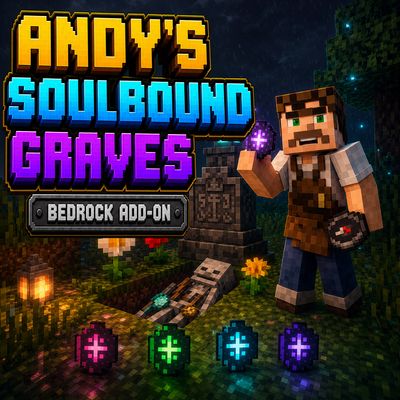
Andy's Soulbound Graves
Bedrock add-on listed for Minecraft 26.x. Download on the author's site.
Protect your inventory with tiered Soulbound Runes that build a physical grave, bury your items in recoverable skeleton remains, and guide you back with a…
⬇ Download on CurseForge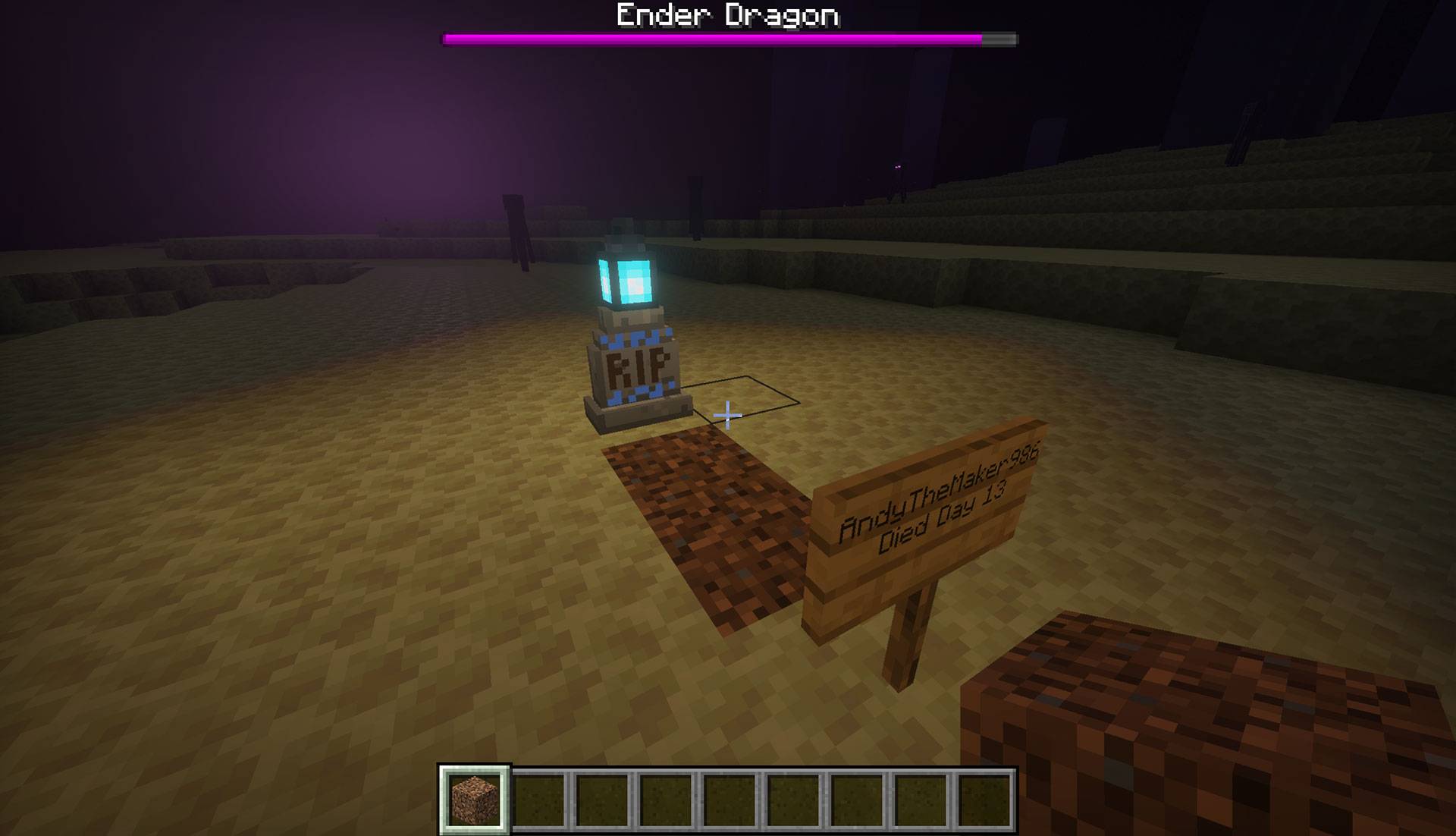
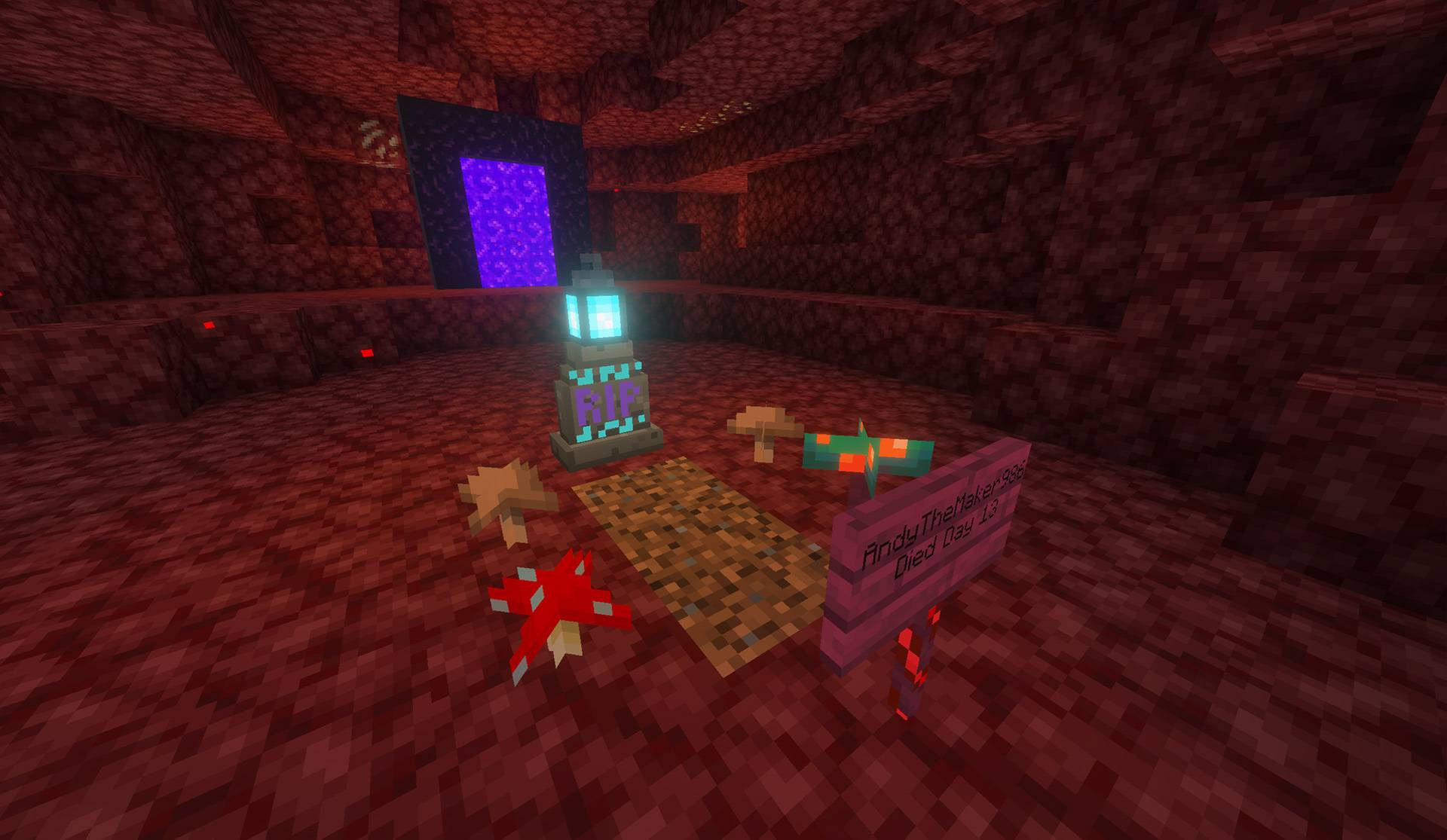
Andy's Soulbound Graves
Carry a rune. Return to your grave. Exhume your remains. Recover what death tried to take.
Andy's Soulbound Graves turns a protected death into a complete physical burial scene. When you die with a usable Soulbound Rune in your off-hand, the add-on secures your dropped inventory inside a buried, prone skeleton; builds a lantern-topped gravesite; and returns a native Recovery Compass bound to that one grave when you respawn.
There is no remote inventory menu and no magic chest at the surface. Follow the compass, dig through the coarse dirt, expose your remains, and use the correctly bound compass to reclaim your possessions. Every successful grave consumes one use from the rune, then stores that updated rune with the rest of your gear so it can be recovered too.
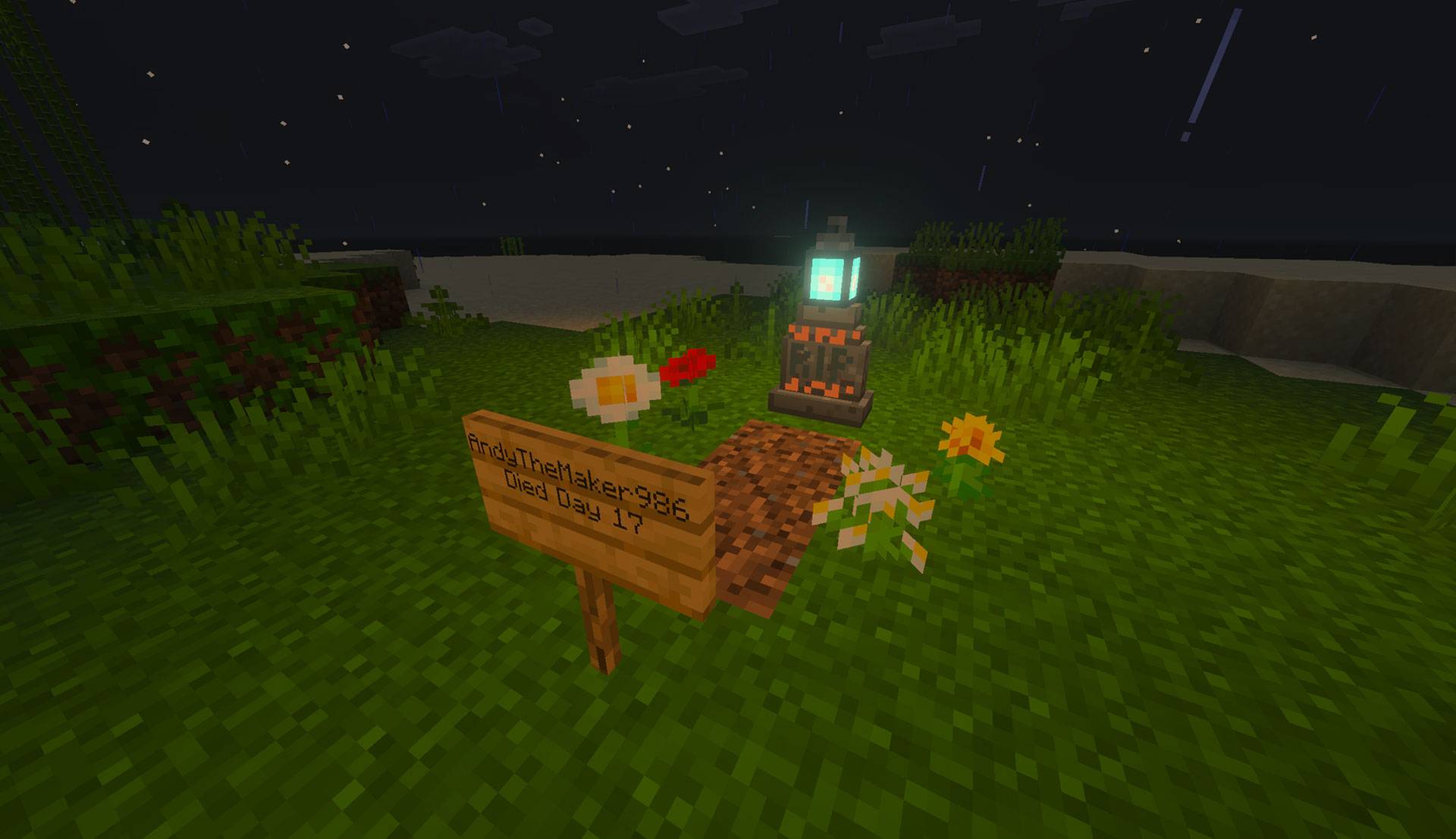
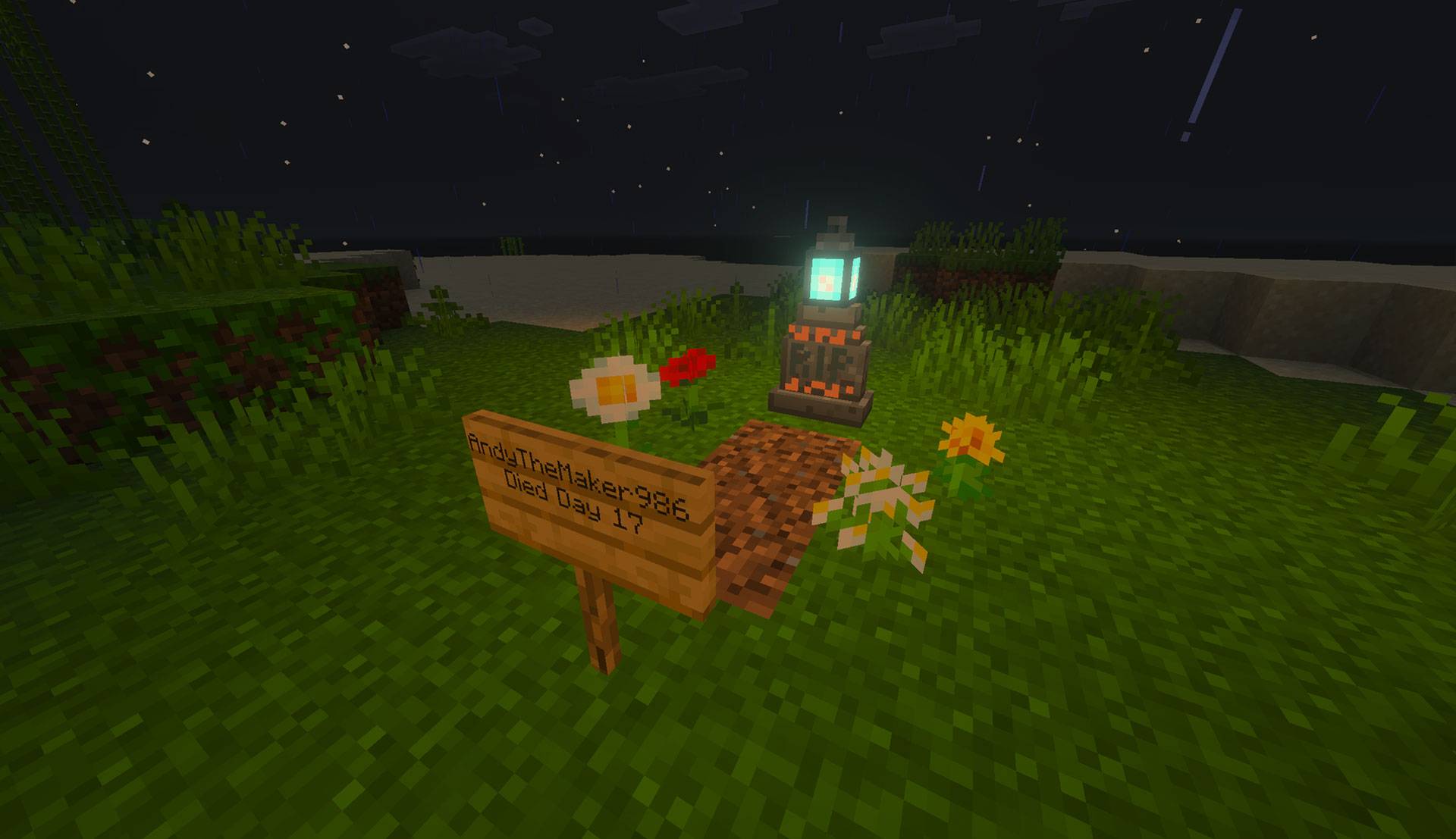
A complete Overworld gravesite marks the burial plot and records the owner and Minecraft death day.
Vanilla-friendly by design
- Physical 1 × 3 gravesites assembled in the world
- Native Recovery Compass item with a per-grave binding
- Familiar Crafting Table progression using vanilla materials
- A meaningful off-hand tradeoff against shields, maps, totems, and other utility items
- Experience follows vanilla death behavior
- No cheats, commands, Beta APIs, experimental gameplay toggles, or required add-on dependencies
- Standard graphics and Vibrant Visuals/PBR support
- Single-player, multiplayer, Realms, and compatible Bedrock servers
Requirements
- Minecraft Bedrock Edition 26.30 or newer
- Both included Andy's Soulbound Graves packs active on the world
- The Soulbound Rune in the player's off-hand/shield slot before death
- Enough valid terrain for the gravesite, except where the supported submerged or Tier IV lava rules apply
The add-on uses stable Script APIs supplied by Minecraft. Players do not need to enable cheats or experimental features.
Installation
Windows and supported desktop devices
- Download the current
Andys_Soulbound_Graves_0.1.31.mcaddonfrom the official project page. - Open the
.mcaddonwith Minecraft Bedrock. - Wait for both Andy's Soulbound Graves [BP] and Andy's Soulbound Graves [RP] to import successfully.
- Create a world or edit the intended existing world.
- Open Behavior Packs → My Packs, select Andy's Soulbound Graves [BP], and choose Activate.
- Confirm Andy's Soulbound Graves [RP] is active under Resource Packs. The packs are mutually linked, but both should still be verified.
- Enter the world, find an Amethyst Shard to unlock the first recipe, and craft Soulbound Rune I.
Android and iOS
Download the .mcaddon, open or share it to Minecraft, allow both packs to import, then activate both linked packs on the intended world. The exact file-sharing steps vary by device and operating-system version.
Consoles through a Realm
Consoles generally do not offer the same local .mcaddon import workflow. Import and activate the add-on on a supported Windows or mobile device, upload that prepared world to a Realm, and join the Realm from the console. Minecraft will deliver the required world packs through its normal Realm process.
Servers and Realms
Install and activate both packs on the world before uploading or starting it. Joining players must accept the Resource Pack so rune, tombstone, remains, item, and PBR visuals appear correctly. Test the first protected death in a backed-up staging copy before deploying to an established shared world.
Updating
- Back up the world.
- Import the newer
.mcaddonand wait for both pack updates to complete. - Edit the world and verify that matching versions of the Behavior Pack and Resource Pack are active.
- Remove or deactivate obsolete duplicate copies if Minecraft retained them.
- Completely leave and reopen the world before testing the update.
The project UUIDs remain stable so saved grave records are designed to continue across updates.
Quick start
- Find an Amethyst Shard to unlock the Soulbound Rune I recipe.
- Craft a Soulbound Rune at a Crafting Table.
- Move the rune into the off-hand/shield slot. Holding it in the main hand or merely carrying it in the inventory does not protect a death.
- Die in a supported location while the rune still has a use remaining.
- Respawn and receive the Soulbound Recovery Compass for that grave.
- Hold the compass to read horizontal direction, distance, vertical guidance, dimension status, and any Soulbinding time remaining.
- Return to the marker, dig through the coarse dirt, and expose the prone skeleton below the surface.
- Hold the compass bound to those remains and interact with the skeleton.
- Make enough inventory room if prompted. Recovery is completed only when every stored stack can be returned safely.
How protected death works
The protection is deliberate rather than automatic:
- A valid Soulbound Rune must be positively detected in the off-hand immediately before death.
- The death must not be in the void, and lava requires Tier IV.
- The add-on correlates the player's dropped item entities with that death.
- The complete inventory is staged inside the grave-remains storage and verified.
- Only after storage succeeds are the loose drops removed and the physical grave committed.
- One rune charge is spent only for that successfully committed grave.
- The updated rune is stored in the skeleton's off-hand storage and comes back with the other possessions.
If a safe grave transaction cannot be completed, the rune is not intentionally consumed. The add-on favors recoverability over silently deleting possessions.
Multiple unrecovered graves can coexist. A later death receives its own grave identity and compass rather than replacing an older record.
The physical gravesite
Every successful grave uses a recognizable 1 × 3 layout:
- A stepped tombstone at the head
- A cyan Soul Lantern above the marker
- Coarse dirt covering the burial line
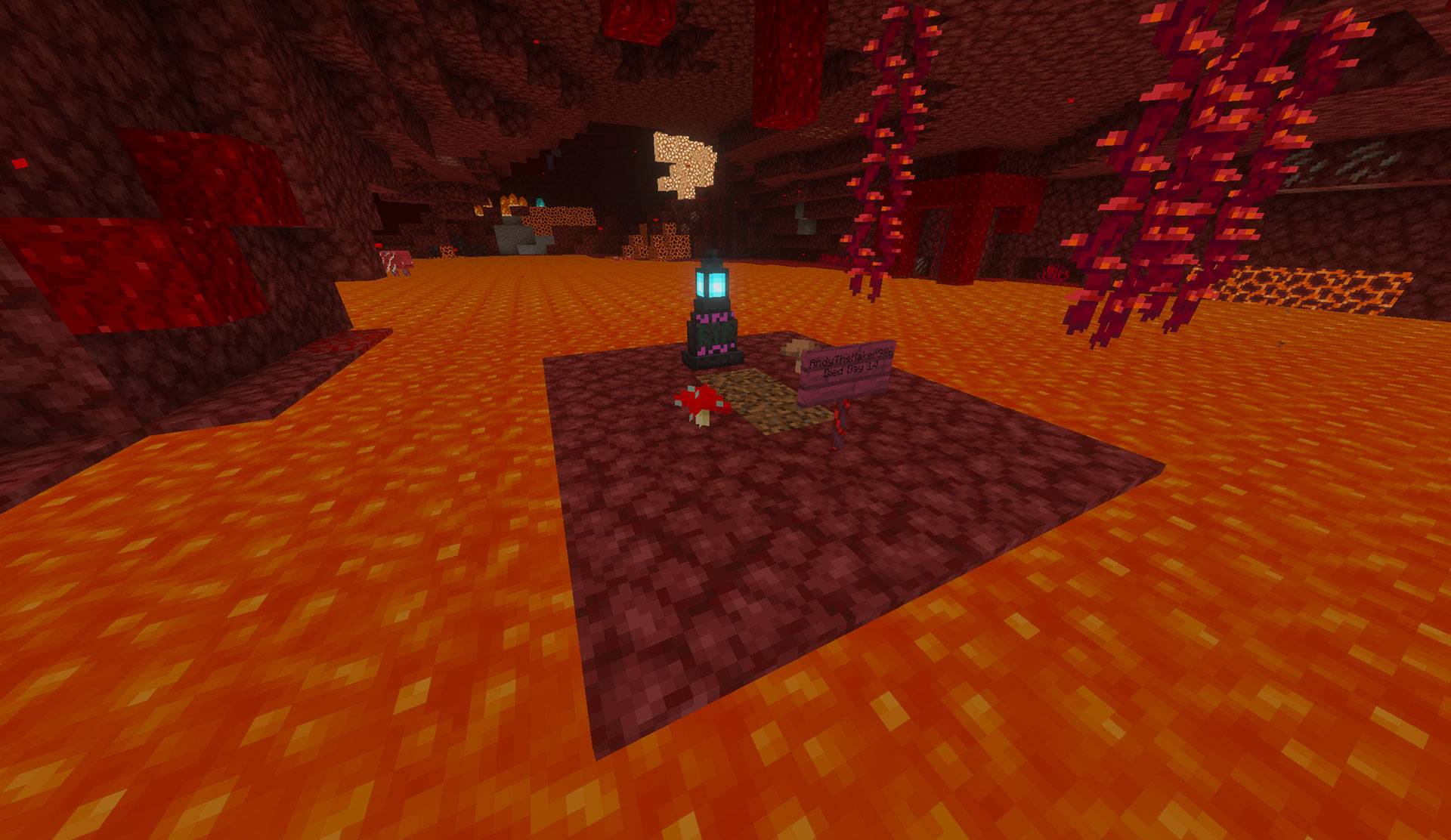
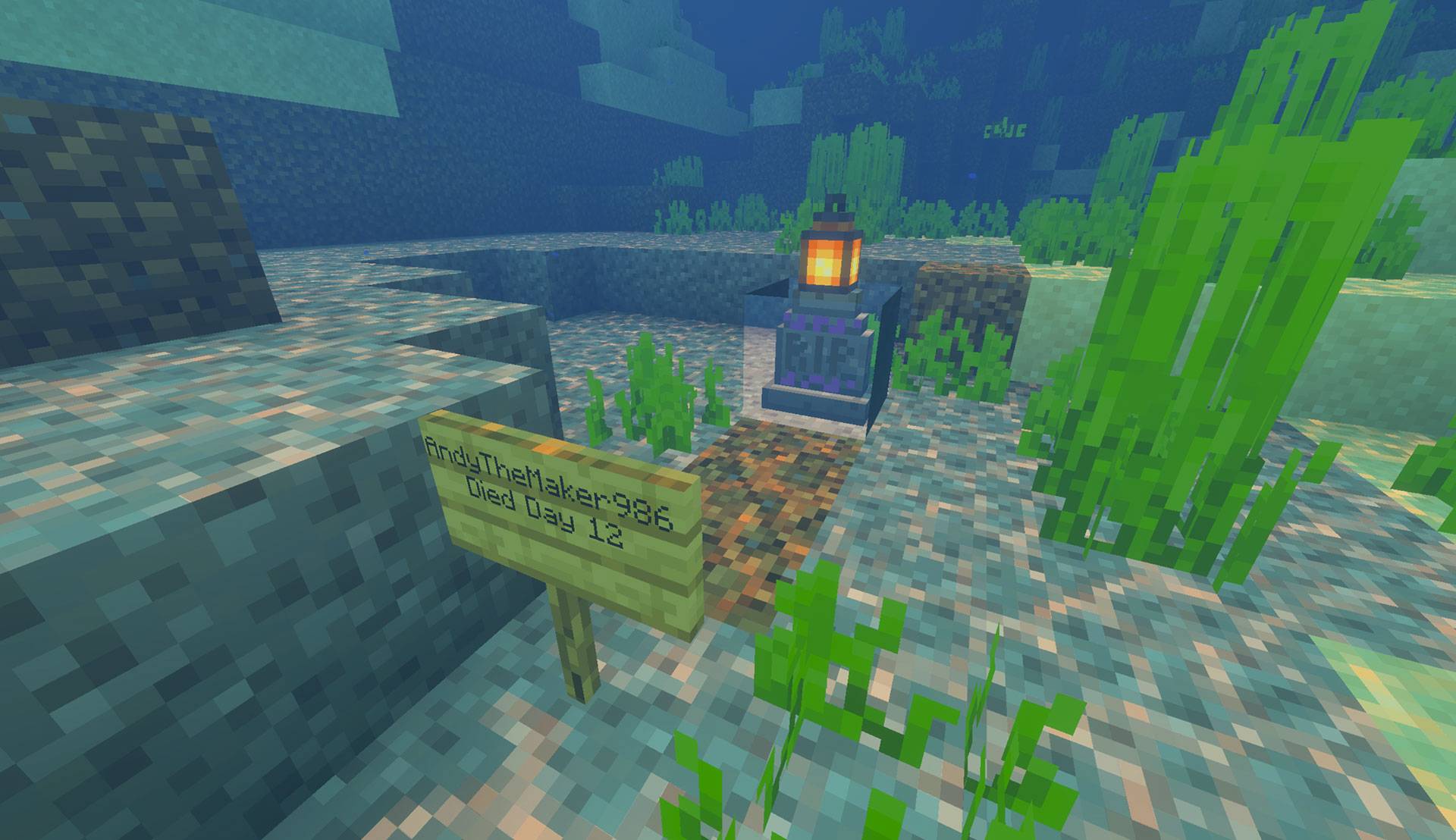
- A protected foot sign naming the player and death day
- Dimension-appropriate flowers or fungi where the environment permits them
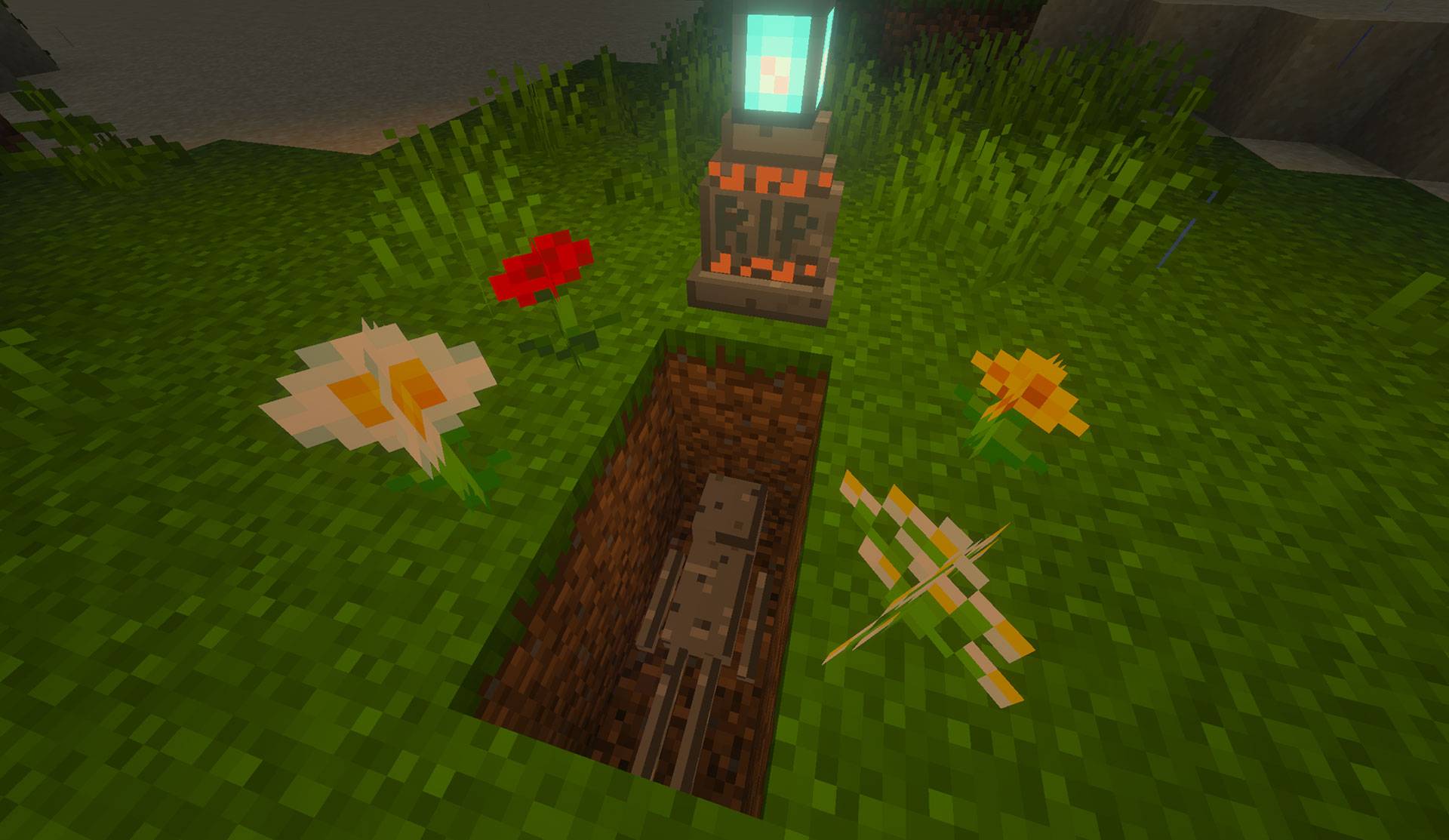
- A prone skeleton beneath the surface, with its skull nearest the tombstone
The tombstone is the public marker; the skeleton is the functional storage. Looking directly at a tombstone from within approximately six blocks shows the grave owner, death day, and recovery state. Other players can identify a grave without gaining access to it.
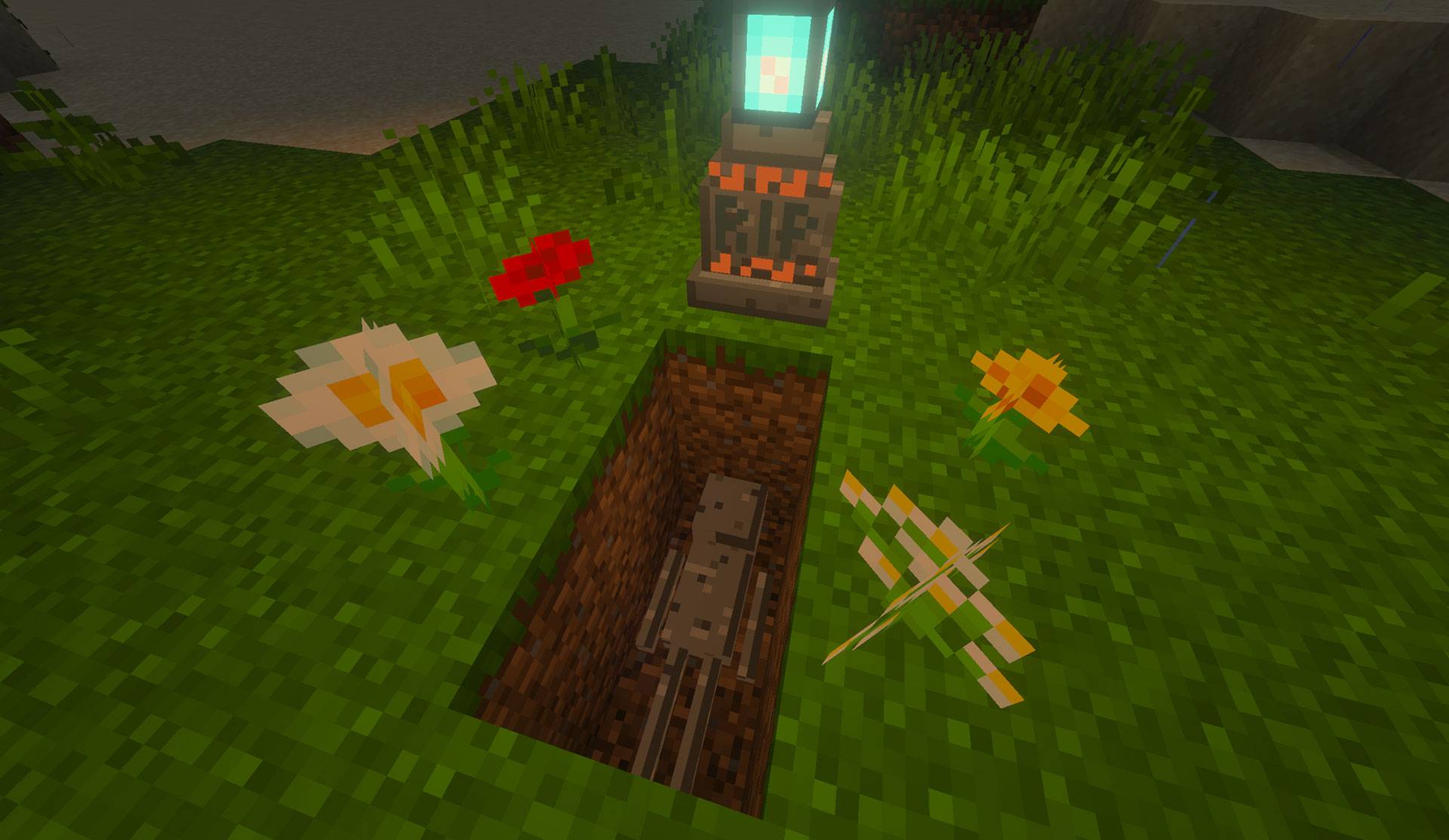
Dig through the grave plot to expose the prone skeleton—the remains are the protected inventory storage, not the tombstone.
Tombstone styles
Each grave deterministically receives one of 24 combinations:
- Materials: stone, deepslate, or diorite
- Inscription palettes: cyan/violet, violet/gold, green/cyan, red/white, magenta/aqua, blue/amber, orange/pale cyan, or white/crimson
The small runes glow faintly. RIP is dark, non-emissive, and reads as lettering carved into the stone. Standard graphics retains readable texture detail; Vibrant Visuals enhances material depth and restrained rune emission.
Soulbound Rune progression
| Rune | Color | Uses | Timed Soulbinding window | Environmental protection |
|---|---|---|---|---|
| Soulbound Rune I | Magenta | 3 | 20 minutes | Normal terrain and supported submerged graves |
| Soulbound Rune II | Emerald green | 6 | 40 minutes | Normal terrain and supported submerged graves |
| Soulbound Rune III | Diamond cyan | 9 | 60 minutes | Normal terrain and supported submerged graves |
| Soulbound Rune IV | Purple | Unlimited | Unlimited | Adds solid-vault protection for lava deaths |
The listed time windows apply only when an operator enables Timed Soulbinding. Timed Soulbinding is off by default, so protected graves remain recoverable indefinitely at every tier unless the world owner chooses otherwise.
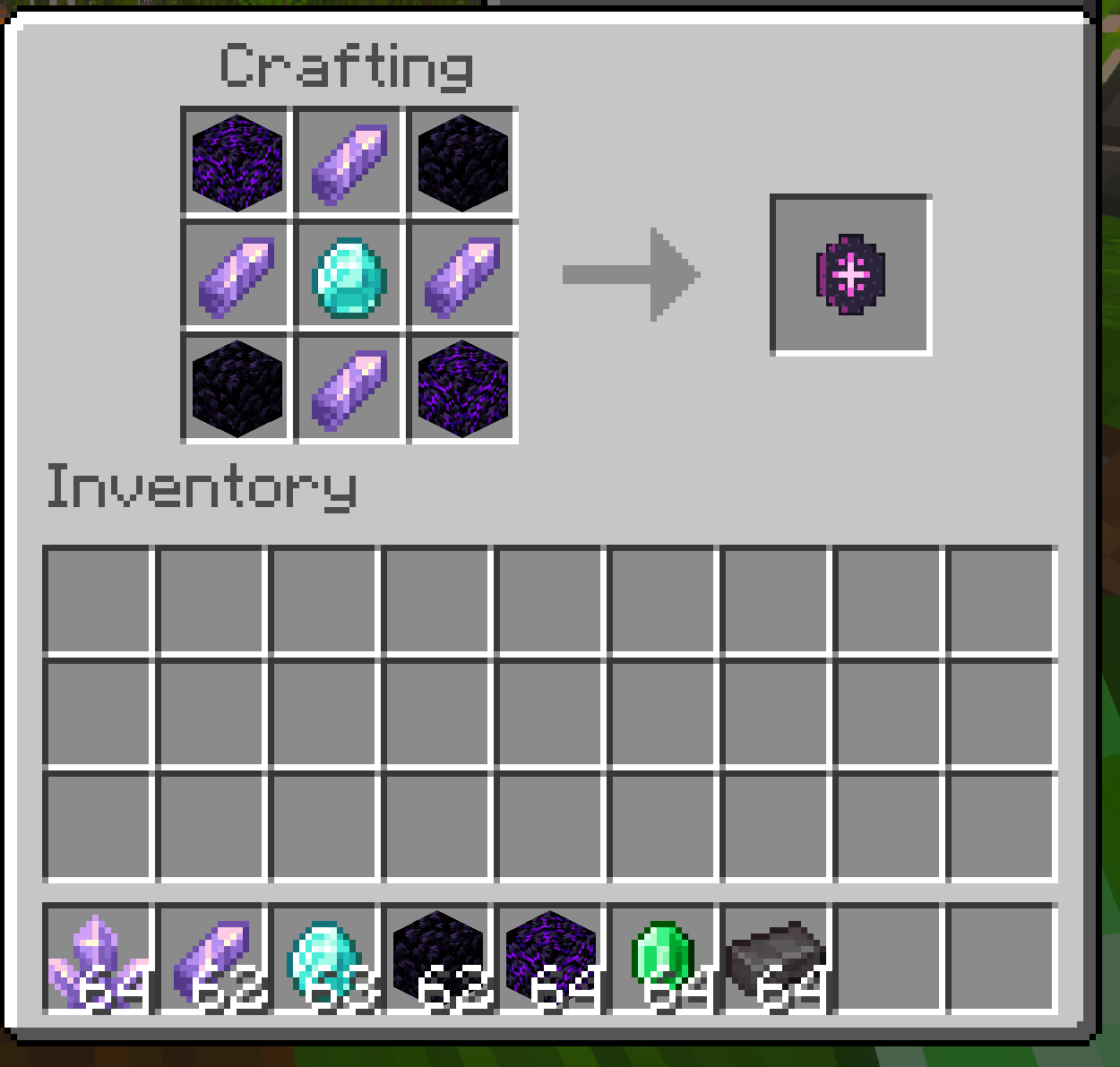
Soulbound Rune I recipe
This shaped recipe unlocks when the player first obtains an Amethyst Shard.
| Tier | I | Ingredients |
|---|---|---|
| Crying Obsidian | Amethyst Shard | Obsidian |
| Amethyst Shard | Diamond | Amethyst Shard |
| Obsidian | Amethyst Shard | Crying Obsidian |
Tier II upgrade
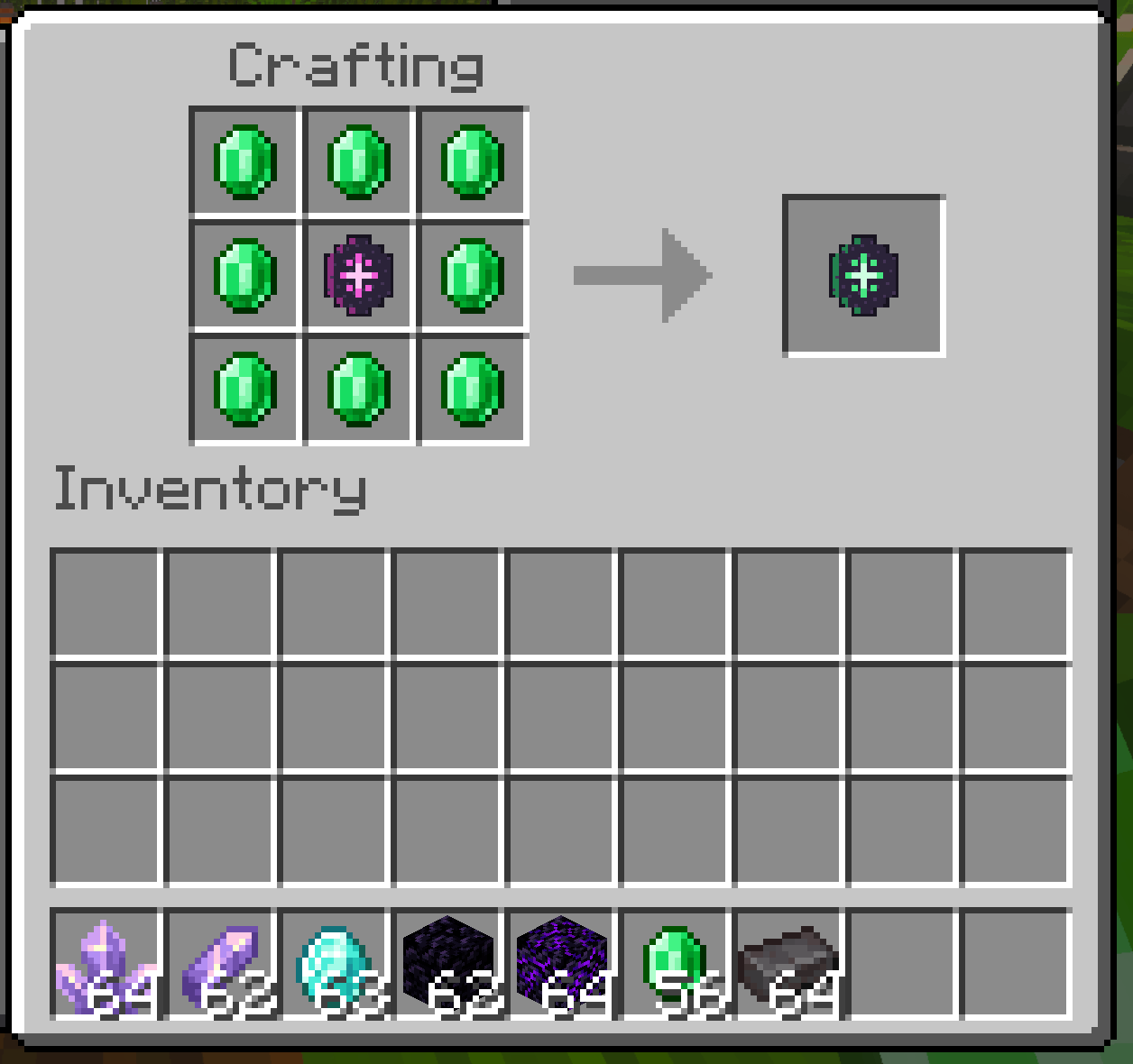
Place Soulbound Rune I in the center of a Crafting Table and surround it with eight Emeralds.
| Tier | II | Ingredients |
|---|---|---|
| Emerald | Emerald | Emerald |
| Emerald | Tier 1 Runestone | Emerald |
| Emerald | Emerald | Emerald |
Tier III upgrade
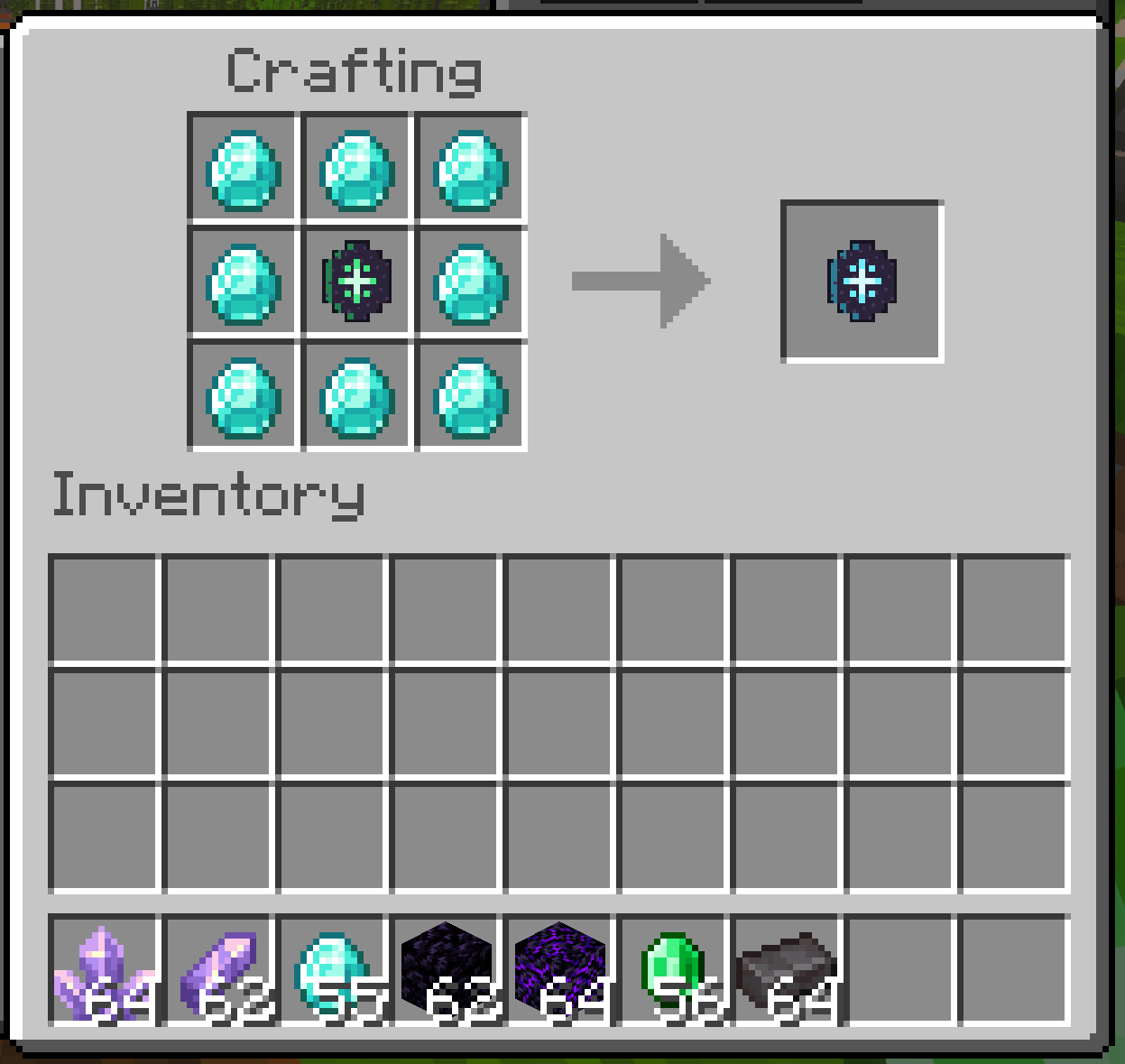
Place Soulbound Rune II in the center and surround it with eight Diamonds.
| Tier | III | Ingredients |
|---|---|---|
| Diamond | Diamond | Diamond |
| Diamond | Tier 2 Runestone | Diamond |
| Diamond | Diamond | Diamond |
Tier IV upgrade
Place Soulbound Rune III in the center and surround it with eight Netherite Ingots.
| Tier | IV | Ingredients |
|---|---|---|
| Netherite Ingot | Netherite Ingot | Netherite Ingot |
| Netherite Ingot | Tier 3 Runestone | Netherite Ingot |
| Netherite Ingot | Netherite Ingot | Netherite Ingot |
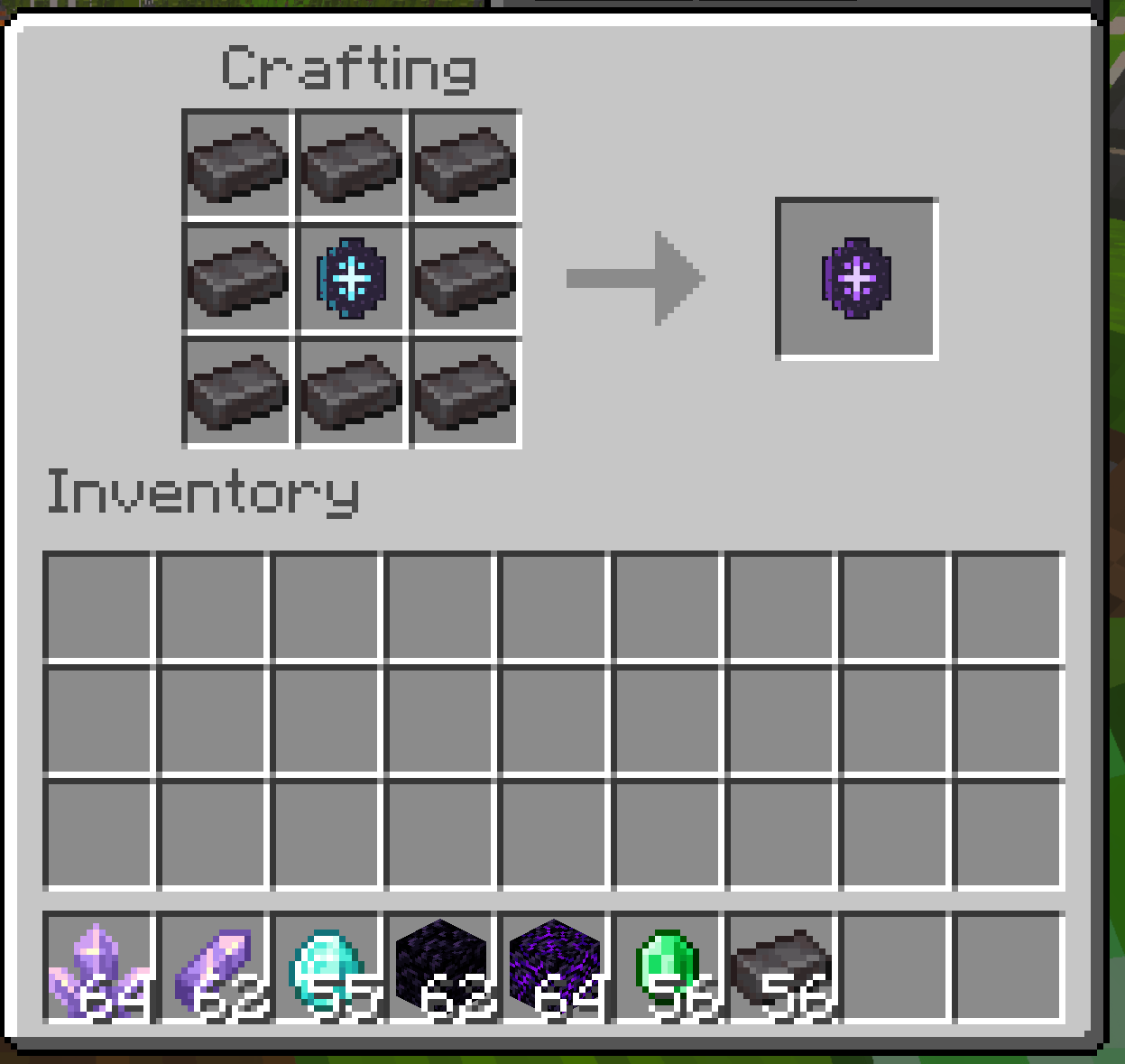
Each upgrade recipe unlocks when the preceding rune tier is obtained.
Recharging a rune
Soulbound Rune I–III can regain one use at a time:
- Carry at least one fully formed Amethyst Cluster in your inventory.
- Hold the partially depleted rune in your main hand.
- Crouch and interact with a normal, chipped, or damaged Anvil.
- One Amethyst Cluster is consumed and one rune use is restored.
A full rune refuses the exchange, so the cluster is not wasted. Tier IV never depletes and cannot be recharged. The ingredient is an Amethyst Cluster, not a shard, block, or bud; obtaining the cluster item normally requires Silk Touch.
Recovery Compass
After respawning from a protected death, the owner receives one ordinary Minecraft Recovery Compass renamed and bound to the new grave. Its lore identifies the owner, death day, dimension, grave identity, and private binding data.
Hold the compass in the selected hotbar slot to receive action-bar guidance:
- Horizontal direction and distance
- Whether the target is above or below
- Whether the grave is in another dimension
- Remaining Soulbinding time when timers are active
- An infinity marker for untimed graves
- Green, amber, and red urgency as a timed grave approaches expiry
Each compass opens only its matching grave. If the player has multiple active graves, keep the compasses separate and read their lore before traveling.
Exhuming and recovering possessions
- Follow the bound compass to the physical marker.
- Dig through the grave's coarse dirt to expose the skeleton. The tombstone, sign, and bound grave components remain protected.
- Put the matching Soulbound Recovery Compass in your main hand.
- Interact with the exposed skeleton.
- If inventory space is insufficient for every stored stack, clear space and try again.
Recovery is atomic: the compass is consumed and the grave is marked recovered only after the stored inventory is safely restored. The rune—already reduced by one use for this grave—returns with the rest of the inventory.
Experience is not stored in the skeleton. Vanilla experience-drop behavior still applies.
Timed Soulbinding and expired graves
Timed Soulbinding is optional and disabled by default. When enabled, the grave freezes its window from the rune tier used at death. Later settings changes do not shorten an existing grave's window.
The timer can count either:
- Owner online only: time advances only while the grave owner is present; this is the default timer mode.
- Whenever the world runs: time advances while the world or server is running.
The owner receives warnings near five minutes and one minute remaining. Expiry never destroys the stored inventory or automatically removes the physical grave. Instead, the remains enter an expired state and normal compass recovery pauses.
To reactivate expired remains:
- Hold a Wither Rose.
- Interact with the expired skeleton.
- One Wither Rose is consumed and the remains become recoverable again.
- Hold the matching Recovery Compass and interact once more to restore the inventory.
World settings
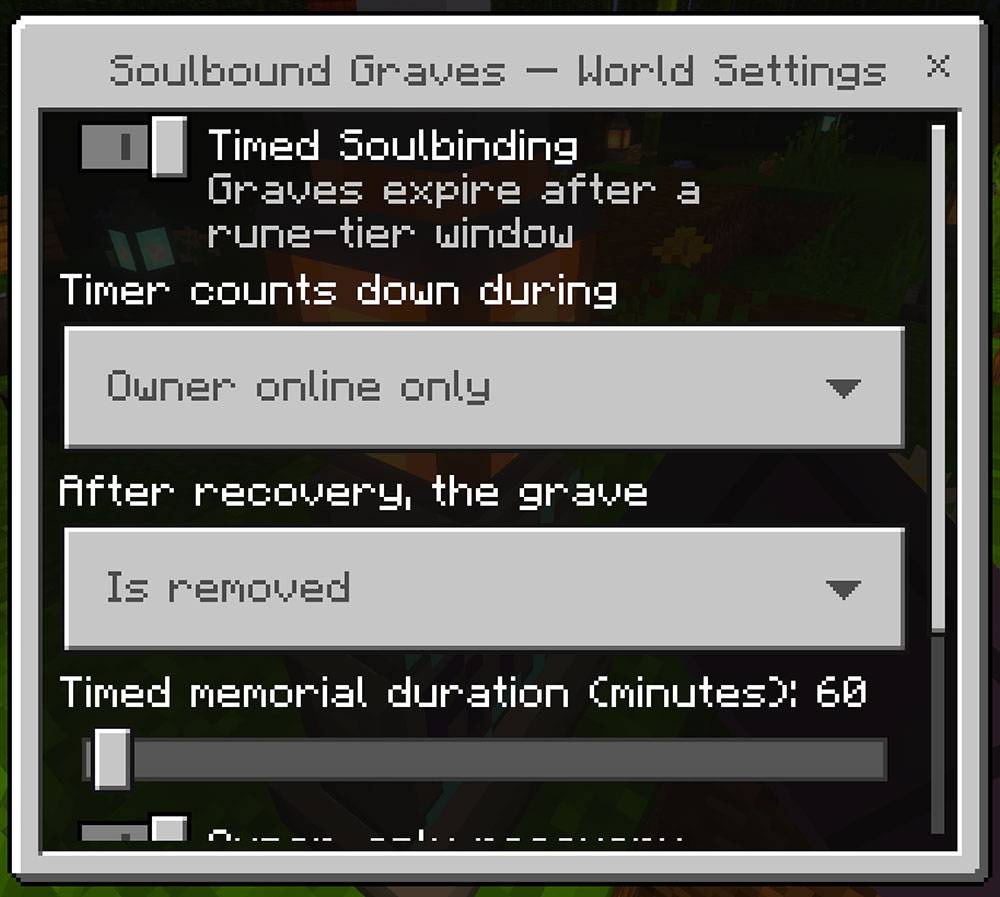
An operator can crouch and use any Soulbound Rune in the main hand to open Soulbound Graves — World Settings. The form controls:
- Timed Soulbinding on or off; default off
- Timer counting while the owner is online or whenever the world runs; default owner online only
- Post-recovery grave behavior; default memorial
- Timed memorial duration from 5 to 1,440 minutes; default 60 minutes
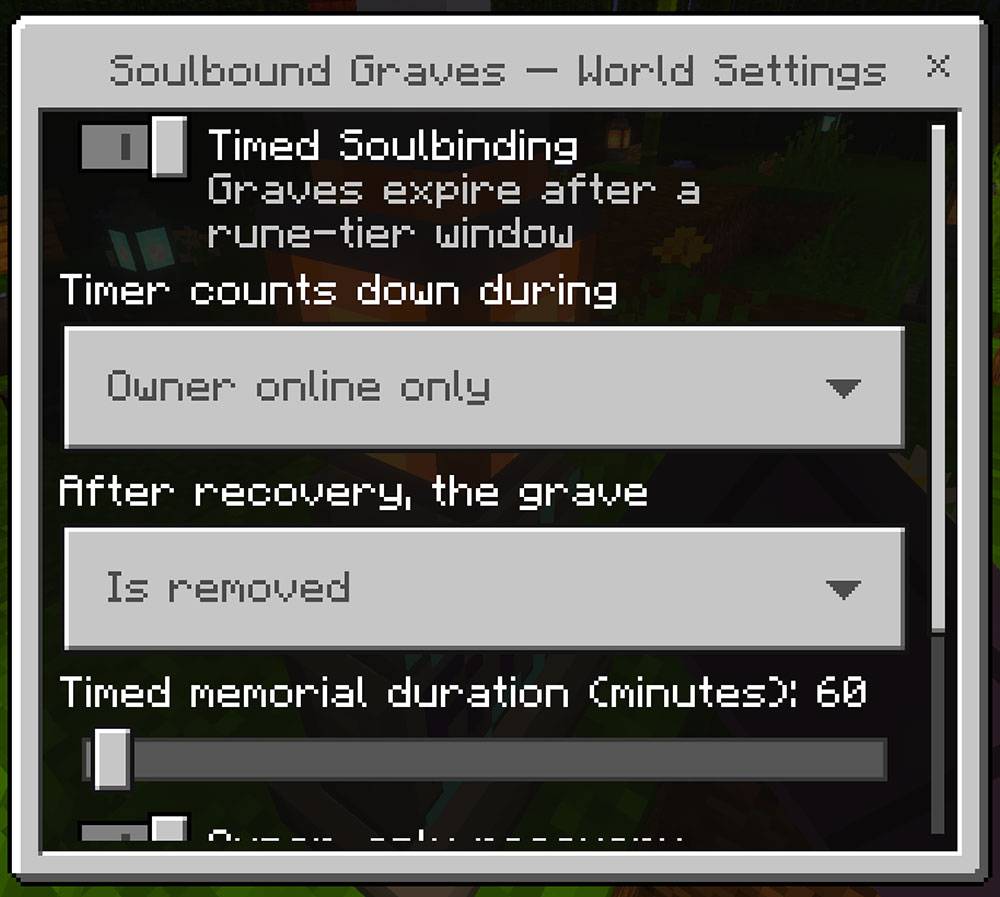
Operators configure timers and post-recovery grave behavior through an in-game form—no commands or experimental pack settings required.
The form also stores owner-recovery and coordinate-visibility preferences. In the initial release, grave recovery remains owner-bound and navigation is provided by the Recovery Compass; operators should retain those safe defaults.
Existing graves keep the timer window captured when they were created.
Grave management and protection
- Other players cannot recover someone else's inventory with a stolen compass.
- Bound grave blocks and remains resist ordinary griefing.
- The automatic foot sign cannot be edited while the grave stands.
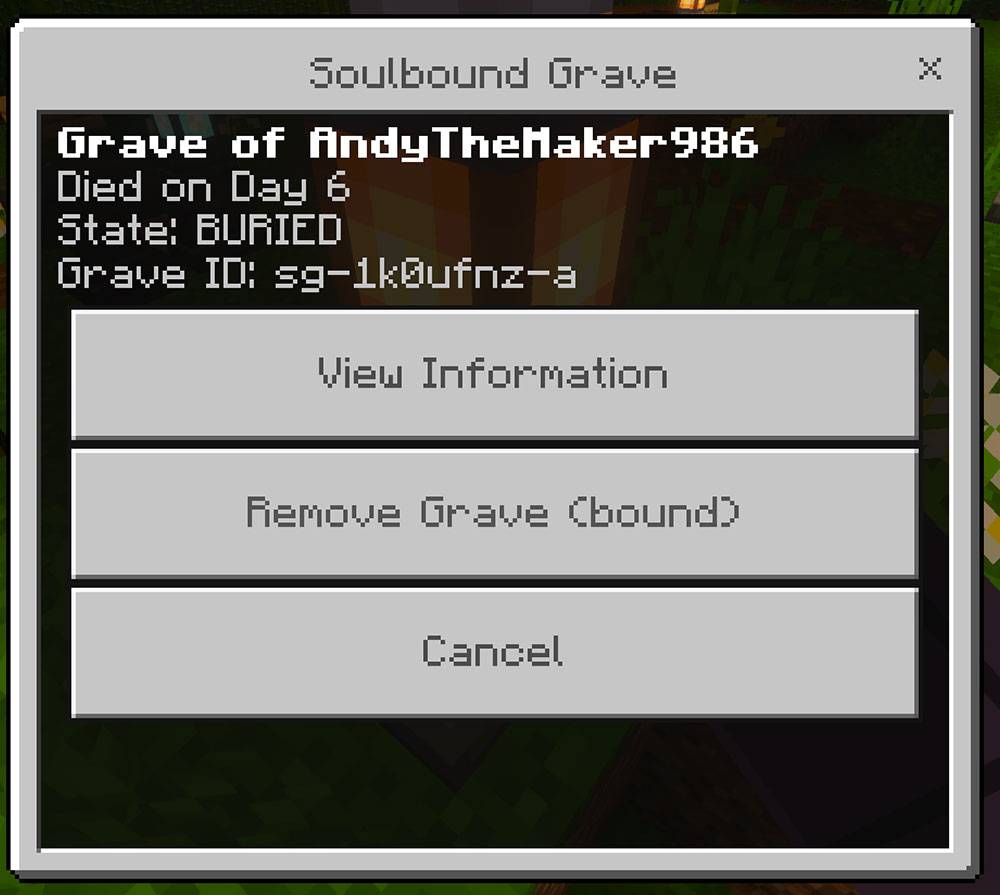
- The owner or an operator can crouch and interact with the tombstone to open its management menu.
- View Information shows owner, day, dimension, location, grave identity, and whether possessions remain bound.
- A grave holding possessions cannot be removed through the menu.
- After recovery, the grave follows the world's configured memorial behavior.
- An emptied, unlocked skeleton can be struck to reduce it to five Bones.
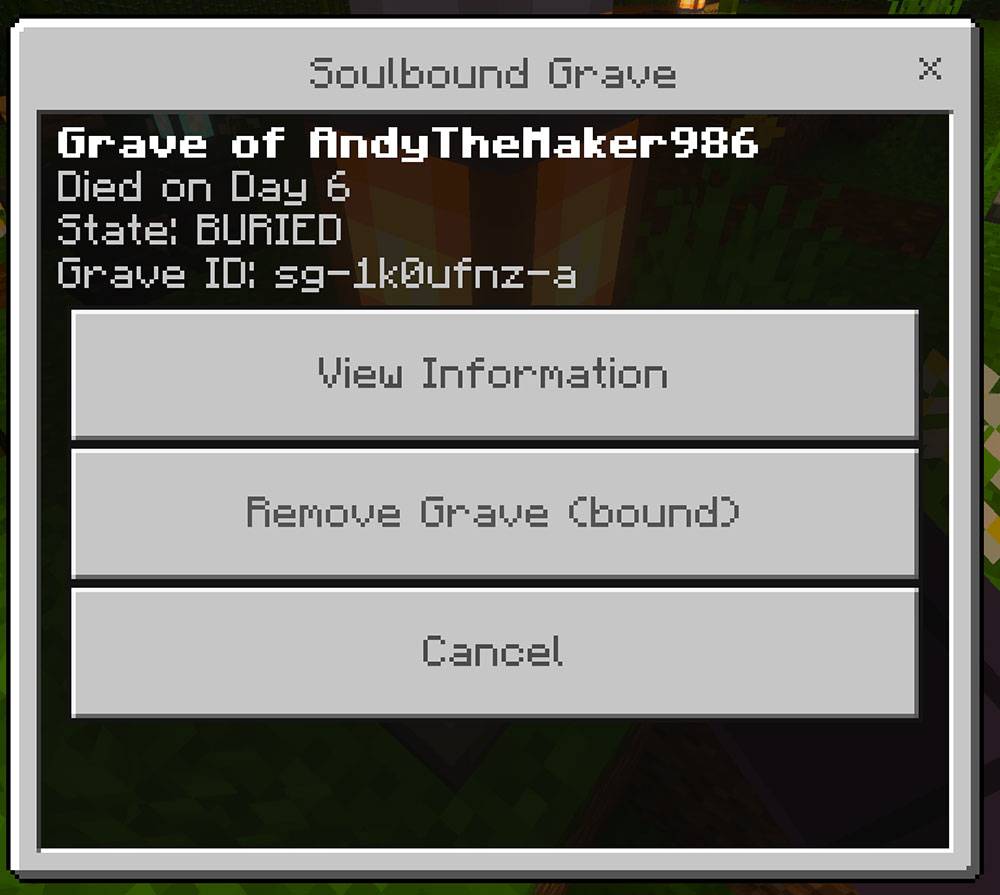
The owner or an operator can inspect a grave, but the removal action stays locked while possessions remain bound.
Post-recovery choices are:
- Memorial: leave the recovered grave standing; default.
- Remove: dismantle it immediately after verified recovery.
- Permanent: retain it until intentionally managed.
- Timed Memorial: retain it for the configured duration, then clear it.
Dimensions and dangerous deaths
Overworld
Ordinary flowers and an oak sign dress a canonical grave when space permits.
Nether
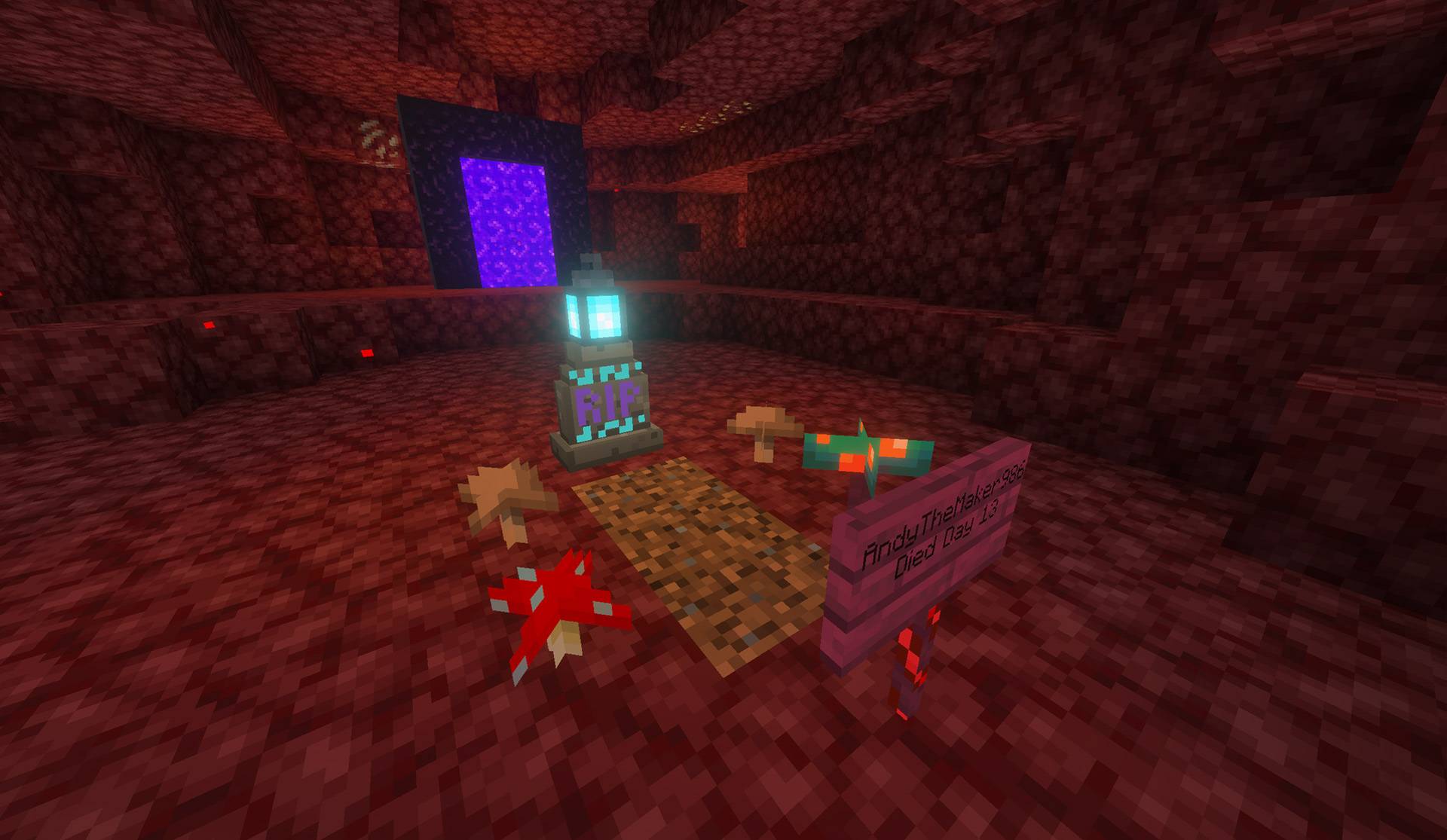
Native fungi or mushrooms replace flowers, and a nonflammable crimson sign replaces oak.
End
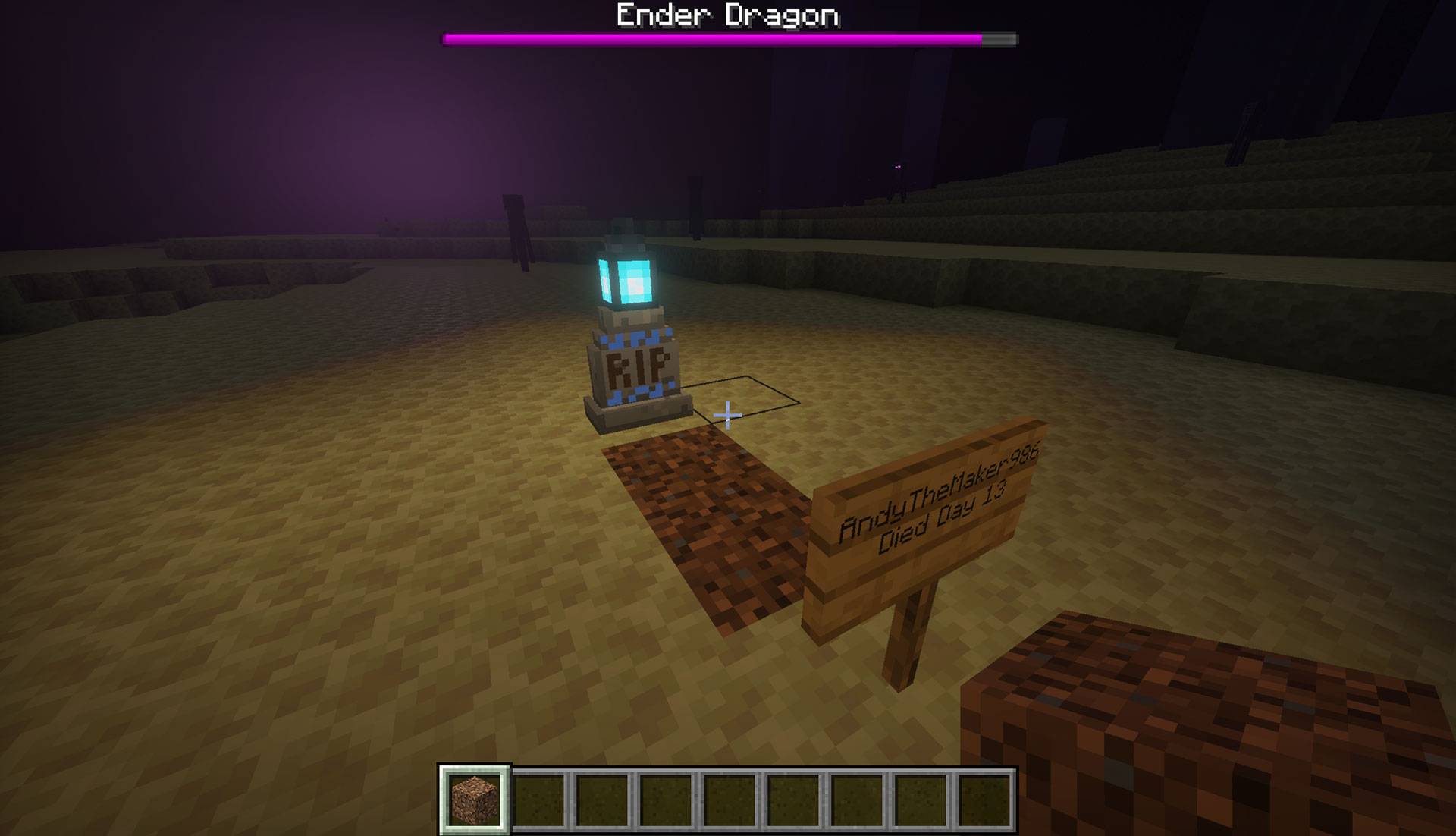
The recognizable marker remains, but flowers are omitted.
Underwater
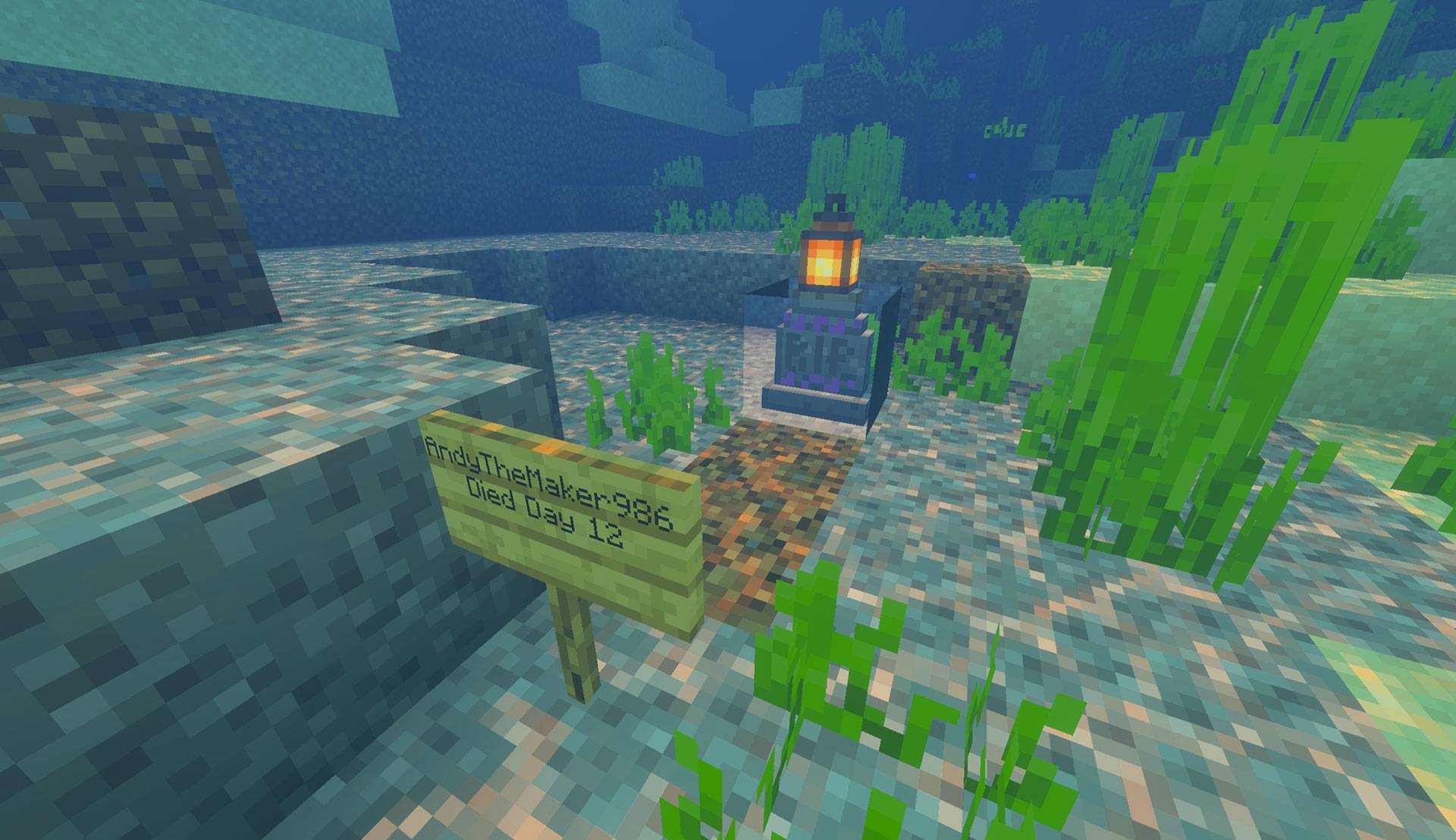
The add-on searches for a suitable floor, builds the grave there, seals a dry burial chamber for the remains, and omits flowers that cannot survive submerged placement.
Lava
Only Soulbound Rune IV protects a lava death. It builds dimension-appropriate solid ground around the grave before carving the burial chamber so the skeleton is not left floating in a hollow box and lava cannot immediately flood the remains. Tiers I–III follow vanilla item-loss behavior in lava.
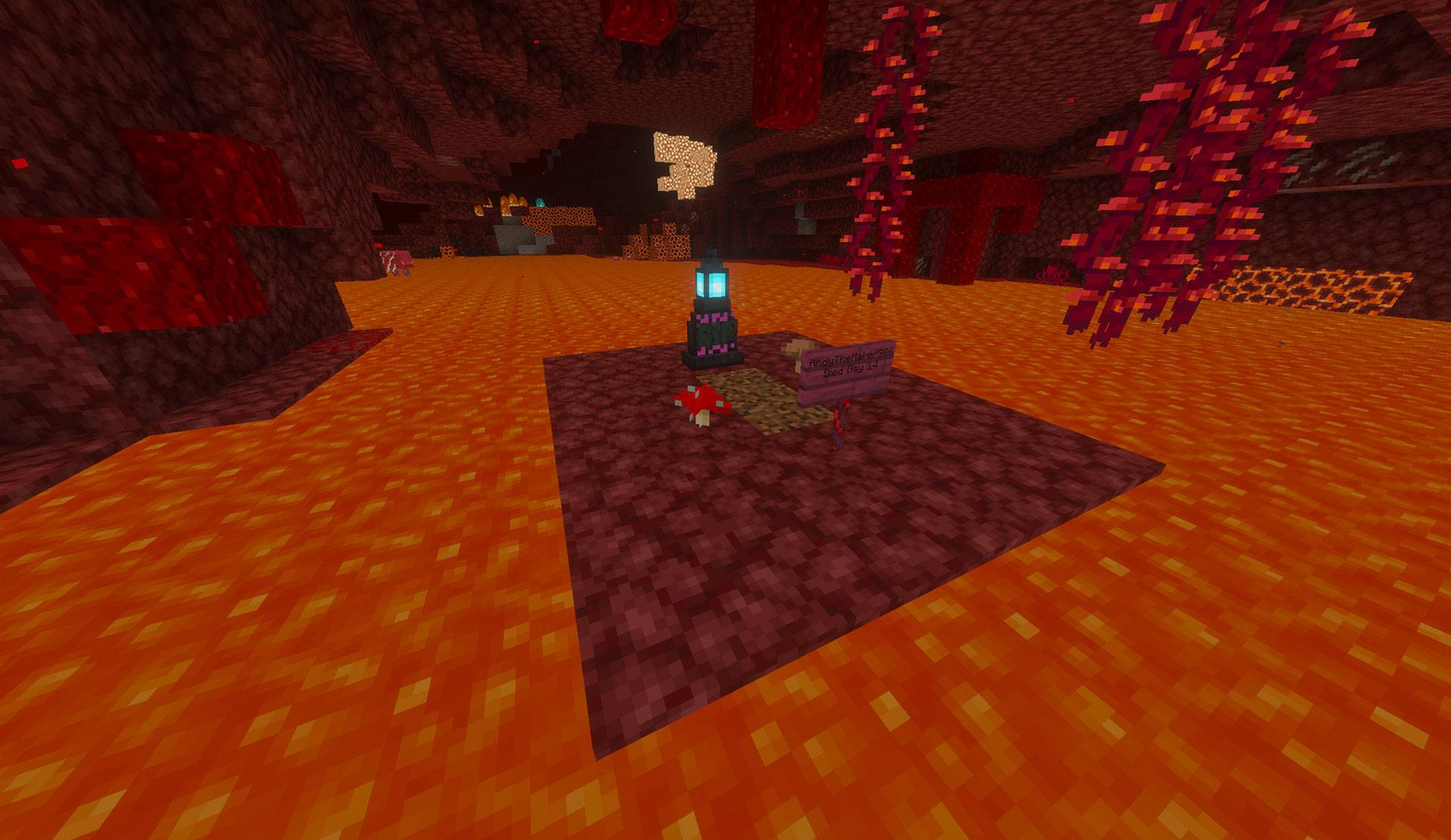
Tier IV can secure a lava death by creating a solid, dimension-appropriate grave vault before placing the burial scene.
Void
Void deaths are not protected. The void removes item entities before a dependable physical grave can be committed, so the add-on deliberately follows vanilla loss rather than promising an unreliable grave.
Compatibility
- Minecraft Bedrock 26.30+
- Standard graphics and Vibrant Visuals/PBR
- Keyboard/mouse, controller, and touch interaction through standard Bedrock use controls
- Single-player and multiplayer worlds
- Realms and compatible Bedrock dedicated servers
- Overworld, Nether, End, and supported submerged locations
- No cheats, commands, experiments, or required dependencies
- Up to 64 active grave records per owner
Third-party inventory, death, keep-inventory, grave, equipment, or custom-dimension add-ons can alter the same death pipeline. Compatibility with those systems is not promised. Test pack combinations in a backed-up world.
Troubleshooting
The recipe is not visible
- Obtain an Amethyst Shard to unlock Soulbound Rune I.
- Obtain the previous rune tier to unlock its upgrade recipe.
- Confirm both 0.1.31 packs are active and older duplicates are disabled.
- Use a Crafting Table and the exact shaped arrangement.
The rune did not protect my death
- The rune must be in the off-hand/shield slot before death. Main-hand or ordinary inventory placement does not qualify.
- Read its lore and confirm at least one use remains.
- Void deaths are never protected.
- Lava requires Tier IV.
- Confirm the Behavior Pack is active and the Content Log reports the addon runtime loading.
- Temporarily disable other death, inventory, grave, keep-inventory, or equipment add-ons in a copied test world.
Items still appeared on the ground
- A few drop entities may exist briefly while the death transaction is correlated, but a successful grave should secure and remove the captured drops.
- Do not leave the world during the death/respawn transition.
- Confirm the grave was actually created and check the Content Log for
Soulbound Graveserrors. - Record the exact death cause, dimension, location, rune tier, and pack order when reporting the issue.
The grave exists but I did not receive a compass
- Make inventory room and respawn or rejoin; undelivered grave compasses are retried rather than abandoning the grave.
- Confirm the item is the renamed native Recovery Compass and read its lore.
- If several graves exist, identify each compass by owner, day, and grave binding.
The compass does not show guidance
- Hold it in the selected hotbar slot.
- Confirm it is the exact compass issued for that grave.
- A compass in another dimension reports the dimension mismatch rather than a local bearing.
- A released, damaged, or unrelated compass cannot guide to the grave.
The skeleton will not return my possessions
- Dig far enough to interact directly with the exposed remains.
- Hold the matching bound Recovery Compass in the main hand.
- Only the grave owner can recover the inventory.
- Clear enough inventory space for every stored stack, then try again.
- If the Soulbinding expired, first interact while holding a Wither Rose, then use the compass.
The gravesite or runes look wrong
- Confirm the Resource Pack is active and matches the Behavior Pack version.
- Remove older duplicate pack copies and restart Minecraft.
- Put the addon Resource Pack above conflicting visual packs for a controlled test.
- Test in Standard graphics to distinguish an asset problem from a Vibrant Visuals or device-rendering issue.
A menu will not open or seems to reopen
- Crouch before interacting.
- Operators open world settings by crouch-using a rune in the main hand.
- Owners/operators open grave management by crouch-interacting with the tombstone.
- Release the use button after opening the form; version 0.1.31 guards against repeated interact events.
Reporting problems
Include:
- Andy's Soulbound Graves version
- Exact Minecraft Bedrock version and platform
- Standard or Vibrant Visuals graphics
- Single-player, multiplayer, Realm, or server
- Active Behavior and Resource Pack order
- Rune tier, remaining uses, and exact slot before death
- Death cause, dimension, and whether the location was dry, submerged, lava, or void
- Whether loose items, grave, compass, sign, tombstone, or skeleton appeared
- Exact recovery steps and any messages shown
- Screenshots or video
- Relevant Content Log entries
- Whether the issue repeats in a new backed-up test world with other add-ons disabled
Keep Exploring with Andy
If Soulbound Graves saved your gear—or simply made death a little more memorable—come explore what else Andy is building. Visit AndyTheMakerMC.xyz for more Minecraft Bedrock add-ons, .mcstructure downloads, HoloPrint files, world lore, tutorials, guides, videos, and other creations.
Join the AndyTheMakerMC Community
Follow @AndyTheMakerMC for new add-on releases, development updates, tutorials, showcases, streams, and more Minecraft adventures:
- YouTube
- Twitch
- <input type="checkbox" disabled style="margin: 0px 0.35em 0.25em -1.6em; vertical-align: middle;" checked>(https://x.com/AndyTheMakerMC)
- TikTok
Help Bring More Add-ons to Life
Enjoying the add-on? Ratings, favorites, recommendations, and kind comments all help more Bedrock players discover Andy's work. If you would also like to support future add-ons, guides, videos, and other AndyTheMakerMC projects, you can contribute through Ko-fi or make a direct Stripe contribution. Every bit of support is appreciated, but it is never required.
End-user permission
You may download the official, unmodified release of Andy's Soulbound Graves from its official CurseForge or authorized GitHub project page and install, activate, and use it in personal single-player worlds, multiplayer worlds, Realms, and compatible Bedrock servers.
This permission includes Minecraft's normal automatic delivery of the official, unmodified add-on to players joining a world, Realm, or server where it is active. It does not permit offering the add-on file separately or distributing it as part of a world download, modpack, bundle, mirror, archive, or server download.
Content-creator permission
Content creators may use an official, unmodified release of Andy's Soulbound Graves in original gameplay videos, livestreams, screenshots, tutorials, reviews, showcases, articles, guides, social posts, and other original content, including monetized content.
Credit to AndyTheMakerMC and a link to the official CurseForge project page are appreciated whenever practical. This permission covers display of normal gameplay and commentary; it does not grant permission to redistribute, modify, extract, or republish the add-on or its assets.
License — All Rights Reserved
All Rights Reserved. Copyright © 2026 Andy / AndyTheMakerMC.
You may not redistribute, reupload, rehost, mirror, resell, sublicense, bundle, repackage, modify and publish, translate, adapt, decompile, disassemble, reverse engineer, extract, or reuse the add-on, its source code, scripts, documentation, branding, textures, models, pack icons, or promotional artwork without prior written permission from the copyright holder.
You may not create derivative works or incorporate any portion of the project into another add-on, Behavior Pack, Resource Pack, application, product, modpack, download, or project without prior written permission. The end-user and content-creator permissions above are limited permissions; they do not transfer ownership or grant redistribution rights.
The promotional artwork is original AI-assisted concept artwork directed for this project. It is not an in-game screenshot.
Minecraft is a trademark of Microsoft Corporation. This project is not affiliated with, endorsed by, sponsored by, or associated with Microsoft or Mojang Studios.
- Edition: Minecraft Bedrock
- File type: .mcpack or .mcaddon
- Minecraft versions listed: 26.30, 26.40
- How to install: Download the .mcpack or .mcaddon file. → Open it — Minecraft imports it. → In your world: Behavior Packs → Available → Activate, then the same under Resource Packs.
- Where to get it: Opens on CurseForge — not every file is mirrored on our own servers.
Install steps are the general flow for this file type — How to install Minecraft Bedrock addons & mods walks through it step by step.
Andy's Soulbound Graves is a free Minecraft Bedrock addon. Compatible with Minecraft 26.30, 26.40. Downloaded 21 times (via CurseForge). Download it and open it directly in the game.