
Durability Percentage
Java mod listed for Minecraft 26.x. Downloads from the MC Java Mods app on Android.
⬇ Download on ModrinthVanilla's durability bar tells you roughly how your tool is doing. This mod tells you the number.
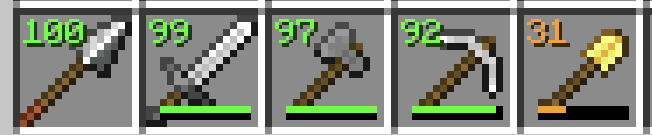
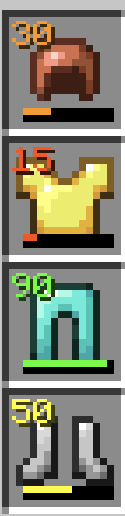
Every item with durability shows its remaining percentage in its own corner, in the hotbar, in your inventory, and in the armour slots. The colour runs from green through yellow to red, so you can spot what's about to break at a glance, without reading anything.
What it does
Exact percentage (1–100) inside the slot Works in the hotbar, inventory and armour slots Colour interpolated by wear: green → yellow → red Half-scale text in the top-left corner, so doesn't cover the stack count or the vanilla bar
Compatibility Purely client-side: works on vanilla servers and on any server without the server having anything installed. It doesn't touch your world or your save, so you can remove it whenever you like with no consequences.
- Edition: Minecraft Java
- File type: .jar
- Minecraft version listed: 26.2
- How to install: Install the matching mod loader (Forge, Fabric or NeoForge) for your Minecraft version. → Download the .jar. → Put it in the .minecraft/mods folder and launch that loader profile.
- Where to get it: Opens on Modrinth — not every file is mirrored on our own servers.
Install steps are the general flow for this file type — How to install Minecraft Java mods & modpacks walks through it step by step.
- Ships as durabilitypercent-1.0.0.jar — drop this file into the mods folder
- Download size: 6 KB
- Download link checked 18 Nov 2026 — working
These come from our own check of the pack file, not from the source page.