
Looming Script Lexicon Mod gives you full control over item hover boxes across your game. You can write custom story lore, show live item stats, apply animated color gradients, and add custom background frames directly in the game menu or through data files. The mod works as both an in-game tool for players and a code library for developers.
Features:
- Custom Tooltip Editor: Lets you build, duplicate, reorder, and sort custom hover text entries from an in-game screen without opening config files.
- Live Text Placeholders: Inserts real-time values like durability, attack damage, enchantments, and keybind labels directly into your text lines.
- Animated Gradients: Adds moving rainbow effects, flowing two-color slide gradients, color pulses, and static hex colors to any line of text.
- Aligns resource pack icons to the start of tooltip lines to keep item info tidy.
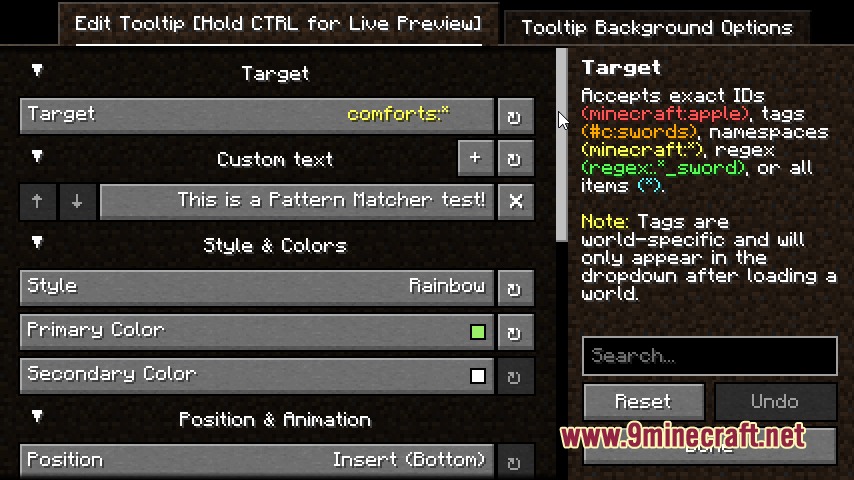
- Targets items by specific IDs, item tags, mod namespaces, regex formulas, or across every item in the game.
- Adds long multi-line story descriptions and skill notes to your favorite gear.
- Customizes background boxes with solid colors, image textures, and adjustable transparency levels.
- Works with custom fonts placed into the config directory.
- Positions text under item names, at the bottom of the box, or replaces vanilla lines entirely.
- Sets display rules so tooltips only appear when items are damaged, enchanted, or when you hold a specific key.
- Applies text styles including bold, italic, underline, strikethrough, and scrambled text codes.
How to Use:
- Open your in-game Mods menu and open the settings for this mod.
- Create a new tooltip entry and select your target item ID or tag group.
- Type your custom lore text, placeholders, and color codes into the editor fields.
- Hold CTRL on your keyboard to check the live preview window.
- Save your changes to view the new tooltip on items in your inventory.
Screenshots:
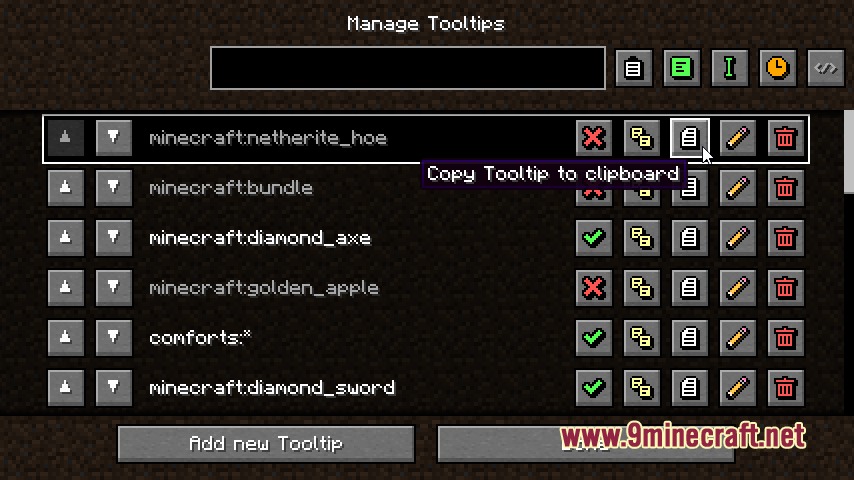
Looming Script Lexicon Mod Download Links
Quick facts
- Edition: Minecraft Java
- File type: .jar
- Minecraft versions listed: 1.21.11, 1.20.1
- How to install: Install the matching mod loader (Forge, Fabric or NeoForge) for your Minecraft version. → Download the .jar. → Put it in the .minecraft/mods folder and launch that loader profile.
- Where to get it: In MC Java Mods, or directly above on this page.
Install steps are the general flow for this file type — How to install Minecraft Java mods & modpacks walks through it step by step.
Verified by MCModsHub
- Downloads as 500801.mcaddon
- Download size: 183 KB
- Download link checked 24 Sept 2026 — working
- Mirrored on our own servers — the download does not depend on the original host
These come from our own check of the pack file, not from the source page.