
Drop Guard
Drop Guard is a client-side Fabric mod that prevents you from accidentally dropping important items. Protect your tools, weapons, armor, building materials or any other items you want to keep safe.
Features
- Prevents protected items from being dropped with the drop key
- Blocks dropping protected items from inventory screens
- Protect an exact stack or an entire item type
- Configure items directly through your inventory, hotbar, armor and offhand slots
- Browse and search the complete item list
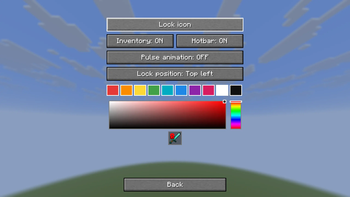
- Display protection using a lock icon or a customizable color
- Customize the lock color, position and pulse animation
- Quickly remove protection rules using reset buttons with confirmation
- Opens through the configurable Open menu keybind
- Optional integration with Mod Menu
- Saves your settings between game sessions
How to use
- Press G to open the Drop Guard menu. The key can be changed under Minecraft's Controls settings.
- Choose Configure inventory to click items currently in your inventory, hotbar, armor or offhand slots.
- Choose Individual items to search through all available items.
- Click an item to enable or disable drop protection.
- Open Settings to customize how protected items are displayed.
Selection modes
- Exact stack: protects only the selected stack.
- Entire item type: protects every stack of that item type.
Slot protection follows the selected inventory slot. If the item in that slot changes, the new item remains protected until it leaves the protected slot.
Requirements
- Minecraft 1.21-26.2
- Fabric Loader
- Fabric API
- Mod Menu is optional
Compatibility
Drop Guard is completely client-side. It works in singleplayer and on multiplayer servers without requiring the server to install the mod.
Drop Guard prevents manual item dropping. It does not prevent items from being lost through death, lava, commands or other server-side actions.
- Edition: Minecraft Java
- File type: .jar
- Minecraft version listed: 26.2
- How to install: Install the matching mod loader (Forge, Fabric or NeoForge) for your Minecraft version. → Download the .jar. → Put it in the .minecraft/mods folder and launch that loader profile.
- Where to get it: Opens on Modrinth — not every file is mirrored on our own servers.
Install steps are the general flow for this file type — How to install Minecraft Java mods & modpacks walks through it step by step.
- Ships as drop-guard-2.8.1+mc26.2.jar — drop this file into the mods folder
- Download size: 149 KB
- Download link checked 28 Aug 2026 — working
These come from our own check of the pack file, not from the source page.