HomeBedrockAddonsZenXveda Health Indicator Bar
ZenXveda Health Indicator Bar
AddonsBedrock

ZenXveda Health Indicator Bar

by ZenXveda · on CurseForge

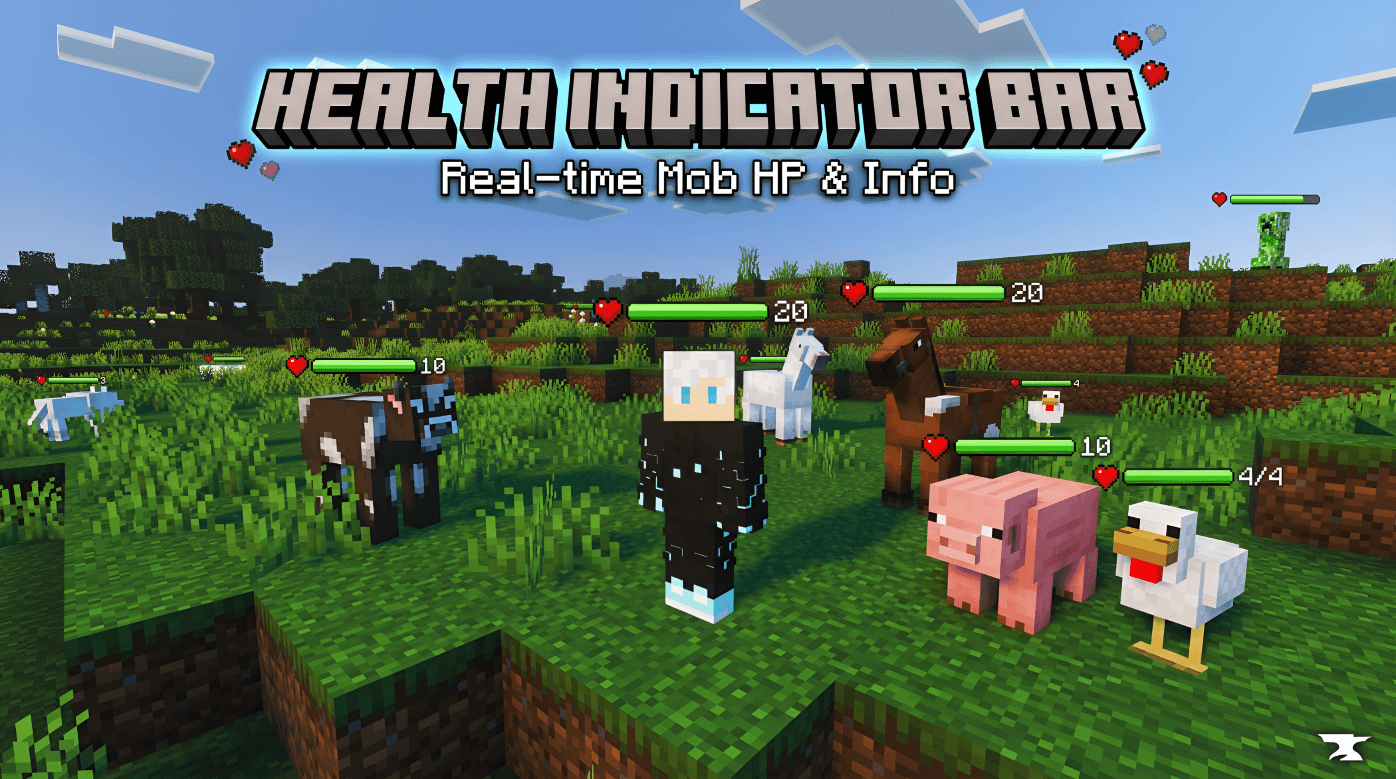
Next-generation, lag-free real-time health indicator bars above players and mobs for Minecraft Bedrock.

⬇ Download on CurseForge
ZenXveda Health Indicator Bar — screenshot 1

❤️ ZenXveda Health Indicator Bar

Next-generation, lag-free real-time health display system for Minecraft Bedrock Edition!
Floating dynamic health bars, boss tracking, and 100% achievement-compatible Singleplayer & Multiplayer support.

Bedrock 1.21 to 26.40+ Achievements Supported Lag Free PvP & Survival


📖 About This Pack

Ever wondered exactly how much health your opponents, teammates, or dangerous mobs have left? ZenXveda Health Indicator Bar brings crystal-clear visual health bars directly above players and entities. Built with ultra-lightweight logic and native rendering controllers, this addon delivers a smooth, competitive UI with zero frame drops and full achievement support!


⚡ Key Features & Highlights

💚 Real-Time Health Sync

Instantly synchronizes damage, natural healing, regeneration, absorption, and potion effects with 100% precision.

🎨 Dynamic Color Tiers

Health bars shift from Green (Safe) → Yellow (Warning) → Red (Critical) based on exact HP percentages.

🌐 Single & Multiplayer Modes

Includes a standalone Singleplayer Resource Pack and a full Multiplayer Add-on for Dedicated Servers, LAN, and Realms.

⚔️ PvP & Boss Optimized

Essential tactical advantage during PvP duels, End Dragon & Wither battles, Nether raids, and mob farming.


📦 Which Version Should You Use?

Package Type Included Files Best Used For Achievements
Singleplayer RP Resource Pack (.mcpack) Solo worlds & Vanilla Survival ✔ Keeps Achievements
Multiplayer Add-on Behavior + Resource Pack (.mcaddon) Servers, Realms & Multiplayer ✔ Keeps Achievements

🚀 Quick Installation Guide

  1. Download the desired .mcpack or .mcaddon file from the Files tab.
  2. Double-click or tap the file to automatically import it into Minecraft Bedrock Edition.
  3. Go to World Settings → Resource Packs → Activate ZenXveda Health Indicator Bar.
  4. (Multiplayer only): Also activate the Behavior Pack and turn ON Beta APIs / Experiments in World Settings.
  5. Launch your world and enjoy real-time health indicators!

🌐 Join the ZenXveda Community

Follow us for updates, tutorials, sneak peeks, and direct support!

YouTube Instagram Twitter Discord

Ko-fi Patreon CurseForge MCPEDL


📜 Terms of Use

Showcase — Feature this pack in YouTube videos or streams with credit to ZenXveda.
Maps & Packs — Include in custom maps or modpacks with a link back to this CurseForge page.
No Re-uploads — Do not re-upload, redistribute behind ad links, or claim as your own.


Created with ❤️ by ZenXveda • Thank you for your support!

Verified by MCModsHub

These come from our own check of the pack file, not from the source page.

Explore more