
Vitrify - Lava Cooling & Obsidian Melting
Bedrock add-on listed for Minecraft 26.x. Download on the author's site.
⬇ Download on CurseForge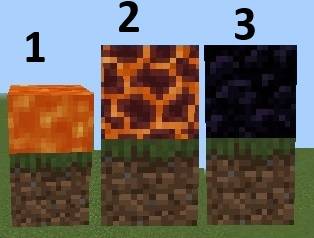
WARNING: This add-on does NOT require experimental world settings or Beta APIs.
Just enable it and play.
Welcome to Vitrify! (Vitrify comes from vitrification—the scientific process of intense heat cooling into glass or solid rock.)
This is a simple Minecraft Bedrock add-on made by Scalarlabs.
Ever poured a bucket of lava and wished it would just settle down? With Vitrify, lava that is all by itself (with no other lava touching it) will slowly cool off.
First it turns into a magma block, and after a while it hardens into solid obsidian.
But if that lava is sitting over a gap with nothing solid underneath, it instead hardens into tuff and then disappears so it doesn't leave a huge mess.
Flowing lava that has wandered away from its source will freeze up, turn into basalt, and then vanish, so your world stays neat.
The fun bonus: put a magma block under any obsidian (or under a magma block) and it melts right back into lava again!
Obsidian with magma directly beneath → converts to magma
Magma with magma directly beneath → converts to lava source
Credits: Scalarlabs
Vitrify is part of Scalarlabs upcoming unannounced mods!
Stay tuned to my CurseForge to find out more.
Vitrify has been in development since 7/29/2026. I have finally made enough progress to post it.
- Edition: Minecraft Bedrock
- File type: .mcpack or .mcaddon
- Minecraft version listed: 26.40
- How to install: Download the .mcpack or .mcaddon file. → Open it — Minecraft imports it. → In your world: Behavior Packs → Available → Activate, then the same under Resource Packs.
- Where to get it: Opens on CurseForge — not every file is mirrored on our own servers.
Install steps are the general flow for this file type — How to install Minecraft Bedrock addons & mods walks through it step by step.
Vitrify - Lava Cooling & Obsidian Melting is a free Minecraft Bedrock addon. Compatible with Minecraft 26.40. Downloaded 37 times (via CurseForge). Download it and open it directly in the game.