
bHold easyPlace
Keeps Litematica's Easy Place running without holding the use key, and makes it work with server custom items. 26.x continuation of Hold-Easy-Place.
⬇ Download on Modrinth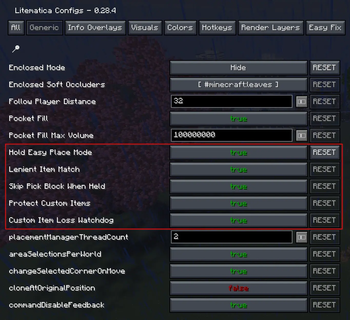
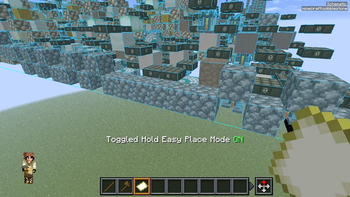
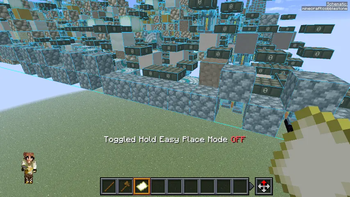
Build from schematics without wearing out your right mouse button. bHold easyPlace keeps Litematica's Easy Place mode firing every client tick, with no use key held.
This is the Minecraft 26.x continuation of Hold-Easy-Place by shane0411 (MIT). The last upstream release supports 1.21.x. This version was rewritten against current Litematica and malilib internals.
Features
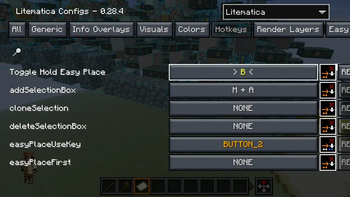
- Adds Hold Easy Place Mode to Litematica's Generic config tab and a
Toggle Hold Easy Place hotkey to its Hotkeys tab. Settings persist
in
litematica.jsonlike any other Litematica option. - Makes Easy Place accept server custom items such as infinite blocks when the schematic wants a plain block. Items that need exact data, like filled shulkers, stay exact.
- Leaves your hotbar alone when what you hold already matches the target, and pick block never moves another item into a slot holding a server custom item.
- Warns with a timestamp when a server custom item leaves your inventory and is not given back within two seconds, so a lost infinite block becomes a support ticket with evidence.
- Every feature has its own toggle in Litematica config > Generic. The toggles are named Lenient Item Match, Skip Pick Block When Held, Protect Custom Items, and Custom Item Loss Watchdog.
- Stays inactive in REBUILD tool mode, while a GUI is open, and while you physically hold the use key, so Litematica's native handling keeps working normally.
- Works with both the legacy Easy Place path and
easyPlacePostRewrite. - Hold-mode placement failures don't spam chat. Your own clicks keep stock Litematica feedback.
Requirements
Fabric API, malilib, and Litematica. Client-side only.
If you still have the original Hold-Easy-Place jar installed, remove it. This mod declares a conflict with it, because both mods would drive Easy Place on the same tick.
Credits
Source on GitHub, MIT.
- Edition: Minecraft Java
- File type: .jar
- Minecraft version listed: 26.2
- How to install: Install the matching mod loader (Forge, Fabric or NeoForge) for your Minecraft version. → Download the .jar. → Put it in the .minecraft/mods folder and launch that loader profile.
- Where to get it: Opens on Modrinth — not every file is mirrored on our own servers.
Install steps are the general flow for this file type — see the MC Java Mods guides for the full walkthrough.
- Ships as bholdeasyplace-0.5.0+26.2.jar — drop this file into the mods folder
- Download size: 22 KB
- Download link checked 29 Aug 2026 — working
These come from our own check of the pack file, not from the source page.